How Secure Is Shared Hosting? What You Need to Know
Choosing the right web hosting plan feels a lot like picking an apartment. You want a great location, enough space for your stuff, and—perhaps most importantly—you want to feel safe. When you are just starting out, shared hosting is often the most attractive option because it is affordable and easy to manage. But the low price tag often leads to a nagging question: Is it actually safe?
Security is a top priority for anyone launching a website, whether it’s a personal blog or a small business store. With shared hosting, the concern is naturally higher because you are sharing server space with hundreds, sometimes thousands, of other users. It raises valid concerns about whether a neighbor’s bad security practices could compromise your own data.
The short answer is that shared hosting can be secure, but it requires a mix of a responsible provider and your own vigilance. It isn’t inherently dangerous, but the architecture does introduce specific risks you wouldn’t face with a dedicated server. This guide will walk you through exactly how shared hosting security works, the real risks involved, and actionable steps you can take to lock down your site.
What Is Shared Hosting? (Quick Overview)
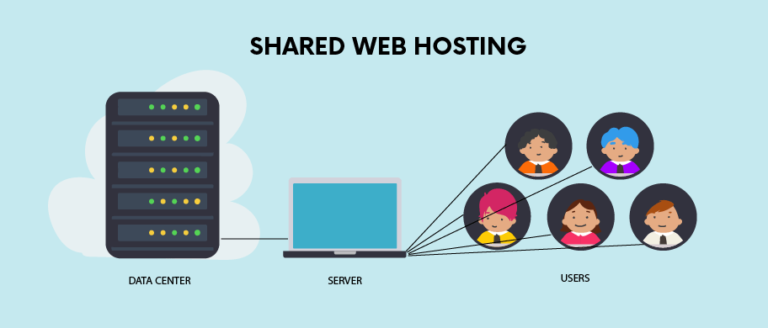
To understand the security implications, we first need to look at how shared hosting operates. As the name suggests, shared hosting involves multiple websites residing on a single physical server. Think of it like living in a large apartment complex. You have your own private unit (your website), but you share the building’s infrastructure—the plumbing, electricity, and main entrance—with everyone else.
In technical terms, all websites on the server share the same system resources, including the CPU (processor), RAM (memory), and disk space. This resource sharing is exactly what makes this type of hosting so affordable. The hosting provider splits the cost of server maintenance among many customers, driving the price down for everyone.
However, this shared environment is also why security is often questioned. If one apartment in a building catches fire, the smoke can damage the units next door. Similarly, if one website on a shared server consumes too many resources or gets infected with a virulent type of malware, there is a fear that it could impact the performance or security of neighboring sites.
How Shared Hosting Security Works
Security on a shared server is a partnership between the hosting company and the user. The provider manages the “building” security, while you are responsible for locking your own “front door.”
Server-Level Security Basics
The hosting provider is responsible for the physical security of the data center and the foundational software of the server. This includes maintaining the operating system, managing the web server software (like Apache or Nginx), and ensuring the network is protected against external threats. They set the baseline rules for how the server operates and who can access what.
Account Isolation Explained Simply
This is the most critical aspect of shared hosting security. Even though you share a server, you shouldn’t be able to see or access another user’s files. Providers use software isolation techniques to create virtual barriers between accounts. This is often done using a technology like CloudLinux, which encapsulates each user in their own Lightweight Virtualized Environment (LVE).
Effective isolation ensures that even if one user’s site is compromised, the attacker cannot easily jump over to your directory to steal your data. It limits the “blast radius” of a security incident.
Role of the Hosting Provider
Your safety depends heavily on the diligence of your host. A proactive provider runs regular malware scans, updates the server software immediately when security patches are released, and monitors the network for suspicious activity. If they are lax about these duties, every site on the server becomes vulnerable, regardless of how strong your personal passwords are.
Is Shared Hosting Secure?
The direct answer: Yes, shared hosting is secure for the vast majority of websites, provided you choose a reputable host.
Shared hosting is secure when the provider implements strict isolation protocols and proactive monitoring. For personal blogs, portfolios, and small business sites that don’t handle sensitive data (like high-volume credit card transactions or medical records), the security measures provided by a quality host are sufficient.
However, it becomes risky if you choose a “bargain bin” host that neglects server maintenance. If a provider crams too many users onto a single server without proper isolation, the risk of cross-contamination increases. Furthermore, shared hosting is generally not recommended for large enterprises or sites with strict compliance requirements (like HIPAA), where dedicated resources and total control over the security environment are mandatory.
Common Security Risks of Shared Hosting
While modern technology has mitigated many issues, the shared nature of the environment does come with inherent risks that you should be aware of.
Neighbor Website Risks
This is the “bad neighbor” effect. In the past, if a website on your server was targeted by a Distributed Denial of Service (DDoS) attack, the entire server could crash, taking your site offline with it. While better isolation has improved this, resource draining is still a potential issue. If a neighbor gets a sudden viral spike in traffic, it could theoretically slow down the server response time for everyone else, although this is more of a performance and availability risk than a data breach risk.
Malware and Infections
Cross-site contamination is the biggest fear for shared hosting users. If a hacker exploits a vulnerability in a neighbor’s outdated WordPress plugin and gains access to the server’s root directory (which is rare but possible on poorly configured servers), they might try to spread malware to other directories. Again, strong account isolation is the primary defense here. If the host fails to isolate accounts properly, an infection in one folder could potentially scan for vulnerabilities in adjacent folders.
Limited Server Control
On a dedicated server or VPS, you have root access, meaning you can install any security software you want and configure the firewall rules specifically for your needs. On shared hosting, you are limited to the tools the provider gives you. You cannot install system-wide security applications or tweak the server configuration files (like php.ini) to the same extent. You have to trust that the provider’s default settings are secure enough.
Outdated Software
You are reliant on the host to keep the underlying architecture up to date. If they are running an ancient version of PHP or an unpatched operating system, your site is vulnerable, and there is nothing you can do about it personally. This is why researching a host’s reputation for maintenance is vital before signing up.
What Hosting Providers Do to Improve Security
Good hosting companies know that security is their primary product. If their servers get hacked, they lose business. Here are the standard measures reputable hosts take to protect shared environments.
Server Firewalls
Web Application Firewalls (WAF) are deployed at the server level to filter out malicious traffic before it even reaches your website. They look for common attack patterns, such as SQL injection attempts or Cross-Site Scripting (XSS), and block them automatically.
Malware Scanning
Providers often run automated scanners that crawl the server looking for known malware signatures. If a file is flagged as suspicious, it is often quarantined automatically. Some hosts will notify you if they detect an issue on your site, giving you a chance to clean it up before they take the site offline to protect other users.
Account Isolation Technologies
As mentioned earlier, technologies like CageFS (part of CloudLinux) are industry standards. They prevent users from seeing each other and sensing the presence of other tenants. This prevents a large portion of privilege escalation attacks, where a hacker tries to gain higher-level administrative rights on the server.
Automatic Updates
To keep the environment safe, hosts will automatically update the server’s operating system, control panel software (like cPanel), and core languages (like PHP and MySQL). Some managed shared hosting plans will even automatically update your WordPress core files to ensure you aren’t running vulnerable software.
DDoS Protection
Denial of Service attacks are designed to overwhelm a server with traffic. Hosting providers use network-level mitigation tools to detect these massive spikes in traffic and reroute them away from the server, keeping your website online even if a neighbor is being targeted.
What You Can Do to Secure Your Shared Hosting Website
Even the most secure bank vault won’t help if you leave the key in the lock. Your host secures the server, but you must secure your specific website.
Use Strong Passwords
This sounds obvious, but it remains the most common entry point for attackers. Use complex, unique passwords for your hosting control panel, your FTP accounts, and your website’s admin dashboard. A password manager is essential here. Never reuse the same password you use for your email or social media.
Keep Software Updated
If you are using a Content Management System (CMS) like WordPress, you are responsible for keeping it updated. An outdated plugin or theme is the number one reason shared hosting websites get hacked. Set up auto-updates where possible, or log in weekly to apply patches.
Install SSL Certificates
An SSL certificate encrypts the data moving between your user’s browser and your website. It is the standard for modern web security (indicated by the padlock icon in the browser bar). Most shared hosts now offer free Let’s Encrypt SSL certificates. Ensure this is activated so that login credentials and customer data aren’t intercepted in transit.
Use Security Plugins
Since you can’t install server-level firewalls, use application-level ones. If you use WordPress, plugins like Wordfence, Sucuri, or iThemes Security act as a second line of defense. They can block brute-force login attempts, scan for malware on your specific site, and alert you to file changes.
Choose a Reputable Hosting Provider
Do not choose a host solely based on the lowest price. Look for providers that explicitly mention “account isolation,” “CageFS,” or “proactive monitoring.” Read reviews to see if users complain about frequent downtime or hacked sites. A slightly more expensive plan from a trusted brand is worth the investment for the added security infrastructure.
Shared Hosting vs Other Hosting Types: Security Comparison
To understand where shared hosting sits on the security spectrum, it helps to compare it to the alternatives.
Shared Hosting vs VPS Security
A Virtual Private Server (VPS) is a step up from shared hosting. While you still share physical hardware, the virtualization is much stricter. You get dedicated resources (RAM and CPU) that neighbors cannot touch. More importantly, you get root access, allowing you to configure custom firewalls and security protocols. VPS is inherently more secure due to this isolation and control, but it requires more technical knowledge to manage correctly.
Shared Hosting vs Cloud Hosting Security
Cloud hosting distributes your data across multiple interconnected servers. If one server fails or comes under attack, your site can be migrated instantly to another node. This offers better availability and resilience against DDoS attacks compared to traditional shared hosting. However, the data privacy risks remain similar if the cloud environment is not properly isolated.
When Upgrading Improves Security
You should consider upgrading from shared hosting if:
- You are collecting sensitive customer data (beyond basic contact forms).
- You need to run custom software that requires specific server configurations.
- Your site has grown large enough that you are becoming the “noisy neighbor” affecting others.
- You require compliance with strict data regulations.
Is Shared Hosting Secure Enough for Business Websites?
This depends entirely on the nature of the business.
Small Business Websites
For a local bakery, a photography portfolio, or a plumbing service, shared hosting is perfectly adequate. These sites typically serve information and don’t store high-risk data. As long as you use SSL and strong passwords, the risk is minimal.
Blogs and Informational Sites
Shared hosting is the industry standard for blogs. The data stored—articles, comments, and images—is generally public anyway. The primary security concern here is keeping the site online and preventing defacement, which a good shared host can handle.
When Shared Hosting Is Acceptable
It is acceptable for startups, testing environments, landing pages, and businesses that use third-party payment processors (like PayPal or Stripe) rather than processing cards directly on their server.
When It Is Not
If you are running a large e-commerce store with thousands of customer accounts, or a SaaS (Software as a Service) application, shared hosting is not secure or robust enough. The lack of control and the shared risk profile are not worth the cost savings.
Does Shared Hosting Affect SEO Security?
Google cares about user safety, so your hosting environment does impact your Search Engine Optimization (SEO).
Website Downtime and Trust
If your shared server is constantly crashing due to overloaded neighbors, your site goes down. Frequent downtime tells Google your site is unreliable, which can hurt your rankings.
Malware Warnings and Rankings
If your site gets infected because of a server vulnerability, Google will flag it. Users will see a big red “Deceptive Site Ahead” warning in Chrome. This destroys your traffic instantly and can take weeks to recover from even after the malware is gone.
Importance of a Clean Hosting Environment
“Bad neighborhoods” are a real concept in SEO. If your shared IP address is also used by hundreds of spammy, scammy, or adult websites, there is a small risk that your site could be guilty by association in the eyes of email filters (causing your newsletters to go to spam). However, Google is generally smart enough to differentiate between different domains on the same IP.
Frequently Asked Questions
Can another website hack mine on shared hosting?
On a high-quality host with proper account isolation (like CloudLinux), it is extremely difficult for one user to hack another. On poorly configured servers with no isolation, it is possible for infections to spread, but this is becoming less common.
Is shared hosting safe for WordPress?
Yes, but WordPress is a frequent target for hackers because of its popularity. You must keep the core software and plugins updated. Using a “Managed WordPress” shared hosting plan adds an extra layer of security specifically designed for the platform.
Can shared hosting handle HTTPS and SSL?
Absolutely. Almost all shared hosting providers support SSL certificates (HTTPS). Many offer them for free and install them automatically.
Should beginners worry about hosting security?
You should be aware of it, but not paralyzed by it. If you choose a reputable host and practice good “digital hygiene” (updates and passwords), you will likely never face a serious issue.
Final Thoughts: How Secure Is Shared Hosting?
Shared hosting gets a bad reputation that it doesn’t entirely deserve. While it is true that you are sharing resources, modern server technology has made great strides in isolating users and securing the environment.
For the vast majority of personal websites, blogs, and small businesses, shared hosting is secure enough. The risks associated with it—such as “bad neighbor” effects—are manageable if you select a provider that values performance and security over cramming as many users as possible onto a single drive.
If you are just starting out, follow this advice: Pick a host with a track record of security, enable two-factor authentication, use strong passwords, and keep your website software updated. If you do those four things, you can enjoy the affordability of shared hosting without losing sleep over the safety of your data.