VPS Hosting Explained: Features, Benefits, and Use Cases
Starting a website is exciting, but as your traffic grows, you might notice your site slowing down or even crashing during peak times. This is the digital equivalent of growing pains. You started with a small, affordable hosting plan that fit your budget, but now your online presence is demanding more power.
This is the crossroads where most website owners find themselves looking for a solution that offers more power than a basic shared plan but doesn’t cost as much as renting an entire physical server. The answer lies in the middle ground: VPS hosting.
Virtual Private Server (VPS) hosting is one of the most popular upgrades for growing blogs, eCommerce stores, and small businesses. It offers a balance of performance, security, and price that is hard to beat. But with technical acronyms and complex configurations, it can feel intimidating to the uninitiated.
In this guide, we will break down exactly what VPS hosting is, how the technology works, and why it might be the perfect next step for your digital journey.
What Is VPS Hosting?
At its core, a Virtual Private Server (VPS) is a hosting solution that mimics a dedicated server environment within a shared physical server. It is a form of web hosting where a physical computer is partitioned into multiple virtual servers.
Simple definition for beginners
Think of a VPS as a private slice of a larger pie. You are still technically sharing the main server hardware with other users, but your specific slice is completely separated. No one else can touch your slice, eat your slice, or ruin your slice. The resources allocated to you—like memory and processing power—are yours and yours alone.
What VPS stands for
The acronym breaks down into three distinct concepts:
- Virtual: It relies on virtualization technology to split one powerful physical machine into multiple smaller machines.
- Private: Your server environment is isolated. You do not share operating system files or resources with other users on the hardware.
- Server: It functions just like a physical computer where your website data and files are stored.
Why VPS hosting exists
The hosting industry created VPS to fill a massive gap in the market. On one end, you have Shared Hosting, which is cheap but unreliable because hundreds of users fight for the same resources. On the other end, you have Dedicated Hosting, where you rent an entire physical machine, which is powerful but incredibly expensive.
VPS hosting exists to offer the reliability and control of a dedicated server at a price point that is much closer to shared hosting. It is the “sweet spot” for websites that have outgrown their starter plans but aren’t yet ready for enterprise-level infrastructure.
How VPS Hosting Works
To understand how a VPS functions, you have to look under the hood at the software that makes it possible. It isn’t magic; it is sophisticated software engineering.
Physical server explained simply
Every website lives on a physical server. This is a powerful computer stored in a data center. It has a Central Processing Unit (CPU), Random Access Memory (RAM), and hard drive space (SSD or HDD). In a VPS setup, the hosting provider maintains this physical hardware.
Virtualization technology overview
The secret sauce of VPS hosting is a layer of software called a Hypervisor.
The hypervisor sits on top of the physical server’s operating system. Its job is to divide the physical resources into virtual compartments. It creates virtual walls between users. Even though User A and User B are on the same physical metal box, the hypervisor ensures that User A generally has no idea User B exists.
How VPS differs from shared hosting
On shared hosting, users are all pooling resources from the same pot. If one user runs a script that drains the memory, everyone else on that server slows down.
On a VPS, the hypervisor allocates a specific amount of RAM and CPU to you. If the physical server has 128GB of RAM, the hypervisor might assign 4GB specifically to your container. Even if every other user on the server is maxing out their limit, your 4GB remains untouched and ready for you to use.
Beginner Example: VPS hosting compared to having your own apartment
The best way to visualize this is through real estate:
- Shared Hosting is like a college dorm. You have a room, but you share the kitchen, bathroom, and living room with many other students. If your roommate throws a loud party (high traffic) or hogs the bathroom (uses all the RAM), your life becomes difficult.
- VPS Hosting is like owning a condo or apartment. You are still in a large building with other people (the physical server). However, you have your own front door, your own kitchen, and your own bathroom. What your neighbors do inside their apartments doesn’t affect your living space. You have privacy and dedicated amenities, but you share the building’s infrastructure.
- Dedicated Hosting is like owning a detached house. You own the land and the building. No one shares your walls. It offers the most freedom, but it is the most expensive to buy and maintain.
Key Features of VPS Hosting
When you shop for VPS plans, you will see a list of technical specifications. Here is what those features actually mean for your website.
Dedicated Resources
The most significant feature is the guarantee of resources. When you sign up for a VPS, you are purchasing a specific amount of:
- CPU (Processor): The brain of the server that handles requests.
- RAM (Memory): Temporary storage that allows multiple processes to run fast.
- Storage (SSD/NVMe): Where your files and database live.
Why resource isolation matters
In shared hosting, resources are “burstable” but not guaranteed. In VPS hosting, resource isolation ensures stability. If you pay for 4GB of RAM, you get 4GB of RAM 24/7. This prevents the “bad neighbor effect,” ensuring your site loads consistently regardless of what other websites on the same physical hardware are doing.
Root or Admin Access
Shared hosting restricts you. You can only use the software the host has pre-installed (usually just a control panel and WordPress).
What root access means
Root access (on Linux) or Administrator access (on Windows) gives you the keys to the kingdom. You have complete control over the operating system.
When beginners need it
While this sounds technical, it is vital if your website requires specific software to run. For example, if you need a specific version of PHP that the host doesn’t support by default, or if you need to install a custom firewall, root access allows you to do that. It gives you the freedom to configure the server environment exactly how you want it.
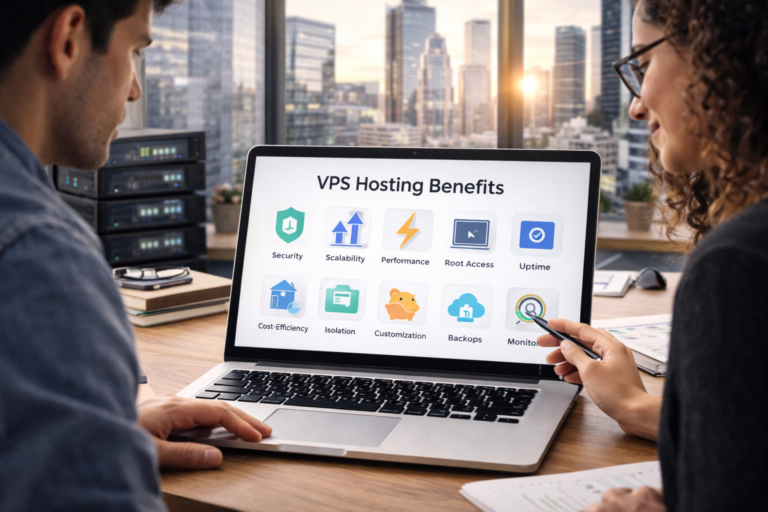
Improved Security
Security is often the primary driver for upgrading to VPS.
Account isolation
Because your file system is completely separated from other users by the hypervisor, there is almost no risk of cross-contamination.
Lower risk from other websites
On shared hosting, if a hacker compromises one site on the server, they can sometimes use that entry point to attack other sites on the same server. In a VPS environment, the virtual walls prevent this. If a neighbor gets hacked, your virtual container remains secure.
Custom Server Configuration
With a VPS, you are not stuck with the “one size fits all” setup of shared hosting.
Install custom software
You can run a gaming server, a database server, a VPN, or a complex web application. You aren’t limited to just hosting a website.
Adjust server settings
You can tweak performance settings, such as memory limits and execution times, to optimize your specific application’s speed.
Benefits of VPS Hosting
Why should you spend the extra money on VPS? The return on investment usually comes down to performance and reliability.
Better Performance
Speed is a ranking factor for Google and a user experience requirement for visitors.
Faster loading times
Because you have dedicated RAM and CPU, your server can process requests much faster. This leads to lower Time to First Byte (TTFB) and faster overall page loads.
More stable performance
Stability is just as important as top speed. A VPS ensures that your website loads at the same speed at 2:00 PM as it does at 2:00 AM, providing a reliable experience for your visitors.
Greater Reliability
Downtime costs money. Whether you are selling products or running ads, every minute your site is offline is a lost opportunity.
Reduced impact from neighboring websites
As mentioned, the hypervisor protects you. You will not face random slowdowns just because another site on the server went viral on Reddit.
Consistent uptime
Because the environment is isolated, VPS hosting generally offers higher uptime guarantees than shared hosting.
Scalability
One of the best aspects of VPS hosting is that it grows with you.
Easy upgrades
Most VPS providers allow “vertical scaling.” If you suddenly need more RAM because of a holiday sale, you can usually click a button in your dashboard, pay a prorated fee, and instantly add more resources without migrating your site or experiencing downtime.
Supports website growth
You don’t have to predict your traffic five years in advance. You can start with a small VPS (e.g., 1GB RAM) and scale up to a massive server (e.g., 32GB RAM) as your business expands.
More Control and Flexibility
You own the environment.
Server-level control
You can restart your specific services (like the web server or mail server) without affecting anyone else. You can choose your operating system (Ubuntu, CentOS, Debian, or Windows).
Suitable for advanced setups
For developers, this is a playground. You can set up Node.js, Python, or Ruby environments, allowing for modern web development that goes beyond basic WordPress setups.
Limitations of VPS Hosting
VPS is powerful, but it isn’t perfect for everyone. There are downsides to consider.
- Higher cost than shared hosting: You are paying for dedicated resources, which is more expensive than the communal living of shared hosting. While shared hosting might cost $3–$5 a month, a decent VPS usually starts around $15–$30 a month.
- Learning curve for beginners: Having more power means you have more buttons to push. The interface can be more complex than the simple cPanel provided with shared hosting.
- Server management responsibilities: Unless you pay for “Managed” hosting, you might be responsible for server updates, security patches, and backups. If something breaks inside your container, it is often up to you to fix it.
Common VPS Hosting Use Cases
Who is the typical VPS user?
Growing Websites
If your blog is starting to get 30,000+ monthly visitors, shared hosting will likely start to choke. A VPS provides the headroom needed for high-traffic content sites.
Small and Medium Businesses
If your business website goes down, you lose credibility. SMBs often move to VPS for the reliability and the ability to host professional, secure email servers alongside their website.
Online Stores
This is a critical use case. eCommerce sites (like those using Magento or WooCommerce) are database-heavy. They require significant RAM to process transactions quickly. Furthermore, because you are processing credit card data, the enhanced security isolation of a VPS is a necessity for compliance and safety.
Developers and Agencies
Agencies often buy a large VPS and host multiple client sites on it. Developers use VPS environments to build “staging” sites—clones of live websites where they can test code changes without risking breaking the actual site.
VPS Hosting vs Shared Hosting
- Performance comparison: A VPS is like driving a personal car; Shared hosting is like riding a bus. The bus is cheaper, but it stops frequently and gets crowded. The car gets you there faster and on your own schedule.
- Cost differences: Shared is the budget option. VPS is the mid-tier investment.
- Which one is better for beginners: If you are starting a brand new blog with zero traffic, start with shared. If you are launching a business that expects immediate traffic, start with VPS.
VPS Hosting vs Dedicated Hosting
- Resource control: Both offer resource control, but dedicated hosting gives you access to the entire machine’s hardware, not just a slice.
- Pricing comparison: Dedicated servers are significantly more expensive, often starting at $100+ per month.
- When dedicated hosting makes sense: You only need dedicated hosting if you are running a massive enterprise website, a huge app with hundreds of thousands of concurrent users, or have strict regulatory requirements that forbid virtualization.
Managed vs Unmanaged VPS Hosting
This is the most important decision a beginner will make when buying a VPS.
- Unmanaged VPS: The host gives you the hardware and the internet connection. You install the software, set up security, and fix errors. It is cheaper but requires technical knowledge (command line skills).
- Managed VPS: The host acts as your IT team. They set up the server, handle security patches, perform backups, and monitor for downtime. It costs more, but you don’t need to know how to code to use it.
- Which option is best for beginners: Absolutely choose Managed VPS. It gives you the power of a VPS with the user-friendly support of shared hosting.
Is VPS Hosting Right for You?
If you are still on the fence, run through this checklist.
Key questions to ask
- Is your website loading slowly (over 3 seconds)?
- Are you seeing “503 Service Unavailable” errors?
- Do you plan to run an online store?
- Do you need custom software that your shared host won’t allow?
When to upgrade from shared hosting
If you answered “yes” to any of the above, it is time to upgrade. Generally, if your site is generating revenue, the small extra cost of a VPS is worth it to protect that revenue stream.
Frequently Asked Questions
Is VPS hosting beginner-friendly?
It depends on the type. Unmanaged VPS is not beginner-friendly. However, Managed VPS is very beginner-friendly because the hosting company handles the technical side for you.
How much traffic can VPS hosting handle?
This depends on the RAM and CPU you buy. A basic VPS with 2GB of RAM can usually handle up to 50,000 monthly visitors comfortably, while larger setups can handle hundreds of thousands.
Is VPS hosting secure?
Yes, it is generally more secure than shared hosting due to file system isolation. However, you still need to follow good security practices like using strong passwords and keeping your website software updated.
Can I downgrade or upgrade later?
Upgrading is usually instant and easy. Downgrading is harder because it often involves shrinking disk space, which can result in data loss. It is usually better to start small and scale up than to start too big and try to shrink down.
Final Thoughts on VPS Hosting
Choosing the right hosting plan is about matching your infrastructure to your goals.
Clear summary
VPS hosting sits perfectly in the middle of the hosting spectrum. It solves the performance and security issues of shared hosting without the massive price tag of dedicated servers. It works by virtually partitioning a server to give you dedicated resources and privacy.
Beginner recommendations
If your website is growing and feeling sluggish, do not be afraid of the upgrade. For most users, a Managed VPS is the correct choice. It removes the technical headache while delivering the speed and reliability your visitors deserve.
Choosing the right hosting stage
Think of your hosting journey as a ladder. You started on the bottom rung with shared hosting. Now that you are climbing higher, VPS is the sturdy, reliable ladder that will support your ascent to the next level of success.