How to Speed Up Your Website with the Right Hosting
You have fewer than three seconds to capture a visitor’s attention. If your website takes longer than that to load, nearly half of your potential audience will simply close the tab and move to a competitor. In the digital economy, speed isn’t just a luxury; it is the currency of user experience and the backbone of technical SEO.
Many website owners spend hours compressing images, minifying code, and deleting unused plugins, only to find their site still crawls at a snail’s pace. The culprit often isn’t what is happening on the screen, but what is happening behind the scenes: the web hosting.
Think of your website as a high-performance vehicle. You can have the most aerodynamic chassis and expert drivers (optimized code and design), but if the engine (your hosting server) is underpowered, you will never win the race.
In this guide, we will explore exactly how hosting infrastructure influences page load times, the specific features that define high-performance web hosting, and how you can choose the best hosting for website speed to secure those coveted top spots in search results.
Why Website Speed Matters for SEO and User Experience
Before we look at the technical aspects of servers, it is crucial to understand the stakes. Why is everyone obsessed with website speed and SEO? The answer lies in how search engines—specifically Google—prioritise user satisfaction.
Google Core Web Vitals Impact
Google has explicitly stated that page experience is a ranking factor. This is measured through a set of metrics called Core Web Vitals. These metrics specifically look at loading performance (Largest Contentful Paint), interactivity (First Input Delay), and visual stability (Cumulative Layout Shift).
If your hosting server is slow to respond, your Largest Contentful Paint (LCP) score will suffer. When your server takes too long to send the first byte of data (Time to First Byte), Google interprets this as a poor user experience, which can result in lower search rankings.
Bounce Rate and Conversion Impact
There is a direct correlation between why website speed matters and your bottom line. A delay of just one second in page response can result in a 7% reduction in conversions.
When users encounter a slow site, they “bounce”—meaning they leave without interacting. High bounce rates signal to search engines that your content isn’t relevant or accessible, creating a negative feedback loop that further harms your SEO visibility. Fast web hosting is the first line of defence against high bounce rates.
How Hosting Affects Website Speed
Many beginners assume all hosting is created equal, but the hardware and infrastructure powering your site vary wildly between providers. Here is how hosting affects website speed on a technical level.
Server Location and Latency
Data travels fast, but it doesn’t travel instantly. If your server is located in London and your visitor is in Sydney, the data has to travel halfway across the world through underwater cables. This physical distance creates latency.
Quality hosting providers offer data centres in multiple global locations. Choosing a server geographically closer to your target audience reduces latency significantly, ensuring the browser receives data faster.
SSD vs HDD
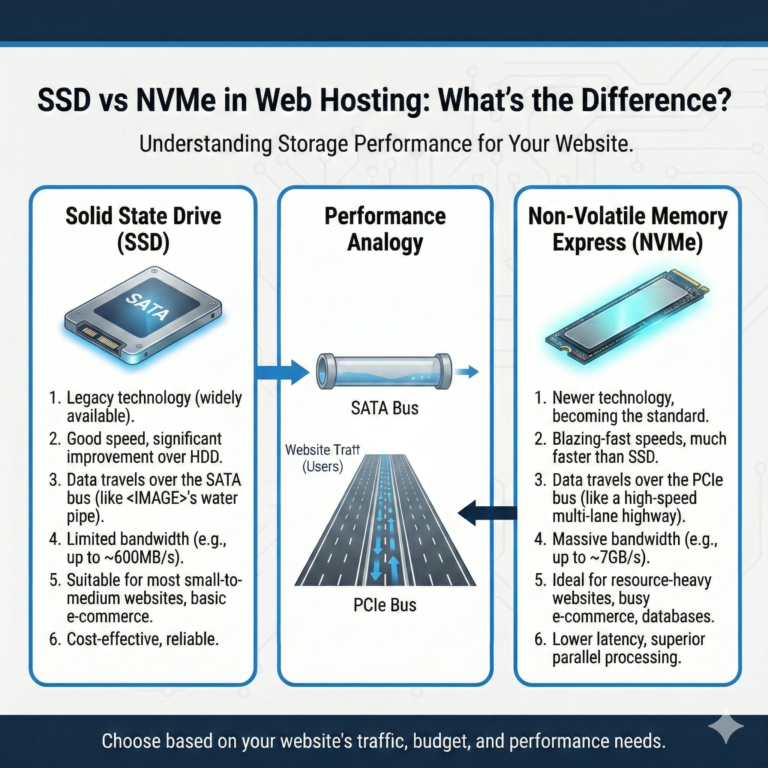
The type of hard drive your host uses is critical. Traditional Hard Disk Drives (HDDs) use spinning magnetic platters to read and write data. Solid State Drives (SSDs), however, use flash memory and have no moving parts.
SSDs are significantly faster than HDDs. Hosting that utilises NVMe SSD storage can read and write data exponentially faster than older technology. If a hosting provider is still using HDDs for their main storage, their performance will bottleneck your website regardless of how well you optimise your code.
Bandwidth and Resources
Think of your server’s resources (RAM and CPU) as a highway. If you have a two-lane road (low resources) and thousands of cars (visitors) try to use it at once, traffic jams occur.
Cheap hosting plans often throttle bandwidth or limit CPU availability. When your site experiences a traffic spike, the server cannot process the requests fast enough, leading to slow load times or even crashes. Fast web hosting ensures you have dedicated or scalable resources to handle traffic without stalling.
Best Hosting Types for Fast Website Performance
Selecting the right type of hosting architecture is arguably the most important decision you will make for your site’s performance. Let’s break down the options to find the best hosting for website speed.
Shared Hosting
Shared hosting is the most common entry-level option. Here, your website lives on a single server alongside hundreds, sometimes thousands, of other websites. You share all resources, including CPU and RAM.
The Speed Verdict: Generally the slowest option. If another site on the same server gets a traffic spike or is poorly coded, your site slows down. It is rarely the fastest web hosting solution but can be adequate for low-traffic personal blogs.
VPS Hosting (Virtual Private Server)
VPS hosting splits a physical server into several virtual servers. While you still share the physical hardware, you have a dedicated slice of resources that other users cannot touch.
The Speed Verdict: Significantly faster and more stable than shared hosting. Because you have guaranteed RAM and CPU power, your website loading speed optimization efforts are much more effective.
Cloud Hosting
Cloud hosting utilises a network of interconnected servers. If one server goes down or reaches capacity, another takes over. It offers immense scalability.
The Speed Verdict: Excellent for speed and reliability. Cloud hosting can dynamically allocate resources during traffic surges, ensuring your site remains fast even under pressure.
Managed WordPress Hosting
This is a concierge service specifically for WordPress sites. The servers are configured specifically for the WordPress CMS architecture.
The Speed Verdict: Often the premier choice for WordPress users seeking high performance web hosting. These providers handle server-side caching, security, and updates automatically, removing the technical burden from the site owner.
Key Hosting Features That Improve Website Speed
When shopping for a provider, look beyond the marketing fluff. You need to identify specific features that contribute to high performance web hosting.
CDN Integration
A Content Delivery Network (CDN) is a network of servers distributed globally. When you use hosting with CDN integration, a copy of your website’s static files (images, CSS, JavaScript) is stored on these servers. When a user visits your site, they download these files from the server closest to them, not your main server. This drastically reduces load times for international visitors.
Server-Side Caching
Caching involves storing a static version of your web pages so the server doesn’t have to generate the page from scratch every time a user visits. While you can use plugins for this, server-side caching (configured by the host) is almost always faster and more efficient.
LiteSpeed Servers
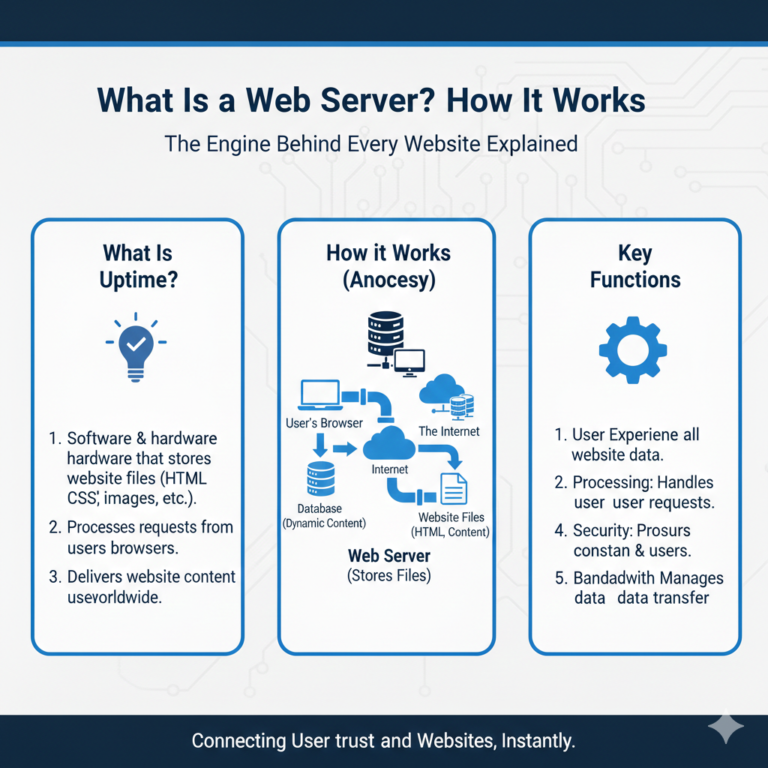
Web servers run on software. Apache and NGINX are common, but LiteSpeed is a newer technology designed for raw performance. It handles concurrent connections with minimal memory usage and is known for serving static content much faster than older server software.
HTTP/3 Support
HTTP/3 is the latest version of the Hypertext Transfer Protocol—the method computers use to communicate over the web. It reduces latency in establishing connections and improves data transmission speed. Fast web hosting providers are increasingly adopting this standard to shave milliseconds off load times.
How to Choose the Best Fast Hosting Provider
Finding the best fast hosting provider requires due diligence. Do not rely solely on “Top 10” lists, which are often influenced by affiliate commissions. Look for these indicators:
Performance Benchmarks
Look for independent reviews that publish Time to First Byte (TTFB) and load time test results. If a host consistently shows a TTFB of under 200ms, they are likely running high-quality infrastructure.
Uptime Guarantees
If your site is down, its speed is irrelevant. Look for a 99.9% uptime guarantee. Frequent downtime suggests an unstable or overloaded server environment, which is bad for SEO and user trust.
Customer Support
When your site slows down unexpectedly, you need an expert to check the server logs immediately. Test a provider’s support responsiveness before buying. Good support teams can often help with server-side website loading speed optimization.
Pricing vs Performance
Be wary of cheap fast web hosting. High-performance hardware (NVMe SSDs, powerful CPUs) costs money. While you don’t need to break the bank, hosting that costs less than a cup of coffee per month is usually cutting corners on performance.
Additional Ways to Speed Up Your Website (Beyond Hosting)
Even the most robust server cannot fix a poorly optimised website. To truly speed up website performance, you must pair great hosting with on-page best practices.
Image Optimisation
Large, high-resolution images are the primary cause of slow rendering. Ensure all images are compressed and served in next-gen formats like WebP. Tools like TinyPNG or Smush can automate this.
Minification
Minification removes unnecessary characters (like spaces and comments) from your code (HTML, CSS, JavaScript) without changing its functionality. This reduces the file size, making them faster to download.
Lazy Loading
Lazy loading defers the loading of non-critical resources (like images further down the page) until the user scrolls to them. This ensures the top of the page loads instantly, improving the perceived speed for the user.
Plugins and Tools
Limit the number of plugins you use. Each plugin adds a request to the server. Use website optimization tips and tools like WP Rocket or Autoptimize to manage database cleaning and script loading efficiency.
How to Test Your Website Speed
You cannot improve what you do not measure. Use these tools to check website loading speed and establish a baseline.
Speed Testing Tools
- Google PageSpeed Insights: Gives you a detailed breakdown of your Core Web Vitals and specific recommendations for mobile and desktop.
- GTmetrix: Provides a visualization of how your site loads (waterfall chart), helping you identify exactly which file is holding up the process.
- Pingdom: Great for testing load times from different geographic locations.
Performance Metrics
Focus on these key metrics during your website speed test:
- TTFB (Time to First Byte): Indicates server responsiveness.
- LCP (Largest Contentful Paint): How long until the main content is visible.
- Fully Loaded Time: When the site is 100% ready to use.
Common Mistakes That Slow Down Websites
Avoid these pitfalls to ensure your website loading speed optimization efforts aren’t wasted.
Cheap Overcrowded Hosting
As mentioned, sticking with the cheapest shared plan as your traffic grows is a recipe for disaster. If your site feels sluggish during peak hours, your host is likely overcrowding the server.
Too Many Plugins
It is tempting to install a plugin for every feature, but this creates “code bloat.” Audit your plugins monthly and delete any that aren’t essential.
Poor Caching Configuration
Installing a caching plugin isn’t enough; it must be configured correctly. Excluding the wrong files or setting the cache expiry too low can negate the benefits.
FAQ – Website Speed & Hosting (High-Intent SEO)
Q1: What is the fastest web hosting for websites?
There is no single “fastest” provider, but generally, managed cloud hosting or high-performance VPS solutions using Google Cloud or AWS infrastructure (like Kinsta, Rocket.net, or Cloudways) offer the highest speeds. Look for providers that use NVMe SSD storage and LiteSpeed servers.
Q2: Does hosting really affect website speed?
Yes, hosting is the foundation of site speed. While you can optimise code, you cannot overcome a slow server response time (TTFB). If your server takes 2 seconds to respond, your site will always be at least 2 seconds slow, regardless of your optimization efforts.
Q3: How much faster is VPS or cloud hosting than shared hosting?
VPS and cloud hosting can be significantly faster—often reducing load times by 50% or more compared to crowded shared hosting environments—because they provide dedicated resources and are not affected by other users’ traffic spikes.
Q4: Can changing hosting improve SEO rankings?
Indirectly, yes. Moving to a faster host improves your Core Web Vitals scores and reduces bounce rates. Since page experience is a Google ranking factor, a faster host gives you a better chance of ranking higher in search results.
Q5: How do I test my website loading speed?
Use Google PageSpeed Insights for SEO-specific data and GTmetrix for a technical breakdown. Run these tests several times at different times of the day to get an accurate average.
Q6: What is a good website load time for SEO?
Ideally, your website should load in under 2.5 seconds. Google recommends an LCP (Largest Contentful Paint) of 2.5 seconds or less for a “good” user experience rating.
Upgrade Your Foundation for Better Results
Website speed is a continuous journey, but it starts with the right infrastructure. No amount of image compression can fix a server that is fundamentally slow. By investing in fast web hosting, you are not just paying for server space; you are investing in better SEO rankings, lower bounce rates, and higher conversion rates.
If your current site performance is stalling your growth, it is time to stop optimising the paintwork and upgrade the engine. Audit your current hosting performance today, and consider moving to a provider that prioritises speed, stability, and modern infrastructure.