Hosting Mistakes That Cost You Traffic in 2026 (How to Fix Them)
You’ve poured hours into creating incredible content. You’ve optimized your keywords, built high-quality backlinks, and engaged with your audience on social media. Yet, despite doing everything “right,” your traffic is stagnant—or worse, declining.
The culprit might not be your content strategy or your marketing budget. It could be the very foundation your website sits on: your hosting.
In 2026, the digital landscape is more competitive than ever. Search engines like Google prioritize user experience (UX) metrics—specifically speed, stability, and security—above almost everything else. If your hosting provider can’t keep up, neither can your rankings.
Many site owners view hosting as a “set it and forget it” utility. This is a critical error. Your hosting environment directly impacts your Core Web Vitals, downtime frequency, and security posture. A slow or unreliable host doesn’t just annoy visitors; it actively signals to search engines that your site is low-quality.
In this guide, we’ll explore the top 10 hosting mistakes that silently kill traffic, how to diagnose them, and the actionable steps you need to take to fix them immediately.
Mistake #1 – Choosing Cheap Hosting Without Performance Testing
We all love a bargain. But when it comes to web infrastructure, “cheap” often translates to “overcrowded.”
Many budget hosting providers practice “overselling.” They cram thousands of websites onto a single server, banking on the idea that not all sites will experience traffic spikes simultaneously. When they do, every site on that server slows to a crawl or crashes.
The Impact on Traffic
If your site shares resources with a “noisy neighbor” (a high-traffic or resource-hogging site on the same server), your visitors will experience slow load times and frequent timeouts. Search engines notice this instability. If Google’s crawlers encounter errors or sluggishness when indexing your site, your crawl budget is wasted, and your rankings suffer.
Symptoms of Overloaded Servers:
- Inconsistent load times (fast one minute, slow the next).
- Frequent “500 Internal Server Error” messages.
- Your dashboard or WordPress admin panel feels sluggish.
How to Fix It
Before committing to a provider, look beyond the price tag. Check for independent performance tests rather than relying on the host’s marketing copy.
- Look for Resource Isolation: Opt for plans that guarantee specific RAM and CPU allocation, such as VPS (Virtual Private Server) or high-end Managed WordPress hosting, rather than shared environments.
- Check the “Bad Neighbor” Effect: If you are on shared hosting, use tools to see what other sites are on your IP address. If many look spammy or low-quality, it’s time to move.
Mistake #2 – Ignoring Page Speed Optimization
In 2026, speed isn’t a luxury; it’s a requirement. Google’s Core Web Vitals have solidified page speed as a major ranking factor.
If your hosting infrastructure uses outdated hardware or poorly configured server software, no amount of image compression or code minification on your end will fix the underlying latency.
The Technical Bottleneck
Slow web hosting impacts the “Time to First Byte” (TTFB). This is the time it takes for a user’s browser to receive the first piece of data from your server. If your TTFB is high (over 600ms), the user is staring at a blank white screen before your site even begins to render.
Why Speed Matters for SEO:
- Bounce Rate: As page load time goes from 1 second to 3 seconds, the probability of bounce increases by 32%.
- Mobile Experience: Mobile devices often rely on slower networks. A slow host makes mobile browsing unbearable.
How to Fix It
Prioritize hosting speed optimization features when choosing a plan.
- Server-Side Caching: Ensure your host offers built-in caching (like Varnish or NGINX caching) so your server doesn’t have to rebuild every page from scratch for every visitor.
- Latest Protocols: Verify your host supports HTTP/3 and the latest PHP versions, which offer significant performance improvements over older standards.
Mistake #3 – Poor Server Location Selection
The physical distance between your server and your visitor matters more than you think. Data travels fast, but it doesn’t travel instantly.
If your server is located in New York, but the majority of your traffic comes from Sydney, Australia, that data has to travel halfway around the world. This creates latency—a delay that makes your site feel sluggish.
Geo-Targeting Issues
For businesses targeting local SEO, server location is a relevant signal. While not the only factor, having a server IP address in the same country as your target audience can provide a slight relevancy boost and a massive speed boost.
The Latency Problem:
- High Ping: Increased distance equals higher ping times.
- Packet Loss: Data traveling longer distances is more susceptible to network congestion and packet loss.
How to Fix It
When setting up your hosting account, most reputable providers allow you to choose your data center location.
- Analyze Your Analytics: Check Google Analytics (or your preferred tool) to see where the bulk of your users are located.
- Select the Closest Hub: Choose a data center closest to that majority. If your audience is global, you cannot rely on server location alone—you will need a CDN (more on that in Mistake #9).
[Soft CTA: Unsure if your current host is fast enough? Run a speed test today using Google PageSpeed Insights.]
Mistake #4 – No Scalability Planning
It’s the nightmare scenario: Your latest blog post goes viral, or your Black Friday sale launches, and your site immediately crashes.
Traffic spikes should be a cause for celebration, not panic. However, if you are on a restrictive hosting plan with hard resource caps, success can break your site.
Hitting the Resource Ceiling
Many hosts enforce limits on:
- Bandwidth: The amount of data transferred.
- Processes: The number of scripts running simultaneously.
- Inodes: The number of files on your server.
When you hit these limits, hosts may throttle your speed or take your site offline entirely to protect other users on the server.
How to Fix It
You need scalable hosting for traffic growth.
- Cloud Hosting: Look for “elastic” cloud hosting solutions. These allow you to automatically scale up resources (RAM/CPU) during traffic surges and scale down when things are quiet.
- Review Upgrade Paths: Before signing up, check how easy it is to move to the next tier. Can it be done with one click, or does it require a site migration?
Mistake #5 – Weak Security & No Backups
Security breaches are a devastating traffic killer. If your site is hacked, Google will display a “This site may be hacked” warning in the search results, causing your click-through rate to plummet to near zero.
Worse, malware can redirect your visitors to spam sites, steal customer data, and result in your domain being blacklisted by security vendors.
The Cost of Data Loss
Imagine waking up to find your website deleted. Without a recent backup, you are starting from zero. Relying solely on your host for backups without verifying them is a classic mistake.
Security Must-Haves:
- WAF (Web Application Firewall): Blocks malicious traffic before it hits your site.
- Malware Scanning: proactive detection of suspicious files.
- SSL Certificates: Essential for trust and SEO rankings.
How to Fix It
Prioritize secure web hosting importance.
- Automatic Daily Backups: Ensure your host takes daily snapshots and retains them for at least 30 days.
- Off-Site Storage: Ideally, your backups should be stored on a different server or cloud provider (like Amazon S3) so that if your hosting account is compromised, your backups remain safe.
- One-Click Restore: Testing your backups is crucial. You should be able to restore your site quickly if something goes wrong.
Mistake #6 – Ignoring Uptime Monitoring
Your website cannot generate traffic if it is offline.
Uptime is the percentage of time your website is accessible. A host claiming 99% uptime sounds good, but that actually equals about 3.65 days of downtime per year. For a business, that is unacceptable.
The SEO Consequence
If Google crawls your site while it is down, you may see a temporary drop in rankings. If the downtime persists or happens frequently (known as “flapping”), Google may de-index your pages entirely to preserve their user experience.
How to Fix It
You cannot fix what you don’t measure.
- Set Up External Monitoring: Use a third-party tool like UptimeRobot or Pingdom. Do not rely on your host’s status page.
- Check the SLA: Review your host’s Service Level Agreement (SLA). Reputable hosts offer uptime guarantees of 99.9% or higher and provide financial credit if they fail to meet it.
- Move if Necessary: If your monitoring tool reports frequent outages, it is time to migrate. No amount of optimization can fix an unstable server.
Mistake #7 – Using Outdated Hosting Technology
Technology moves fast. If your host is running your site on hardware from 2018, you are at a disadvantage.
HDD vs. SSD vs. NVMe
Old-school Hard Disk Drives (HDD) utilize spinning platters to read data. They are slow and prone to mechanical failure. Solid State Drives (SSD) are significantly faster.
However, the new standard is NVMe (Non-Volatile Memory Express). NVMe drives were designed specifically for high-speed storage and can be up to 6x faster than standard SATA SSDs.
PHP Versions
Running an old version of PHP (the programming language WordPress runs on) is a security risk and a performance drag. PHP 8.x can handle significantly more requests per second than PHP 7.x.
How to Fix It
Audit your current technology stack.
- Demand NVMe: Ensure your plan specifically mentions NVMe storage.
- Update PHP: Log into your hosting control panel and check your PHP version. If it’s below 8.0, update it (after backing up your site).
- Ask About Hardware: Don’t be afraid to ask support what CPU generation your server uses.
[Soft CTA: Is your current host slowing you down? Compare top-rated hosting providers here.]
Mistake #8 – Poor Hosting Support Quality
When your site breaks at 2:00 AM on a Sunday, you don’t want to talk to a chatbot. You want a qualified engineer.
Poor support extends downtime. If a server error occurs and it takes 24 hours for support to reply to your ticket, that is 24 hours of lost traffic and revenue.
The Expertise Gap
Many budget hosts outsource support to call centers where agents read from scripts. They often blame your plugins or theme rather than investigating server-level issues.
How to Fix It
Test the support before you buy.
- Send a Pre-Sales Question: Ask a technical question about their caching configuration or backup policy. See how fast they reply and if the answer is generic or specific.
- Look for Specific Channels: Live chat is great for quick questions, but for complex issues, a ticketing system is often better. Ensure they offer 24/7 support.
Mistake #9 – Not Using CDN or Caching
We mentioned server location earlier. But what if your audience is truly global? A single server cannot be close to everyone.
This is where a Content Delivery Network (CDN) comes in. A CDN is a network of servers distributed around the globe. They store static copies of your site’s files (images, CSS, JavaScript). When a user visits your site, the CDN serves these files from the server closest to them.
The Cache Advantage
Without caching, your server has to do “heavy lifting” for every single visitor. With proper caching, the server does the work once, and subsequent visitors get the pre-built page instantly.
Impact of missing CDN/Caching:
- High server load.
- Slow global load times.
- Increased bandwidth costs.
How to Fix It
- Cloudflare Integration: Many hosts offer free one-click integration with Cloudflare, the world’s most popular CDN.
- Server-Level Caching: As mentioned in Mistake #2, use hosts that provide LiteSpeed Cache or NGINX FastCGI caching rather than relying solely on WordPress plugins.
Mistake #10 – Overlooking Renewal Pricing and Hidden Costs
This mistake hurts your wallet, which eventually hurts your traffic when you are forced to downgrade to save money.
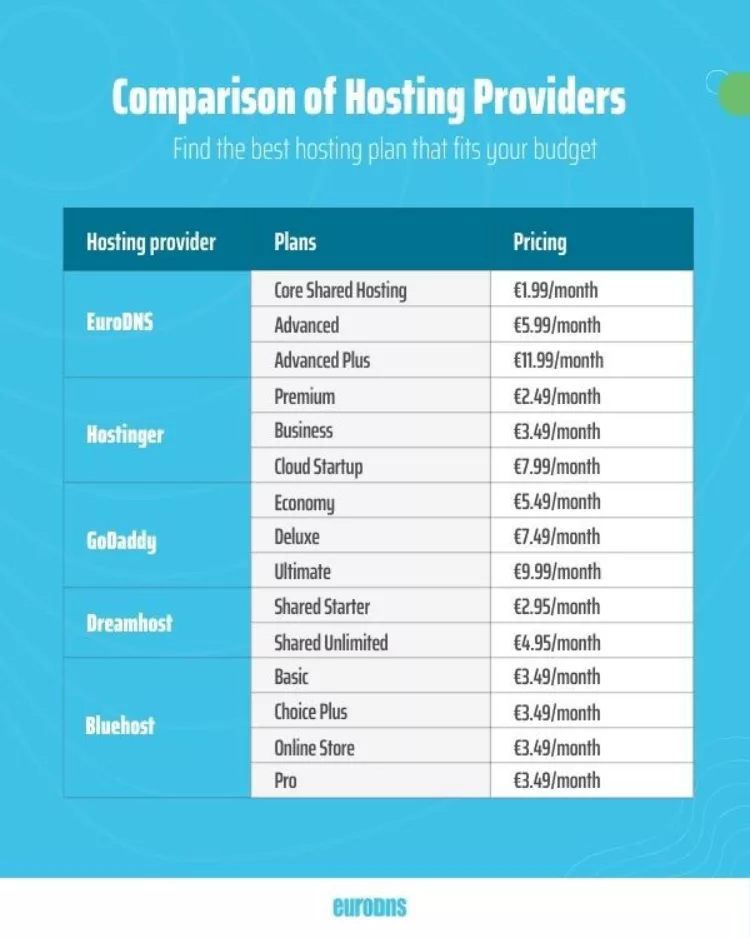
The hosting industry is notorious for “introductory pricing.” You might sign up for $2.99/month, but when the renewal invoice arrives a year later, the price jumps to $14.99/month.
The “Lock-In” Trap
If you can’t afford the renewal, you might try to migrate cheap, resulting in downtime or moving to a lower-quality host (Mistake #1). Additionally, some hosts charge extra for “essentials” like SSL certificates, backups, and email accounts.
How to Fix It
- Read the Fine Print: Always check the renewal price, not just the sign-up price.
- Calculate TCO (Total Cost of Ownership): Add up the cost of hosting + SSL + Backups + Security features to get the true monthly cost.
How to Fix Hosting Mistakes (Action Checklist)
Realized you might be making some of these errors? Here is your step-by-step recovery plan.
- Run a Baseline Test: Use Google PageSpeed Insights and GTmetrix to record your current speed.
- Check Uptime: Sign up for a free UptimeRobot account.
- Audit Your Plan: Login to your host. Check your PHP version, storage type (NVMe?), and resource usage graphs.
- Enable Caching/CDN: If not active, turn on your host’s caching and set up Cloudflare.
- Optimize Images: Ensure your content isn’t weighing down the server.
- Contact Support: Ask them to move you to a newer server if you are on legacy hardware.
- Migrate (If Needed): If your host can’t meet these standards, plan a migration to a performance-focused provider.
Best Hosting Solutions to Avoid These Mistakes
Not all hosts are created equal. Depending on your needs, here is what you should look for.
For Small Business & Blogs: Managed WordPress Hosting
Managed hosting handles the technical side (updates, security, caching) for you. It costs more than shared hosting but pays for itself in speed and time saved.
- Look for: Kinsta, WP Engine, or Flywheel.
For Growing Sites & Ecommerce: Cloud VPS
If you need raw power and scalability, a VPS (Virtual Private Server) or Cloud instance provides dedicated resources.
- Look for: DigitalOcean, Vultr, or Cloudways (which manages cloud servers for you).
For Enterprise: Dedicated Clusters
For massive traffic, you need custom architecture with load balancers and multiple database servers.
[Soft CTA: Ready to stop losing traffic? Upgrade your hosting today to a provider that prioritizes speed and stability.]
FAQs – Hosting Mistakes That Cost Traffic
Can bad hosting really affect SEO rankings?
Yes, absolutely. Google has confirmed that page speed and user experience (Core Web Vitals) are ranking factors. Furthermore, if your site experiences frequent downtime (500 errors), Google will crawl your site less frequently, making it harder for new content to rank.
How fast should a website load in 2026?
Ideally, your site should load within 2.5 seconds or less. Google’s Core Web Vitals recommends a Largest Contentful Paint (LCP) of 2.5 seconds or faster. Anything over 4 seconds will see significant user drop-off.
Is cheap hosting bad for traffic?
Not always, but often. Cheap hosting usually means shared resources. If other sites on your server get busy, your site slows down. For hobby sites, it’s fine. For businesses relying on SEO traffic, “cheap” often ends up being very expensive in lost revenue.
How often should I upgrade hosting?
You should review your hosting performance every 6 months or whenever you notice:
- Your site feels slow.
- You are receiving traffic alerts/resource warnings.
- You are planning a major marketing campaign or launch.
Does server location affect Google rankings?
It is a minor direct factor but a major indirect factor. Server location affects speed (latency). Speed affects user experience. User experience affects rankings. Always choose a server location close to your primary audience.
What uptime percentage is acceptable?
99.9% is the industry standard minimum. This allows for about 8 hours of downtime a year. 99.99% is excellent (less than an hour a year). Anything below 99.9% is poor quality.
Which hosting type is best for SEO?
Managed Cloud Hosting or Managed WordPress Hosting is typically best for SEO. These providers configure the server specifically for speed, include server-side caching, and often have built-in CDNs, giving you a technical head start.
Conclusion
Your hosting is the engine of your online presence. You can have the sleekest design and the most compelling copy, but if the engine stalls, you aren’t going anywhere.
The hosting mistakes outlined above—from ignoring speed optimization to skipping security protocols—are silent traffic killers. They frustrate users and signal to search engines that your site is not a priority.
The good news? These issues are fixable. By auditing your current setup, demanding better performance, or migrating to a provider that aligns with 2026 standards, you can remove the technical ceiling holding your traffic back.
Don’t let a $5/month saving cost you thousands in lost traffic. Evaluate your hosting today, make the necessary upgrades, and build a foundation that supports growth, not hinders it.