Best Cloud Hosting for Small Business in 2026
Choosing the right web hosting feels a lot like picking a physical storefront. You need a location that’s secure, easy for customers to find, and big enough to hold your inventory—but you don’t want to pay for a massive warehouse when you’re just starting out.
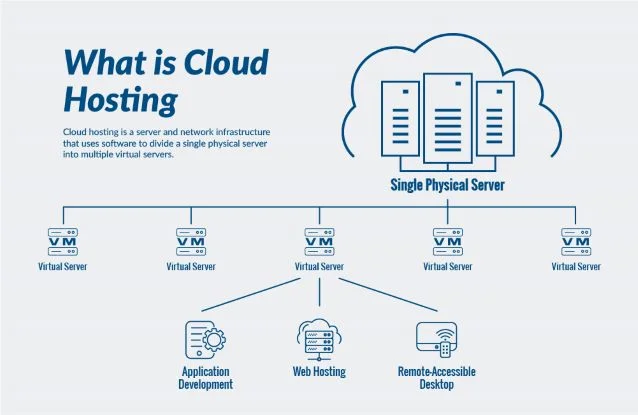
For most small businesses in 2026, cloud hosting is the sweet spot. Unlike traditional shared hosting, where your website fights for resources on a single server like a crowded apartment complex, cloud hosting spreads your data across multiple interconnected servers. If one server goes down, another picks up the slack instantly.
The result? Better speed, higher reliability, and the ability to grow without crashing your site. But with dozens of providers throwing technical jargon at you, how do you choose?
This guide cuts through the noise. We’ll break down why cloud hosting is the smart move, compare the top providers for 2026, and help you find the perfect fit for your budget and goals.
Why Cloud Hosting Matters for Small Business
In the past, small businesses often defaulted to shared hosting because it was cheap. But as website expectations have risen, shared hosting often leads to slow load times and security vulnerabilities. Cloud hosting has become the new standard for three main reasons.
Cost Efficiency and Scalability
One of the biggest fears for a small business owner is paying for technology they don’t use. Traditional hosting often forces you into tiered plans where you pay a flat rate regardless of your actual traffic.
Cloud hosting operates differently. Many providers offer “pay-as-you-go” models or scalable plans. If you have a quiet month, you aren’t overpaying. If you run a Black Friday sale and traffic spikes by 500%, cloud resources can scale up instantly to handle the load, then scale back down. You only pay for what you need.
Uptime and Reliability
Downtime costs money. If a potential customer clicks your link and gets an error message, they likely won’t come back.
Cloud hosting is inherently more stable than single-server hosting. Because your site’s data is mirrored across a cluster of servers, there is no single point of failure. If a hardware issue hits one server, your site simply runs from another node in the network. This redundancy allows top-tier cloud hosts to offer 99.99% uptime guarantees.
Security and Performance
Speed is a ranking factor for Google and a dealbreaker for users. Cloud hosting typically uses advanced caching and Content Delivery Networks (CDNs) to serve your site from a server location closest to your visitor.
Furthermore, cloud environments are isolated. In shared hosting, a virus on a neighbor’s site could theoretically infect yours. In a cloud environment, your resources are virtualized and separated, offering a much stronger security barrier against cyber threats.
Top Cloud Hosting Providers for Small Business in 2026
We’ve analyzed the market to find the best options specifically for small business needs—balancing performance, price, and ease of use.
Provider 1: HostGator Cloud (Best Overall)
HostGator has long been a household name, but their Cloud solution stands out in 2026 as the best all-rounder for small businesses. It bridges the gap between user-friendliness and raw power.
- Key Features: Unmetered storage, free domain for the first year, and an integrated dashboard that tracks site performance and usage trends.
- Pricing Highlights: Introductory rates are very aggressive, often starting under $5/month, making it accessible for startups.
- Ideal Use Cases: Perfect for businesses that want a “set it and forget it” experience. If you run a local service business, a restaurant, or a standard professional site, this offers the best balance.
Provider 2: SiteGround (Best for Performance)
If your business relies heavily on website speed—perhaps you have a photography portfolio or a content-heavy blog—SiteGround is the industry leader for speed.
- Speed and Uptime Data: SiteGround utilizes the Google Cloud Platform infrastructure. This means you are riding on the same high-speed network that powers Google Search and YouTube.
- Pricing vs. Value: It is pricier than HostGator, usually starting around $15–$20/month upon renewal. However, the value lies in their “SuperCacher” technology and top-tier customer support. You are paying for premium speed.
Provider 3: DreamHost (Best Budget Cloud Hosting)
For businesses operating on a shoestring budget, DreamHost offers cloud computing (DreamCompute) that is surprisingly powerful for the price.
- Low-Cost Plans: DreamHost offers unmanaged cloud servers for pennies an hour. While they have managed plans, their entry-level options are unbeatable for those willing to learn.
- Features Included: You get full root access and control. It’s a developer-friendly environment, but they also offer one-click installs for common apps to help beginners get started.
Provider 4: Bluehost (Best for WordPress/Managed Hosting)
Bluehost is officially recommended by WordPress.org, and their managed cloud hosting for WordPress sites is exceptional.
- WordPress Optimizations: The environment is built specifically for WordPress. Updates, security patching, and backups are handled automatically.
- Support and Ease of Use: Their onboarding is the best in the business. If you have never built a website before, Bluehost guides you through every step.
Provider 5: AWS Lightsail (Best for Scalability)
Amazon Web Services (AWS) powers the internet’s giants. Lightsail is their product designed specifically for smaller businesses and developers who want the power of AWS without the complexity.
- Auto-Scaling: Lightsail allows you to start small and seamlessly migrate to the broader AWS ecosystem as you grow into a global enterprise.
- Enterprise Features: You get access to enterprise-grade firewalls, load balancers, and object storage, packaged in a simplified monthly plan.
How to Choose Cloud Hosting for Your Business
With the top contenders listed, how do you make the final call? Focus on these three areas.
Define Your Needs
Before looking at price tags, look at your business metrics.
- Traffic: Do you get 1,000 visitors a month or 100,000? High traffic requires high bandwidth.
- Storage: Are you hosting high-res video files or simple text and images?
- Budget: Are you bootstrapping with $10/month, or can you invest $50/month for premium speed?
Compare Performance and Support
If you are a non-technical owner, support is your most valuable feature. Test a provider’s live chat before buying. Ask a simple question. If it takes them 20 minutes to reply, walk away. Technical problems will happen; you need a partner who responds fast.
Understand Pricing Models
Be wary of the “Introductory Price” trap. Many hosts offer a low rate (e.g., $2.99/mo) for the first term, which then renews at a regular rate (e.g., $14.99/mo). Always calculate the total cost of ownership over three years, not just the first month.
Cloud Hosting Pricing Comparison
Here is a simplified breakdown of what you can expect to pay in the current market.
| Plan Tier | Estimated Cost | Best For | Typical Features |
|---|---|---|---|
| Entry-Level | $5 – $10 / mo | New blogs, local businesses | 1 website, ~10GB storage, standard support |
| Mid-Tier | $15 – $35 / mo | Growing e-commerce, active blogs | Unlimited sites, unmetered bandwidth, priority support |
| Pro / Managed | $50+ / mo | High-traffic sites, agencies | Dedicated resources, advanced security, staging environments |
- Free Tiers and Trials: Providers like AWS and Google Cloud often offer a “free tier” for 12 months, or credits for startups. This is a great way to test the waters.
- Add-ons: Watch out for paid add-ons like email hosting, SSL certificates (which should be free), and daily backups. These can double your monthly bill.
Key Features to Look For
When reading the fine print, keep an eye out for these essentials.
Uptime Guarantees
Look for a Service Level Agreement (SLA) that guarantees at least 99.9% uptime. This means your site won’t be down for more than 45 minutes in a month. If they dip below this, they should credit your account.
Security & Backups
Ransomware attacks on small businesses are rising. Your host should offer:
- Free SSL certificates (the padlock icon in the browser).
- Automated daily backups (so you can restore your site if it breaks).
- Malware scanning and removal.
24/7 Support
Your website doesn’t close at 5:00 PM. If your site crashes on a Saturday night, you need help immediately. 24/7 chat or phone support is non-negotiable.
CDN and Caching Options
A Content Delivery Network (CDN) stores copies of your site in data centers around the world. If a user in London visits your US-based site, the CDN serves them from a London server. This drastically improves speed. Top hosts include free Cloudflare integration.
Cloud Hosting for Specific Use Cases
One size rarely fits all. Here is the quick verdict based on your business model.
E-commerce Websites
If you sell products online, speed equals revenue. You need a host with robust security (PCI compliance) and high performance.
- Verdict: SiteGround or WP Engine (if using WooCommerce). Their speed ensures customers don’t abandon carts.
Portfolio and Brochure Sites
If your site is mostly static (text, images, contact info) and exists to generate leads, you don’t need expensive enterprise power.
- Verdict: HostGator or Bluehost. They are affordable and easy to manage.
SaaS and Apps
If you are building a web application, you need root access and scalability.
- Verdict: AWS Lightsail or DigitalOcean. These offer developer-centric tools and total control over the server environment.
FAQs – Best Cloud Hosting for Small Business
What is the cheapest cloud hosting option?
For pure cost savings, unmanaged cloud hosting from providers like DigitalOcean or entry-level plans from HostGator are often the cheapest. However, remember that “unmanaged” means you fix it if it breaks. For most small business owners, paying a few dollars more for managed hosting is worth the peace of mind.
Do small businesses need cloud hosting?
Not every business needs it, but most should use it. While shared hosting is cheaper, the performance and reliability gap has widened. If your website is a core part of your revenue generation, the stability of cloud hosting is a necessary investment.
Can cloud hosting scale with my business?
Absolutely. This is the defining feature of the cloud. You can usually upgrade your CPU (processing power) and RAM (memory) with a single click in your dashboard, instantly accommodating growth without migrating your site.
How much should a small business expect to pay?
For a quality managed cloud hosting plan in 2026, expect to budget between $10 and $30 per month. Plans cheaper than this often cut corners on support or performance, while plans over $50 are usually overkill for a standard small business site.
Is managed hosting worth it?
For 90% of small business owners, yes. Managed hosting means the provider handles server updates, security patches, and technical glitches. Unless you have a dedicated IT person on staff, the time you save with managed hosting pays for itself.
Upgrade Your Digital Foundation
Your website is likely the first interaction a customer has with your brand. In 2026, a slow, unreliable site sends a message that your business is slow and unreliable.
Cloud hosting offers the infrastructure you need to look professional, load instantly, and stay secure. Whether you choose the all-around utility of HostGator, the blazing speed of SiteGround, or the WordPress specialization of Bluehost, the move to the cloud is an upgrade your business deserves.
Review your budget, check your traffic numbers, and pick the provider that gives you room to grow.