Shared Hosting “Noisy Neighbors” vs VPS Performance Isolation Explained
You’ve built a website, optimized your images, and written great content. Yet, every now and then, your site slows to a crawl for no apparent reason. You check your analytics, but your traffic is normal. What’s going on?
You might be the victim of a “noisy neighbor.”
This phenomenon is one of the most frustrating aspects of shared web hosting. It’s an invisible problem that can hurt your user experience and search engine rankings, often without you even realizing it. The solution often pitched is Virtual Private Server (VPS) hosting, which promises performance isolation. But what does that actually mean, and is it worth the upgrade?
This guide breaks down the technical differences between shared environments and VPS isolation, helping you decide if it’s time to move your digital property to a quieter neighborhood.
Background and Hosting Environment Explained
To understand why performance fluctuates, we first need to look at the architecture under the hood. The fundamental difference lies in how server resources are distributed among users.
How shared hosting environments work
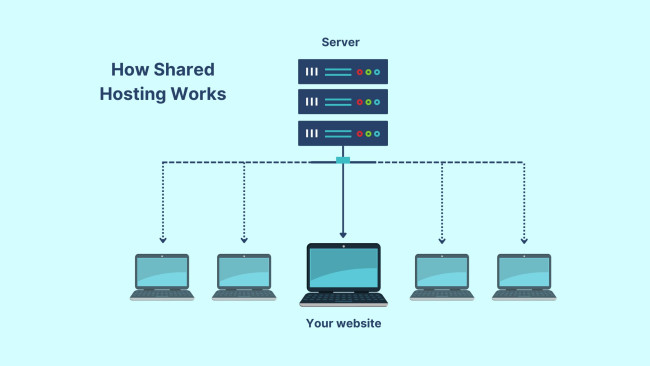
Shared hosting is the entry-level standard for most personal blogs and small business websites. It is cost-effective because the hosting provider places hundreds, sometimes thousands, of websites on a single physical server.
Think of this like living in a massive dormitory. Everyone has their own room (their website files and database), but you all share the same utilities. The plumbing, electricity, and Wi-Fi bandwidth are communal. The server’s CPU (Central Processing Unit), RAM (Random Access Memory), and disk I/O (Input/Output) are the utilities.
The operating system manages these resources dynamically. When one website is quiet, its idle resources are available for others to use. This model relies on the statistical probability that not every site on the server will experience a traffic spike at the exact same time. It is efficient and cheap, but it lacks strict boundaries.
What VPS isolation means in practice
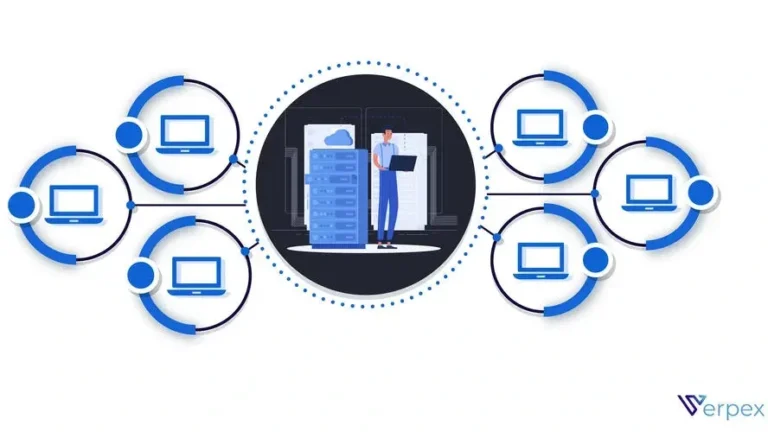
A Virtual Private Server (VPS) takes that same physical server but uses virtualization technology to create distinct, isolated environments.
If shared hosting is a dormitory, a VPS is an apartment building. You still share the physical foundation (the server hardware), but you have your own dedicated breaker box and water heater. A hypervisor (software that creates and runs virtual machines) slices the physical server into smaller virtual servers.
Each VPS runs its own operating system instance. The hypervisor allocates a specific portion of CPU cores, RAM, and storage space exclusively to that instance. Even if your neighbor is throwing a massive party (a huge traffic spike), they cannot easily drain the electricity from your apartment because your resources are reserved specifically for you.
Understanding the “Noisy Neighbor” Effect
The “noisy neighbor” effect is the primary downside of the shared resource model. It occurs when one user on a shared server monopolizes the available resources, negatively impacting everyone else on that same machine.
Resource contention on shared servers
Servers have finite limits. A physical processor can only handle so many calculations per second. A hard drive can only read and write data so fast. In a shared environment, there are few hard limits preventing one account from hogging these resources.
If a poorly coded script on Website A gets stuck in a loop, it might consume 90% of the server’s CPU power. When a visitor tries to load Website B—which is hosted on the same server—the server struggles to process the request because it is preoccupied with Website A’s error.
This is resource contention. Your website isn’t slow because of anything you did; it’s slow because it’s waiting in line for CPU time behind a resource-heavy neighbor.
How traffic spikes from other users impact performance
Traffic spikes are the most common cause of noise. Imagine a small e-commerce site on your shared server goes viral on social media. Suddenly, thousands of visitors flood that site.
The server works overtime to serve images, process database queries, and handle checkout requests for that one site. The Disk I/O (the speed at which the hard drive reads/writes data) hits its maximum capacity.
If a potential customer visits your site at that moment, the server might be too busy to retrieve your homepage files. Your site loads slowly, or worse, times out completely, displaying a 503 Service Unavailable error. You lose traffic and credibility purely due to proximity to a viral site.
VPS Hosting and Performance Isolation
VPS hosting solves the noisy neighbor problem through strict resource allocation. It shifts the model from “first come, first served” to “this is yours, and nobody else can touch it.”
Dedicated CPU, RAM, and storage allocation
When you purchase a VPS plan, you aren’t just buying space; you are buying guaranteed power. A typical plan might offer 2 CPU cores and 4GB of RAM.
In a true VPS environment, those 4GB of RAM are allocated to your virtual machine and removed from the general pool. Even if your website is sitting idle, that RAM is reserved for you. No other user on the physical server can “borrow” it.
This guarantee ensures that your website always has the fuel it needs to run. If a neighbor on the physical hardware experiences a massive traffic surge, their virtual machine will hit its own resource ceiling and slow down, but it won’t bleed over into your allocated resources. Your CPU cores remain available to process your visitors’ requests instantly.
Role of virtualization in isolating workloads
Virtualization is the magic that makes this possible. Technologies like KVM (Kernel-based Virtual Machine) provide “kernel-level isolation.” This means your VPS acts completely independently of others.
In shared hosting, if a neighbor’s site suffers a security breach or a catastrophic malware infection that crashes the main operating system, your site goes down too. In a KVM VPS, your neighbor’s OS can crash, burn, and reboot without you ever noticing. The hypervisor creates a firewall around your resources, preventing security issues and performance drains from crossing the property line.
Key Performance Differences Between Shared and VPS Hosting
The technical architecture leads to observable differences in how websites perform day-to-day.
Speed consistency and load handling
Shared hosting performance is often described as “peaky.” Your site might load in 0.8 seconds at 3:00 AM but take 4.5 seconds at 8:00 PM during peak internet usage hours. This inconsistency makes it difficult to troubleshoot performance issues because the variables are outside your control.
VPS hosting offers linear performance. If your site loads in 0.8 seconds now, it will likely load in 0.8 seconds later, regardless of what other users are doing. This consistency is vital for user retention. Visitors don’t care that your server is busy; they just want the page to load.
Stability during peak usage periods
Black Friday, Cyber Monday, or simply a busy weekday evening can cripple shared servers. Hosting providers often oversell shared servers, betting that not everyone will use their maximum allowance at once. When that bet fails during peak times, stability plummets.
With a VPS, stability is dictated by your traffic, not the aggregate traffic of strangers. As long as your allocated resources are sufficient for your own audience, your site remains stable. You are the master of your own destiny rather than a passenger on a crowded bus.
Predictability of server response times
Server response time, or Time to First Byte (TTFB), is a critical metric. It measures how long the browser waits between requesting the page and receiving the first byte of data.
On shared hosting, TTFB can fluctuate wildly based on server load. A “noisy neighbor” hogging the disk I/O will cause your TTFB to spike because the drive physically cannot read your files yet.
VPS isolation keeps TTFB low and predictable. Because your I/O throughput is dedicated (or at least prioritized), the server responds to requests immediately. This predictability creates a snappier, more professional feeling experience for users navigating through your pages.
Why This Comparison Matters Worldwide
The impact of hosting architecture isn’t just about technical specs; it has real-world consequences for business growth and visibility.
User experience expectations across global markets
Internet speeds vary globally, but impatience is universal. Users have become accustomed to instant gratification. A study by Google found that as page load time goes from 1 second to 3 seconds, the probability of a bounce (a user leaving immediately) increases by 32%.
If your shared host is having a bad day due to a noisy neighbor, you are actively pushing users away. In competitive markets, a slow site is viewed as untrustworthy or broken. Consistent performance builds brand trust. When a user clicks, and the page appears instantly every single time, it subconsciously signals reliability.
Impact of inconsistent performance on SEO and conversions
Search engines like Google care deeply about speed. They use metrics like Core Web Vitals to measure user experience. One of these vitals is Largest Contentful Paint (LCP), which is heavily influenced by server response time.
If Google crawls your site while a noisy neighbor is active, it sees a slow server. If this happens frequently, your search rankings can suffer. You might have better content than your competitor, but if their site is on a VPS and loads consistently faster, they have a distinct technical advantage.
Furthermore, inconsistency kills conversion rates. If a checkout page hangs for five seconds because of server lag, the customer often abandons the cart. They assume the payment failed or the site is insecure. VPS isolation safeguards your revenue stream by ensuring the checkout process is smooth, regardless of external server loads.
Current Trends in Hosting Performance
The hosting industry is shifting as technology becomes cheaper and more accessible.
Migration from shared to entry-level VPS plans
Historically, VPS hosting was expensive and required advanced Linux knowledge. Today, the gap is closing. “Managed VPS” providers handle the technical setup, making VPS almost as easy to use as shared hosting.
Simultaneously, the price of hardware has dropped. You can now find entry-level VPS plans that cost only a few dollars more than premium shared hosting. This has led to a mass migration of small businesses moving to VPS earlier in their lifecycle to escape the noisy neighbor trap before it ever becomes a problem.
Increased emphasis on performance transparency
Users are smarter today. They know what CPU cores and RAM are. Hosting companies are responding by being more transparent about resource limits.
Even in shared hosting, some providers now use CloudLinux or similar OS-level distinctors to place “soft limits” on individual accounts. While not a true VPS, this trend shows an industry-wide acknowledgment that resource contention is a major pain point that needs addressing.
Expert Insights and Data-Backed Analysis
Data often tells a clearer story than marketing copy. When we look at benchmarks, the distinction becomes sharp.
Hosting benchmarks related to shared server contention
Independent benchmarks frequently test shared hosting environments by simulating load. These tests often show that while a shared server can handle 10 or 20 concurrent users fine, performance degrades exponentially once load increases beyond that. The response times don’t just double; they can spike by 10x or 20x or result in failed requests.
In contrast, benchmarks on VPS environments typically show a linear degradation. If you double the traffic, the load doubles, but the server keeps chugging along predictably until it hits its hard physical limit. This “graceful failure” is much easier to manage than the chaotic collapse seen in overloaded shared servers.
Common misconceptions about shared hosting limits
Many shared hosts advertise “Unlimited Bandwidth” or “Unlimited Storage.” This is a marketing myth. Nothing is unlimited.
The fine print (Terms of Service) usually restricts CPU and RAM usage. You might have “unlimited space,” but if you try to upload 500,000 files, you will hit an “inode limit” (file count limit) or get flagged for excessive CPU usage during the upload.
These hidden caps are the mechanisms hosts use to manage noisy neighbors. If you become the noisy neighbor by actually using your “unlimited” resources, the host will throttle your site or take it offline to protect other users. VPS limits are transparent: you get what you pay for, and you can use 100% of it without fear of penalty.
What to Watch Next
The line between shared and VPS is blurring, offering better options for everyone.
Improvements in shared hosting resource controls
We are seeing better software isolation in shared environments. Technologies are emerging that allow hosts to burst resources more intelligently, preventing a single user from crashing the server while still allowing for small, temporary spikes. This won’t eliminate the noisy neighbor effect entirely, but it acts as better soundproofing for the walls.
VPS advancements aimed at small and mid-size websites
The future of VPS is “elastic.” Cloud VPS technology allows servers to scale automatically. If your site gets a traffic spike, the server can temporarily add more RAM or CPU power instantly, then scale back down when the traffic subsides. This “pay-for-what-you-use” model combines the isolation of VPS with the flexibility required for modern, unpredictable web traffic.
Conclusion
The choice between shared hosting and VPS comes down to your tolerance for risk and your need for control. Shared hosting is an affordable entry point, perfectly capable of handling low-traffic blogs or hobby sites where a few seconds of delay here and there won’t destroy a business.
However, the “noisy neighbor” effect is an inherent flaw in the shared model. You cannot control who lives next door, and you cannot control how they use the server’s resources.
For any business where user experience, SEO, and revenue are priorities, VPS performance isolation is no longer a luxury—it’s a necessity. The strict allocation of dedicated resources ensures that your site’s speed is determined solely by your content and your traffic, not by the erratic behavior of strangers. In the digital world, good fences truly do make good neighbors.
Frequently Asked Questions
What is a “noisy neighbor” in shared hosting?
A noisy neighbor is a website on the same shared server as yours that consumes excessive resources (CPU, RAM, disk I/O). This causes performance issues, such as slow loading times or downtime, for other websites on that server, including yours.
Does VPS hosting completely eliminate resource contention?
It eliminates contention from other users. In a VPS, your resources are reserved. However, you can still experience resource contention if your own website grows too big for the plan you purchased. The difference is that the bottleneck is your own allocation, not a neighbor’s usage.
Can shared hosting be stable for low-traffic sites?
Yes. For personal blogs, portfolios, or small local business sites with low traffic, shared hosting is often stable enough. The noisy neighbor effect is intermittent; if your site doesn’t rely on 100% uptime for revenue, shared hosting offers excellent value.
When does noisy neighbor impact justify upgrading to VPS?
You should upgrade if you notice inconsistent slow-downs during peak hours, if your site begins generating revenue, or if you plan to run resource-intensive applications. If a slow website costs you money or reputation, the stability of a VPS is worth the investment.