Cloud Hosting Explained: How It Works, Benefits, and Use Cases
Imagine launching a new marketing campaign. It’s a massive success, and thousands of potential customers flood your website simultaneously. Then, disaster strikes. Your site slows to a crawl, and eventually, it crashes completely. The server couldn’t handle the load.
This scenario is the nightmare of every digital business owner, but it highlights the primary weakness of traditional web hosting: rigidity. When your site lives on a single physical server, its resources are finite. Once you hit the limit, you have nowhere to go.
This is where cloud hosting changes the game. It has rapidly evolved from a tech buzzword into the backbone of the modern internet. By moving away from single-server reliance and embracing a network of virtual resources, cloud hosting offers a level of reliability and flexibility that traditional models simply cannot match.
Whether you are a startup founder expecting rapid growth or a developer looking for better infrastructure, understanding the mechanics of the cloud is essential. This guide breaks down exactly what cloud hosting is, how the underlying technology functions, and how to decide if it is the right move for your digital presence.
What Is Cloud Hosting?
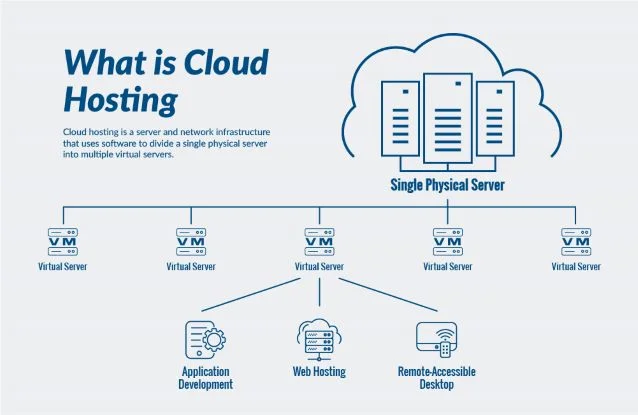
At its simplest, cloud hosting is a method of hosting websites and applications on virtual servers that pull their computing resources from an extensive underlying network of physical web servers.
To understand this better, let’s look at the alternative. In traditional hosting (like shared or dedicated hosting), your website resides on one specific physical machine. If that machine experiences a hardware failure, your site goes down. If that machine runs out of RAM because of a traffic spike, your site crashes.
Cloud hosting works differently. Instead of relying on one machine, your data is spread across a cluster of servers. This network acts as a single, powerful entity—the “cloud.” If one server in the cluster fails, another immediately picks up the slack.
Key Concepts for Beginners
- Virtualization: Creating a virtual version of a resource, such as a server or storage device.
- IaaS (Infrastructure as a Service): The most common form of cloud hosting, where you rent the infrastructure (servers, storage, networking) and manage the software yourself.
- Scalability: The ability to add or remove resources instantly based on demand.
How Cloud Hosting Works
While the “cloud” sounds ethereal, the physical reality is a complex orchestration of hardware and software housed in massive data centers. Here is the breakdown of the mechanics that keep cloud-hosted sites running.
Virtualization
Virtualization is the software technology that makes cloud hosting possible. A layer of software called a “hypervisor” sits on top of physical servers. This hypervisor divides the physical server’s resources (CPU, RAM, and storage) into multiple virtual environments, known as Virtual Machines (VMs). Each VM acts as a standalone server with its own operating system, completely isolated from other VMs on the same hardware.
The Role of Multiple Servers
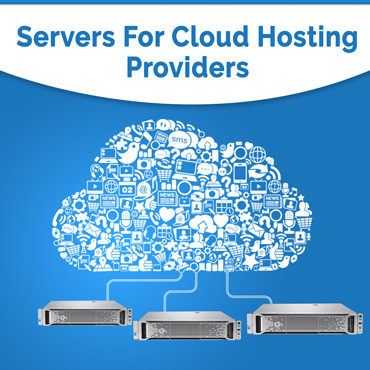
Cloud hosting doesn’t just rely on one physical server splitting into VMs. It connects multiple physical servers into a single cluster. Your website’s files and data might be stored across several devices. This interconnectedness ensures that resources are pooled. If your application suddenly needs more memory than one physical server can provide, the cloud infrastructure can tap into the resources of the wider network.
Load Balancing and Redundancy
These are the twin pillars of cloud reliability.
- Load Balancing: Think of a load balancer as a traffic cop. When requests (visitors) come to your website, the load balancer distributes this traffic across multiple servers. This prevents any single server from becoming overwhelmed and ensures consistent speed for users.
- Redundancy: This refers to having backups. In a cloud environment, data is often mirrored across different drives or even different data centers. If a hard drive fails or a server loses power, a redundant copy takes over immediately, resulting in zero downtime.
On-Demand Resource Allocation
Perhaps the most distinct feature of cloud hosting is elasticity. In a traditional setup, upgrading your server usually involves a technician physically adding RAM or migrating your site to a new box. In the cloud, resource allocation is software-defined. You can increase your CPU power or storage space with a few clicks (or automatically via scripts) to handle a traffic spike, and then scale back down when the traffic subsides.
Key Components of Cloud Hosting
To fully grasp the ecosystem, it helps to understand the building blocks that make up a cloud environment.
Virtual Machines (Instances)
The Virtual Machine is your server in the cloud. Providers like AWS call them “EC2 instances,” while others might call them “Droplets” or “VMs.” This is where your operating system, web server software (like Nginx or Apache), and application code live.
Storage and Databases
Cloud hosting separates compute power (the VM) from storage.
- Block Storage: This acts like a hard drive attached to your VM. It’s used for the operating system and files.
- Object Storage: Used for storing massive amounts of unstructured data like images, videos, and backups (e.g., Amazon S3).
- Managed Databases: Instead of installing database software on your VM, many cloud providers offer dedicated, managed database services (like SQL or NoSQL) that scale independently from your web server.
Networking and Security
This layer controls how your VMs talk to each other and the internet. It includes virtual firewalls, private networks (VPCs), and IP address management. It allows you to create secure, isolated environments where backend databases are not directly exposed to the public internet.
Benefits of Cloud Hosting
Why are businesses moving their infrastructure to the cloud en masse? The advantages are significant.
Scalability and Flexibility
This is the primary selling point. If you are running an eCommerce store and Black Friday arrives, you can double or triple your server capacity for that weekend and then return to normal on Monday. You are not locked into a fixed amount of hardware.
High Availability and Uptime
Because your site isn’t tied to a single piece of hardware that can break, cloud hosting offers superior uptime. Most major providers offer Service Level Agreements (SLAs) guaranteeing 99.9% to 99.99% availability. The redundancy built into the system means hardware failures rarely result in website downtime.
Cost Efficiency
Cloud hosting typically operates on a pay-as-you-go model. You are billed for the hours your server runs and the gigabytes of storage you use. This shifts costs from Capital Expenditure (buying hardware upfront) to Operational Expenditure (paying for what you use). For startups, this lowers the barrier to entry significantly.
Performance Optimization
Cloud providers have data centers all over the world. You can host your website in a region physically closer to your customers, reducing latency (load times). Additionally, the ability to use load balancers and high-performance SSD storage ensures your applications run smoothly under pressure.
Drawbacks of Cloud Hosting
Despite the benefits, cloud hosting is not a magic bullet. There are challenges to consider.
Pricing Complexity
While “pay-as-you-go” sounds great, it can be unpredictable. If you have a massive, unexpected traffic spike, or if you forget to turn off a test server, you might receive a surprisingly high bill at the end of the month. Understanding the pricing structure of providers like AWS or Azure requires careful attention.
Management and Technical Curve
Unmanaged cloud hosting is not for the faint of heart. You are generally given a “blank slate” Linux server. You need to know how to install the OS, set up security firewalls, manage updates, and configure the web server via the command line. If you lack these skills, you will need to hire a system administrator or opt for a managed cloud solution.
Dependency on Internet Connectivity
Since cloud hosting is entirely remote, you have no physical access to the hardware. If your internet connection drops, you cannot manage your infrastructure. Furthermore, while rare, if the cloud provider themselves suffers a massive outage (which has happened to all major providers), your business is at their mercy until they fix it.
Common Cloud Hosting Use Cases
When is cloud hosting the absolute best choice?
- eCommerce Platforms: Online stores experience fluctuating traffic. The cloud handles these peaks and valleys without crashing during a sale.
- SaaS Applications: Software-as-a-Service companies need high reliability and the ability to scale as they acquire new users.
- Mobile Apps and APIs: Apps often require a backend that can handle thousands of simultaneous API requests.
- Enterprise Workloads: Large corporations use the cloud to process big data, run internal tools, and manage global networks.
Cloud Hosting vs. Other Hosting Types
To make an informed choice, you must compare the cloud against traditional options.
Shared Hosting vs. Cloud Hosting
Shared hosting is like living in a dormitory. You share a room (server) and resources (bathroom/kitchen) with many others. If one person hogs the bathroom, you wait. It’s cheap but unreliable.
Cloud hosting is like owning a network of apartments. You have your own space, and if you need more room, you just rent the unit next door instantly.
VPS vs. Cloud Hosting
A Virtual Private Server (VPS) is similar to cloud hosting in that it uses virtualization. However, a traditional VPS is often hosted on a single physical server. If that server fails, your VPS fails. Cloud hosting distributes that virtual machine across a cluster, offering better redundancy.
Dedicated Servers vs. Cloud Hosting
A dedicated server gives you the entire physical machine. It offers immense power but zero flexibility. To upgrade, you must physically install new hardware. Cloud hosting matches the power of dedicated servers but allows you to scale that power up or down instantly.
Who Should Use Cloud Hosting?
- Startups: You don’t know how fast you will grow. Cloud allows you to start small and scale without migrating servers later.
- High-Traffic Websites: If you receive over 50,000 monthly visitors, or if your traffic is “bursty,” shared hosting will likely fail you.
- Developers and Agencies: The ability to spin up test environments, clone servers, and automate deployments makes the cloud a developer’s playground.
- Companies Needing Reliability: If downtime costs you money, the redundancy of the cloud is a necessary insurance policy.
Popular Cloud Hosting Platforms
The market is dominated by a few giants, but there are options for every skill level.
The “Big Three” (Hyperscalers)
- AWS (Amazon Web Services): The market leader. Offers the widest range of tools but has a steep learning curve.
- Google Cloud Platform (GCP): Known for high-performance networking and data analytics tools.
- Microsoft Azure: Popular among enterprise companies already using Microsoft software integration.
Managed Cloud Hosting
For those who want the power of the cloud without the headache of command-line management, managed providers are the solution.
- DigitalOcean / Linode: Developer-friendly, simpler pricing than the Big Three.
- Cloudways: A platform that manages AWS, Google, or DigitalOcean servers for you, providing a user-friendly control panel.
- Kinsta/WP Engine: Specialized managed cloud hosting specifically for WordPress sites.
How to Choose the Right Solution
- Assess Your Technical Skills: Can you manage a Linux server? If not, budget for a managed cloud provider.
- Analyze Traffic Patterns: Do you have steady traffic, or does it spike? If it spikes, look for providers with auto-scaling features.
- Budget: Calculate your estimated usage. Remember that managed services cost more than the raw infrastructure cost of unmanaged services.
- Performance Needs: If your audience is global, choose a provider with data centers in multiple regions or a built-in Content Delivery Network (CDN).
Summary and Final Recommendation
Cloud hosting has transformed the internet by democratizing access to enterprise-grade infrastructure. It works by pooling resources from a network of physical servers, utilizing virtualization to offer scalable, redundant, and on-demand computing power.
While it introduces some complexity regarding management and pricing, the benefits—near-infinite scalability, superior uptime, and flexibility—far outweigh the drawbacks for most modern businesses.
The Verdict: If you are running a personal hobby blog, traditional shared hosting is likely sufficient. However, if you are building a business, managing a growing application, or simply cannot afford for your website to go offline, cloud hosting is the investment you need to make. It ensures that your infrastructure grows with you, rather than holding you back.