Shared Hosting: Everything You Need to Know Before You Start
If you’re launching your first website, the jargon can feel overwhelming. You’ll hear terms like bandwidth, SSL certificates, and DNS records thrown around casually. But the first big decision you’ll need to make—and one of the most confusing—is choosing a web host. Specifically, you’ll probably be steered toward “shared hosting.”
Shared hosting is the entry point for the vast majority of websites on the internet. It’s affordable, accessible, and generally easy to set up. But is it right for you? Will your website be fast enough? What happens if your site gets popular overnight?
For non-technical users, understanding performance without getting bogged down in server metrics is crucial. You want to know if your visitors will have a good experience, not necessarily the clock speed of the server’s CPU. You want a balance between cost and reliability.
This guide breaks down shared hosting performance in plain English. We’ll look at how it works, why it’s so cheap, and realistic expectations for speed and security. By the end, you’ll know exactly if shared hosting is the smart move for your new project or if you need to look elsewhere.
What Is Shared Hosting?
At its simplest level, shared hosting is like living in an apartment building. You have your own private space (your website), but you share the building’s resources—like water, electricity, and the front door—with all your neighbors.
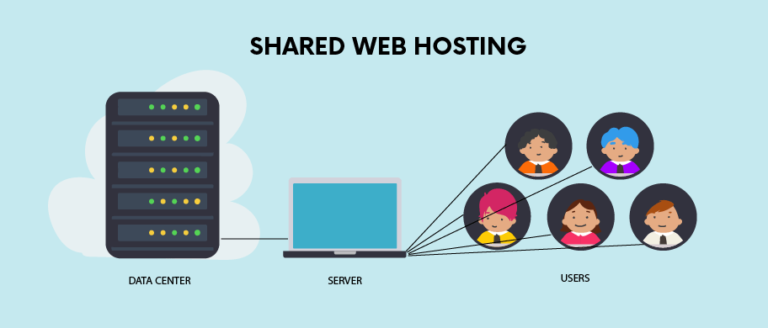
In technical terms, shared hosting means your website lives on a single physical server alongside hundreds, sometimes thousands, of other websites. You are renting a small slice of that server’s storage space and computing power. This is the most popular form of web hosting because it is incredibly cost-effective. Since the hosting provider can stack many customers onto one machine, they can split the operating costs among everyone.
Why it is called “shared” hosting
The name is literal. You aren’t just sharing the physical metal box (the server); you are sharing the system resources that make a website run. This includes the Central Processing Unit (CPU), the Random Access Memory (RAM), and the connection to the internet. If one website on the server suddenly gets a massive spike in traffic, it’s like a neighbor taking a really long shower—the water pressure (performance) might drop for everyone else.
How Shared Hosting Works
To really understand the performance implications, we need to take a quick look under the hood. Don’t worry, we’ll keep the tech talk to a minimum.
What a web server is
Think of a web server as a specialized, powerful computer that never turns off. It is connected to the internet 24/7. When someone types your website address into their browser, their computer sends a request to your server. The server then “serves” the files—images, text, code—that make up your website back to the visitor’s screen.
How multiple websites share one server
On a shared hosting plan, the hosting provider sets up software that partitions the server into many smaller accounts. Each account has a specific directory where you upload your files. To the outside world, your website looks independent. But internally, the server is juggling requests for your site, your neighbor’s baking blog, and another neighbor’s local plumbing business all at the same time.
Shared resources explained simply
Imagine a pizza at a party. If there are only three people, everyone gets plenty of slices (resources like RAM and CPU). If 50 people show up, everyone only gets a tiny sliver. Hosting providers use software to manage these “slices” fairly, preventing one site from eating the whole pizza. However, there is a limit to how much “food” is available. If the server gets overwhelmed, websites might load slowly or temporarily fail to load at all.
Key Features of Shared Hosting
Shared hosting is designed for mass appeal, particularly for people who don’t know how to code or manage a server. Here are the features that define it.
Affordable pricing
This is the headline feature. Shared hosting is undeniably the cheapest way to get online. You can often find plans for the price of a cup of coffee per month. This low barrier to entry makes it perfect for hobbyists and startups on a shoestring budget.
Easy-to-use control panel
Most shared hosting comes with a control panel, often cPanel or a custom dashboard provided by the host. This interface lets you manage your website using graphical icons rather than typing commands into a black screen. You can create email accounts, manage files, and check statistics with simple clicks.
One-click website installation
Want to start a WordPress blog? On a shared host, this usually takes less than five minutes. Installers like Softaculous are typically included, allowing you to install popular software (WordPress, Joomla, Drupal) instantly without needing to touch a single database file.
Email hosting included
Unlike some modern cloud platforms that require you to pay extra for email (like Google Workspace), shared hosting almost always includes free email hosting. You can create professional addresses like contact@yourdomain.com at no extra cost.
Managed server maintenance
The hosting provider handles all the boring, difficult stuff. They replace hardware if it breaks, update the operating system, and manage security patches for the server itself. You only have to worry about your specific website files.
Advantages of Shared Hosting
Why do millions of people choose this route?
- Low cost: As mentioned, it is budget-friendly. This allows you to test ideas without a significant financial commitment.
- Beginner-friendly: The entire ecosystem is built for non-experts. Support teams are used to answering basic questions, and the tools are intuitive.
- No technical management: You don’t need to be a Linux system administrator to run a website. The host manages the infrastructure.
- Quick setup: You can buy a domain and hosting plan and have a live “Hello World” website in under an hour.
Disadvantages of Shared Hosting
The “apartment building” model has downsides, primarily centered around performance and freedom.
- Limited performance: You have a ceiling on how fast your site can go. You cannot add more RAM just for your site.
- Shared resources: The “bad neighbor effect” is real. If another site on your server gets hacked or goes viral, your site might slow down through no fault of your own.
- Less control: You generally cannot install custom server-side software or change deep system configurations. You are stuck with the setup the host provides.
- Not ideal for high-traffic sites: Shared hosting usually caps out at a certain number of visitors. If you exceed this, the host might ask you to upgrade or even temporarily suspend your site.
How Much Does Shared Hosting Cost?
Pricing in the web hosting industry can be tricky. It often involves heavy discounting for new customers.
Typical price ranges
You will typically see shared hosting advertised anywhere from $2.99 to $9.99 per month. Premium shared hosting, which offers fewer sites per server (less crowding), can go up to $15 to $20 per month.
Introductory vs. renewal pricing
This is the most common trap. A host might advertise $2.99/month, but that price is only valid if you pay for three years upfront. Furthermore, when that first term expires, the price often jumps to the “regular” rate, which could be $10.99 or higher. Always check the renewal price before signing up.
What affects cost
Cheaper plans usually have strict limits on storage space (how many files you can have) and bandwidth (how many people can visit). More expensive plans often include “unlimited” storage and bandwidth, free domain names, and automatic backups.
Shared Hosting Performance Explained
Now, let’s talk about what “performance” actually means for you and your visitors.
Speed expectations
On shared hosting, your site should load reasonably fast—typically under 2 or 3 seconds—provided you haven’t overloaded it with huge images or too many plugins. However, it will likely not be “blazing fast” compared to a dedicated server. There might be a slight delay (latency) before the server starts sending data because it is busy processing requests for other sites.
Uptime reliability
Uptime is the percentage of time your website is accessible online. A good shared host guarantees 99.9% uptime. This sounds perfect, but 99.9% still allows for about 43 minutes of downtime per month. In shared hosting, downtime can happen if the server gets overloaded or needs maintenance. While modern hosts are quite stable, they are generally less reliable than enterprise-grade cloud solutions.
What affects performance
- Resource Throttling: If your site uses too much CPU, the host might automatically slow it down to protect other users.
- Traffic Spikes: Shared hosting handles steady, low-to-moderate traffic well. It struggles with sudden bursts (like if you get featured on a major news site).
- Server Location: If your server is in New York but your visitors are in London, the physical distance will add a slight delay.
How Secure Is Shared Hosting?
Security is a partnership between you and your host.
Basic security features
Most reputable hosts provide a free SSL certificate (the padlock icon in the browser bar), which encrypts data between your site and your visitors. They also usually have server-level firewalls to block common attacks.
Common risks
The main risk is cross-contamination. While rare on quality hosts, it is theoretically possible for a hacker to compromise one site on a server and use it to attack others on the same machine. However, the more common risk is that you, the user, might install a plugin with a security vulnerability that lets hackers in.
How providers protect your site
Hosts use “cage” technology (like CloudLinux) to isolate accounts. Even if your neighbor destroys their own apartment, the damage shouldn’t spread to yours. They also run malware scans and often provide basic backup services.
Who Should Use Shared Hosting?
Shared hosting isn’t “bad”—it’s just designed for specific use cases.
- First-time website owners: If you are learning the ropes, start here. It’s cheap and forgiving.
- Bloggers: Personal blogs generally don’t require massive computing power.
- Small businesses: A local bakery, dentist, or consultant with a brochure-style website (hours, location, services) fits perfectly on shared hosting.
- Personal websites: Portfolios and resumes are ideal candidates.
Who Should Avoid Shared Hosting?
If your business relies on the website being up 100% of the time to make money, shared hosting is risky.
- High-traffic websites: If you receive tens of thousands of visitors a day, shared hosting will crash.
- Online stores: E-commerce sites (like Magento or heavy WooCommerce stores) require more processing power to handle secure checkouts and product searches.
- Membership platforms: Sites where users log in and interact with dynamic content are resource-heavy and perform poorly on shared servers.
Shared Hosting vs. Other Hosting Types
Knowing what else is out there helps you understand where shared hosting fits in the hierarchy.
Shared hosting vs. VPS
VPS (Virtual Private Server) is the next step up. It’s like owning a condo. You still share the building, but you have dedicated walls and resources that nobody else can touch. VPS is faster and more reliable but costs more ($20–$50+/month) and requires more technical knowledge.
Shared hosting vs. cloud hosting
Cloud hosting uses a network of servers rather than one single machine. If one server fails, another takes over instantly. It is much more scalable and reliable than shared hosting, but the pricing model can be complex.
When to upgrade
You should leave shared hosting when:
- Your site loads slowly despite optimization.
- You are getting errors saying “Resource Limit Reached.”
- You are starting to make consistent revenue from your site and can justify the cost of better performance.
Is Shared Hosting Good for SEO?
Search Engine Optimization (SEO) is how you get found on Google. Does cheap hosting hurt your rankings?
Website speed and rankings
Google uses page speed as a ranking factor. Because shared hosting is slower than dedicated options, it puts you at a slight disadvantage. However, a well-optimized site on shared hosting can still rank very well. Content is still king.
Uptime importance
If Google tries to crawl your site and it is down, that’s a bad signal. Frequent downtime will hurt your SEO. This is why choosing a reputable shared host is better than choosing the absolute cheapest one.
Choosing a quality provider
Don’t scrape the bottom of the barrel. A shared host that charges $5/month is usually significantly better for SEO than one that charges $0.99/month, simply because they don’t crowd the servers as much.
How to Choose the Right Shared Hosting Provider
Not all hosts are created equal. Here is a checklist for shoppers.
Reliability and uptime
Look for a status page or historical data. Do they actually meet their 99.9% guarantee? Read reviews specifically looking for complaints about downtime.
Support quality
When your site breaks at 2 AM, you need help. Test their live chat before you buy. Do they answer in 2 minutes or 2 hours?
Pricing transparency
Read the fine print. Look for the renewal rate. Check if they charge extra for backups or SSL certificates (these should be free).
Security features
Do they offer daily backups? Do they have a firewall? Do they scan for malware? These features are invaluable when things go wrong.
Frequently Asked Questions
Is shared hosting good for beginners?
Absolutely. It is the most logical starting point because it removes the technical barriers of server management. You can focus on building your site, not fixing the engine.
Can I upgrade later?
Yes. Almost every hosting provider makes it incredibly easy to upgrade from a shared plan to a VPS or cloud plan as your site grows. They will usually migrate your data for you.
Is shared hosting safe?
Generally, yes. While it is less secure than a dedicated server, reputable hosts use sophisticated isolation methods. If you use strong passwords and keep your website software updated, you should be fine.
How much traffic can shared hosting handle?
It depends on the plan, but a rough estimate is anywhere from 10,000 to 50,000 monthly visits. If you are consistently hitting the upper end of that, it’s time to move to a VPS.
Final Thoughts: Should You Start with Shared Hosting?
For 90% of new projects, the answer is yes. Shared hosting offers the best balance of price and functionality for getting started. It allows you to validate your idea, build your audience, and establish your online presence without burning through your budget.
If your website eventually becomes so popular that it crashes your shared hosting plan, that is a good problem to have—it means you’re successful. Until then, start small, keep your costs low, and scale up only when your traffic demands it.