Shared Hosting Explained: Features, Benefits, and Limitations
Launching a new website is an exciting venture. You have your domain name picked out, your design ideas ready, and your content planned. But then you hit a technical hurdle: web hosting. As you browse through provider websites, you’re bombarded with terms like VPS, dedicated servers, and cloud hosting. However, the most common option you’ll see—and likely the most affordable—is shared hosting.
But what exactly is it? Is it reliable? Will it be fast enough for your needs?
For the vast majority of new websites, shared hosting is the perfect starting point. It balances cost and functionality, allowing you to get online without needing a degree in computer science. Yet, like any technology, it has its ceilings. Understanding how it works is crucial to deciding if it aligns with your goals.
This guide breaks down everything you need to know about shared hosting, from how the server mechanics work to the pros and cons you need to weigh before buying a plan.
What Is Shared Hosting?
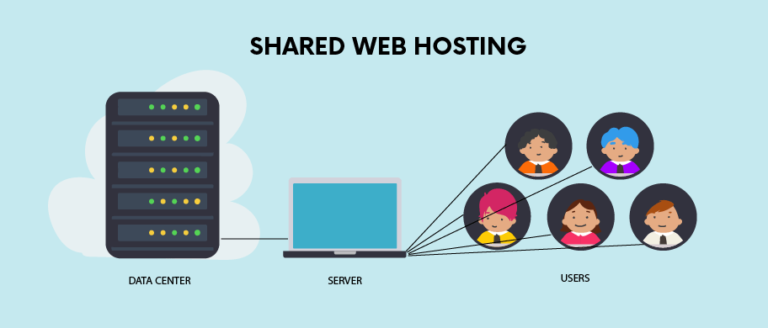
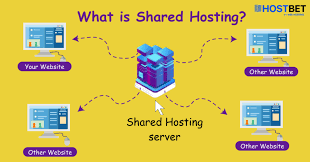
In plain English, shared hosting is a web hosting service where multiple websites reside on a single web server connected to the internet. It is generally the most economical option for hosting, as the overall costs of server maintenance are amortized over many customers.
Think of it as the entry-level tier of the web hosting world. When you sign up for a plan, you are renting a small slice of a physical server. The hosting provider sets up the infrastructure, and you simply upload your files.
Why is it called “shared” hosting? The name is quite literal. You are sharing the physical hardware and the server’s resources with other users. This collaborative approach is what drives the price down, making it accessible for personal blogs, small businesses, and hobby sites.
How Shared Hosting Works
To truly understand shared hosting, you first need to understand what a server is. A server is essentially a powerful computer that stores website files (images, code, text) and delivers them to a user’s browser when they type in a domain name.
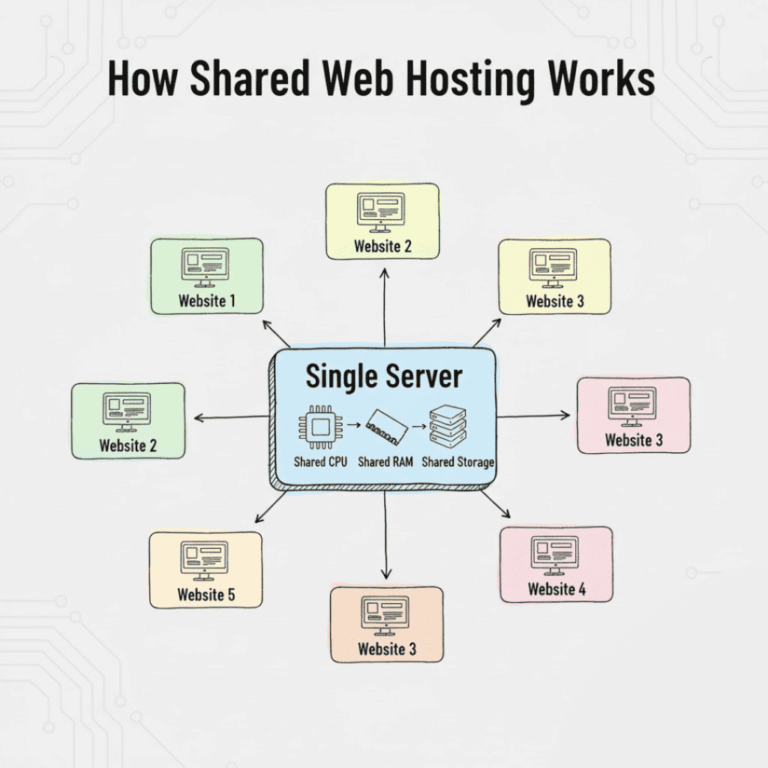
On a shared hosting plan, one single physical server might host hundreds or even thousands of different websites.
The Apartment Building Analogy
The best way to visualize this is to compare web hosting to housing.
- Shared Hosting is like living in a large apartment complex. You have your own private unit (your website), but you share the building’s resources with your neighbors. You all share the same water supply, electricity, parking lot, and maintenance staff. If your neighbor throws a massive party (a huge spike in traffic), the noise and activity might bother you. If the elevator breaks, everyone is inconvenienced.
- VPS Hosting is like a townhouse; fewer neighbors and more dedicated space.
- Dedicated Hosting is like owning a detached house on your own land. You have total control, but you are also responsible for all the maintenance.
Shared Resources
On a technical level, all the websites on that specific server are competing for the same pool of resources:
- CPU (Central Processing Unit): The brain of the server that processes requests.
- RAM (Random Access Memory): The short-term memory used to run scripts and load pages.
- Disk Space: The physical storage available for your files and databases.
In a shared environment, the hosting provider installs software to manage these resources. However, if one website on the server suddenly goes viral and hogs the CPU, other sites on that same server might experience slower load times.
Key Features of Shared Hosting
While every hosting provider offers slightly different packages, the core features of shared hosting remain consistent across the industry.
Multiple Websites on One Server
As mentioned, the defining feature is density. By stacking many users onto one machine, providers maximize their hardware investment. This density is the primary reason you can find hosting plans for as little as a few dollars a month.
Managed Server Maintenance
This is a massive benefit for beginners. With shared hosting, the “backend” work is done for you. The hosting company handles the server’s operating system updates, hardware repairs, network connectivity, and general security patches. You don’t need to know how to use the command line or configure a firewall; you just focus on building your site.
Easy-to-Use Control Panel
Shared hosting almost always comes with a graphical interface, such as cPanel or Plesk. This control panel allows you to manage your website files, create email accounts, and check statistics without needing technical coding skills. It turns complex server management into a point-and-click experience.
One-Click App Installs
Most providers include auto-installers (like Softaculous) in their plans. This feature allows you to install popular Content Management Systems (CMS) like WordPress, Joomla, or Drupal instantly. You fill out a simple form, click “Install,” and your site is live in minutes.
Email Hosting Included
Unlike some modern cloud platforms that charge extra for email, shared hosting typically includes professional email addresses (e.g., yourname@yourdomain.com) as part of the package. You can create mailboxes, set up forwarders, and access webmail directly through your control panel.
Benefits of Shared Hosting
Shared hosting remains the most popular form of web hosting for a reason. It offers distinct advantages that make it the logical choice for new projects.
Affordable Pricing
The most significant advantage is cost. Because the server costs are split among many users, plans are incredibly cheap.
- Low Monthly Cost: You can often find introductory rates between $2.00 and $5.00 per month.
- Budget-Friendly: For startups or hobbyists with zero revenue, this low barrier to entry allows them to establish a professional web presence without breaking the bank.
Beginner-Friendly
Shared hosting is designed for the non-technical user.
- No Technical Skills Required: You don’t need to be a Linux administrator. If you can use a basic web browser, you can manage a shared hosting account.
- Simple Setup: From purchasing a domain to launching a WordPress site, the onboarding process is streamlined to get you online as fast as possible.
Low Maintenance
For a small business owner, time is money. With shared hosting, you outsource the headache of server management.
- Provider Handles Updates: The host ensures the server software (like PHP and MySQL) is up to date.
- Security Patches: While you are responsible for your specific website’s security, the host protects the server infrastructure against broad attacks.
Good for Small Websites
If your site is primarily informational—such as a portfolio, a local restaurant menu, or a personal blog—you simply do not need the power of a dedicated server. Shared hosting provides more than enough bandwidth and storage for websites that receive moderate traffic (typically up to 10,000–20,000 visitors a month, depending on the plan).
Limitations of Shared Hosting
While shared hosting is excellent for starting out, it is not a “forever solution” for everyone. The trade-off for the low price is a ceiling on performance and control.
Limited Performance
Because resources are shared, your site’s performance is tied to the server’s overall health.
- The “Bad Neighbor” Effect: If another site on your server is poorly coded or experiencing a DDoS attack, it can slow down the entire server, causing your site to load slowly or time out.
- Traffic Spikes: If your own website suddenly gets a rush of traffic (like a link from a major news site), shared hosting may not be able to handle the load, resulting in your site crashing temporarily.
Less Control
Shared hosting is a pre-packaged environment. You play by the host’s rules.
- Restricted Settings: You cannot change core server configurations or install specialized software that requires root access.
- Standardization: The software versions (PHP, Python, etc.) are set by the host to accommodate the majority of users, which might not be ideal for custom development projects.
Security Concerns
While hosts work hard to isolate accounts, the nature of a shared environment carries inherent risks.
- Shared IP Address: If a “neighbor” on your server sends spam, the server’s IP address could get blacklisted, potentially affecting your email deliverability.
- Cross-Contamination: Although rare with modern security measures, a severe vulnerability on one site on the server could theoretically be used to attack others on the same machine.
Not Scalable
Shared hosting has a hard limit. You can only upgrade your disk space or bandwidth so much. Once your site grows beyond a certain size, you cannot simply add more RAM to a shared plan; you must migrate to a different type of hosting entirely, like VPS or Cloud.
Who Should Use Shared Hosting?
Given the pros and cons, shared hosting is the ideal solution for specific types of users.
First-Time Website Owners
If this is your first foray into building a website, start here. It is the cheapest place to make mistakes and learn the ropes of managing a site.
Personal Blogs
Writers and hobbyists generally do not require heavy server resources. A shared plan can easily handle a blog with hundreds of posts and a loyal readership.
Small Businesses
Local businesses (plumbers, bakeries, law firms) that need a “brochure” style website—listing hours, services, and contact info—will find shared hosting perfectly adequate.
Informational Websites
Any site that is mostly text and images, without complex software functions or massive databases, will run smoothly on shared hosting.
Who Should Avoid Shared Hosting?
Conversely, some projects are doomed to fail if they attempt to run on shared infrastructure.
High-Traffic Websites
If you are expecting 50,000+ visitors a month, or if you anticipate viral spikes, shared hosting will likely crash under the pressure.
Online Stores
While you can run a small WooCommerce shop on shared hosting, it isn’t recommended for serious e-commerce. E-commerce requires fast loading times and high security for transactions. A slow checkout page leads to abandoned carts and lost revenue.
Membership or SaaS Platforms
Sites that require users to log in, upload files, and interact with a database heavily (like a social network or a software tool) need dedicated resources to function correctly.
Resource-Heavy Applications
If you are running custom scripts, video processing, or large-scale data crunching, you need the isolated power of a VPS or Dedicated server.
Shared Hosting vs Other Hosting Types
To clarify where shared hosting sits in the ecosystem, here is a quick comparison.
Shared Hosting vs VPS (Virtual Private Server)
A VPS is still technically on a shared physical server, but it uses virtualization technology to create a private wall around your resources.
- Shared: You compete for resources.
- VPS: You have a guaranteed allotment of CPU and RAM that no one else can touch. It costs more but offers consistent performance.
Shared Hosting vs Cloud Hosting
Cloud hosting uses a network of different servers to host your site. If one server goes down, another picks up the slack.
- Shared: Relies on one single machine.
- Cloud: Relies on a cluster of machines. Cloud is much more scalable; you can add more power instantly during a traffic spike.
Shared Hosting vs Dedicated Hosting
Dedicated hosting is renting the entire physical box.
- Shared: Renting a room in a hostel.
- Dedicated: Renting the entire mansion. It is significantly more expensive and requires advanced technical knowledge to manage, but offers the ultimate performance and security.
Is Shared Hosting Good for SEO?
Search Engine Optimization (SEO) is vital for getting found on Google. A common myth is that shared hosting kills your SEO rankings. This isn’t entirely true, but there are nuances.
Website Speed
Google uses page speed as a ranking factor. Because shared hosting can be slower due to resource crowding, it can negatively impact SEO if your host is overcrowding their servers. However, a high-quality shared host will still provide speeds adequate for ranking.
Uptime Importance
If your site is constantly crashing because the server is overloaded, Google will notice and may lower your rankings. Reliability varies greatly between cheap budget hosts and premium shared hosts.
When It’s Enough
For local SEO and low-competition keywords, shared hosting is perfectly fine. Google is unlikely to penalize a local bakery for being on shared hosting as long as the site loads reasonably fast. However, if you are competing for highly competitive national keywords, every millisecond counts, and better hosting might give you an edge.
Frequently Asked Questions
Is shared hosting safe?
Generally, yes. Reputable hosting companies use firewalls, malware scanning, and server isolation to keep users safe. However, it is never as secure as a dedicated environment. You must also do your part by using strong passwords and keeping your website software updated.
Can I upgrade from shared hosting later?
Absolutely. Most providers make it very easy to scale up. You can start on a $5/month shared plan, and when your traffic grows, the host can migrate you to a VPS or Cloud plan with minimal downtime.
How much traffic can shared hosting handle?
This varies by provider, but a typical shared hosting plan can comfortably handle between 10,000 to 25,000 monthly visits. If you consistently exceed this, your host will likely ask you to upgrade.
Is shared hosting good for WordPress?
Yes. In fact, most shared hosting is optimized specifically for WordPress. Many hosts offer “Managed WordPress Hosting,” which is essentially shared hosting that comes pre-configured with caching and security settings specifically for WordPress sites.
Final Thoughts: Is Shared Hosting Right for You?
Choosing a web host is the foundation of your digital presence. Shared hosting is the bedrock of the internet—it powers millions of websites because it is accessible, affordable, and easy to maintain.
It is the right choice if:
- You are just starting out.
- You have a limited budget.
- You are building a blog, portfolio, or small business site.
- You don’t want to worry about server maintenance.
It is the wrong choice if:
- You expect massive traffic immediately.
- You are running a complex application or large e-commerce store.
- You need total control over server settings.
For 90% of new projects, shared hosting is the smartest place to start. It allows you to launch your idea with minimal risk. Remember, hosting is not a lifetime contract. You can always start small on a shared plan and upgrade your infrastructure as your audience grows.