Shared Hosting Performance Explained for Non-Tech Users
Starting a website is an exciting venture, but the technical jargon involved can often feel overwhelming. Terms like “bandwidth,” “uptime,” and “server resources” get thrown around casually by hosting providers, leaving beginners wondering what actually matters. One of the most critical aspects you’ll encounter is “performance.”
You might hear that shared hosting is “slow” or “unreliable,” or conversely, that it’s the “perfect starting point.” The truth lies somewhere in the middle. Performance isn’t just about raw speed; it’s about how well a hosting service delivers your website to visitors. For non-technical users, understanding this balance is key to choosing the right home for your new blog, portfolio, or small business site.
This guide strips away the complex terminology to explain exactly how shared hosting performance works, what you can realistically expect, and how to know if it’s the right choice for you.
What Does “Performance” Mean in Web Hosting?
When we talk about performance in the context of web hosting, we aren’t talking about how fast a computer can calculate complex math problems. Instead, we are looking at the user experience. Performance generally boils down to three main pillars: speed, uptime, and reliability.
Speed refers to how quickly your website loads when someone types in your URL or clicks a link. In the digital age, attention spans are short. If your site takes more than a few seconds to appear, visitors are likely to hit the “back” button and look elsewhere.
Uptime is a measure of availability. It represents the percentage of time your website is online and accessible to the public. If a server crashes or undergoes maintenance, your site goes down. High performance means high uptime—your “digital storefront” is open for business 24/7.
Reliability ties these concepts together. A reliable host delivers consistent speed and uptime without frequent, unexplained glitches or slowdowns.
Performance matters because it directly impacts how people perceive your brand. A fast, reliable site builds trust. A slow, glitchy site feels unprofessional and frustrating.
How Shared Hosting Performance Works
To understand shared hosting, imagine living in a large apartment complex.
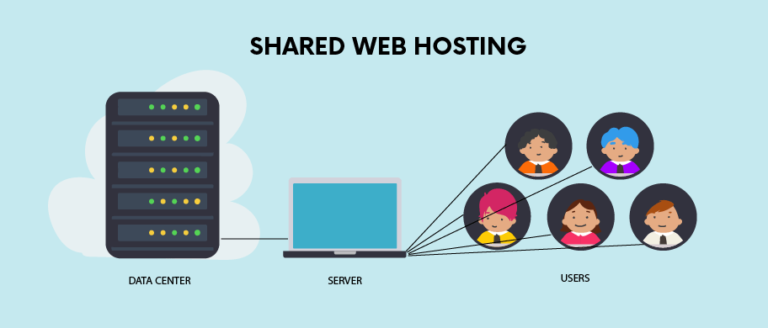
In this analogy, the server is the apartment building itself. It is a powerful computer connected to the internet that stores all the files, images, and code that make up websites.
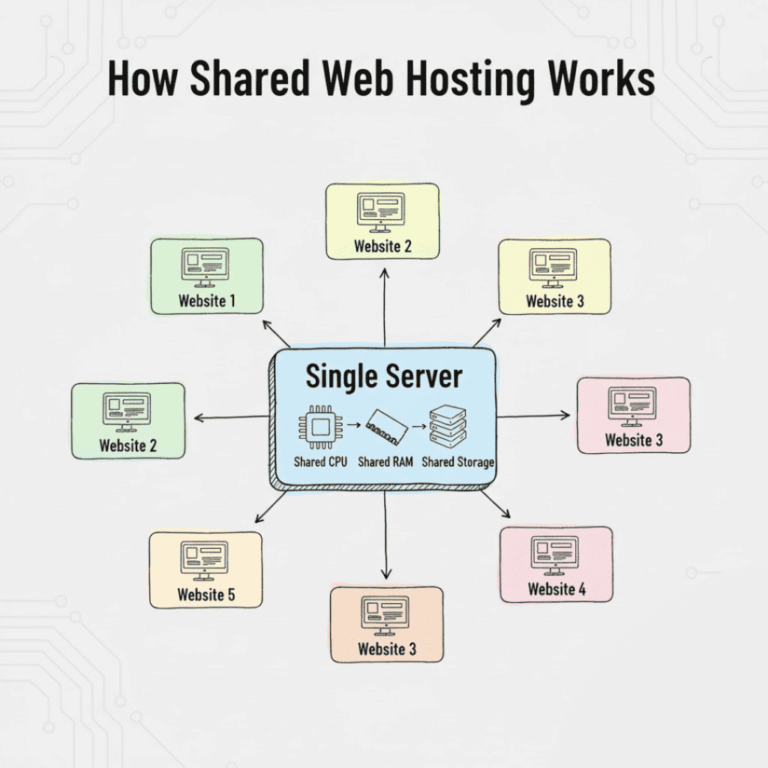
On a shared hosting plan, you are renting one apartment within that building. You have your own private space for your website’s files, but you share the building’s main resources—like water, electricity, and the swimming pool—with hundreds of other tenants (other websites).
Shared resources in technical terms usually refer to:
- CPU (Central Processing Unit): The “brain” of the server that processes requests.
- RAM (Random Access Memory): The short-term memory used to handle active tasks.
- Bandwidth: The “pipe” through which data travels to visitors.
Because you are sharing these resources, the cost of maintaining the server is split among many users. This is why shared hosting is so affordable. However, just like in an apartment complex where the hot water might run out if everyone showers at once, shared resources can sometimes be stretched thin.
Is Shared Hosting Fast Enough?
The short answer is: usually, yes—for the right kind of website.
For a standard blog, a portfolio, or a local business page, shared hosting offers adequate speed. When a visitor arrives at your site, the server retrieves your files and sends them to the visitor’s browser. Modern servers are quite powerful, and even when splitting resources, they can handle this process quickly for simple sites.
However, you should have realistic expectations. Shared hosting is not designed for lightning-fast speeds under heavy loads. It can sometimes feel “slow” compared to premium hosting options because the server has to juggle requests from potentially hundreds of different websites simultaneously.
If you are just starting out, “fast enough” is often exactly what you need. You aren’t trying to beat Amazon or Facebook in a speed test; you just need your pages to load reasonably quickly for your readers. Most quality shared hosting providers optimize their servers to ensure that, under normal conditions, your site loads within 2-3 seconds, which is the standard benchmark for a good user experience.
Key Factors That Affect Shared Hosting Performance
While the server itself plays a big role, several variables determine whether your specific website feels snappy or sluggish.
Server Resources
Think of CPU and RAM as the engine and transmission of the server. If a server has a powerful CPU and plenty of RAM, it can handle many requests at once. However, in shared hosting, these resources are capped for each user. If your website tries to use more than its “fair share” (perhaps due to a viral post), the host might temporarily throttle your speed to prevent you from slowing down everyone else.
Other Websites on the Server
This is known as the “bad neighbor” effect. Because you share resources, if another website on your server suddenly gets a massive spike in traffic or runs a poorly coded script that hogs the CPU, your website might slow down as a result. While good hosting companies have software to isolate users and minimize this risk, it is an inherent characteristic of the shared environment.
Website Size and Content
Your own choices matter, too. A webpage that is just text will load instantly. A webpage packed with high-resolution photography, auto-playing videos, and dozen of interactive plugins will be “heavy.” The heavier the page, the more resources it takes to load. On shared hosting, where resources are limited, a heavy site will struggle much more than a lean, optimized one.
Traffic Levels
Shared hosting is great for low to moderate traffic. If you have 10 people visiting your site at once, shared hosting handles it easily. If you have 1,000 people visiting at once, the limited resources allocated to your account will likely be overwhelmed, causing the site to slow to a crawl or even crash temporarily.
Shared Hosting Uptime Explained
Uptime is usually expressed as a percentage, such as 99.9%.
- 99.9% Uptime: This sounds perfect, but it actually allows for about 8.7 hours of downtime per year.
- 99.99% Uptime: This allows for roughly 52 minutes of downtime per year.
For a personal blog, 8 hours of downtime over a year (perhaps occurring in small chunks in the middle of the night for maintenance) is generally acceptable. For an online store where every minute of downtime means lost sales, it is not.
Most shared hosting providers guarantee around 99.9% uptime. This is standard for the industry. It’s important to realize that downtime on shared hosting can happen not just because of hardware failure, but because software updates need to be applied to the whole server, or because a “bad neighbor” crashed the operating system.
Reliable providers monitor their servers 24/7 to fix these issues immediately, but occasional brief outages are part of the trade-off for the low price.
Shared Hosting vs Other Hosting Types (Performance Only)
To understand where shared hosting stands, it helps to compare it to the upgrades.
Shared Hosting vs VPS (Virtual Private Server)
A VPS is like upgrading from an apartment to a townhouse. You still share the building (server), but you have dedicated walls and your own utility lines. In hosting terms, a VPS guarantees you a specific amount of CPU and RAM that no one else can touch.
- Performance: VPS is significantly more consistent. Your neighbors’ traffic spikes won’t affect you.
Shared Hosting vs Cloud Hosting
Cloud hosting uses a network of servers rather than a single physical machine. If one server is busy or fails, another takes over.
- Performance: Cloud hosting offers better reliability and scalability. It can handle traffic spikes much better than shared hosting because it can draw resources from the whole network.
When Upgrading Improves Speed
If you optimize your site but it still loads slowly, or if you frequently see “Resource Limit Reached” errors in your hosting dashboard, it is a sign you have outgrown shared hosting. Moving to VPS or Cloud hosting at that point will provide an immediate boost in speed and stability.
What Kind of Websites Perform Well on Shared Hosting?
Shared hosting isn’t “bad”—it’s simply designed for specific use cases. It is the perfect performance match for:
- Blogs: Whether you are writing about travel, cooking, or technology, text-heavy content with optimized images runs beautifully on shared hosting.
- Personal Websites: Online resumes, wedding websites, or family portals usually have low traffic and modest resource needs.
- Small Business Sites: A local bakery, dentist, or plumber needs a site that lists hours, services, and contact info. These “brochure” style sites are lightweight and perform well.
- Informational Websites: Wikis, documentation sites, or community notice boards often fit well within shared hosting limits.
Essentially, if your goal is to provide information to a steady stream of visitors, shared hosting performance is more than sufficient.
When Shared Hosting Performance Is NOT Enough
There are scenarios where the limitations of shared hosting will frustrate you and your visitors.
- High-Traffic Websites: If you are expecting hundreds of thousands of visitors a month, shared hosting will crumble under the pressure.
- Online Stores (E-commerce): E-commerce sites are complex. They require secure processing, database queries for products, and shopping cart functionality. A slow checkout page leads to abandoned carts. While a tiny shop with 5 products might work on shared hosting, serious stores need more power.
- Membership or Application-Based Sites: If users are logging in, creating profiles, and interacting with dynamic content (like a social network or a learning management system), the constant database queries will tax a shared server quickly.
Simple Tips to Improve Shared Hosting Performance
Even within the limits of shared hosting, you can do a lot to make your site fly.
Choose a Quality Hosting Provider
Not all shared hosts are created equal. Some cram thousands of users onto one server to maximize profit (resulting in terrible speeds), while others limit the number of users to ensure everyone gets decent performance. Read reviews and look for hosts known for not “overselling” their servers.
Use Lightweight Themes and Plugins
If you are using WordPress (which most shared hosting users are), your theme determines how much code needs to load. Choose a “lightweight” or “fast” theme rather than one bloated with unnecessary features. Similarly, only install plugins you actually need.
Optimize Images
Large images are the #1 cause of slow websites. Before uploading a photo, resize it to the actual dimensions you need and use a compression tool (like TinyPNG) to reduce the file size without losing quality.
Enable Caching
Caching saves a static copy of your pages so the server doesn’t have to rebuild them from scratch every time a visitor arrives. Many hosts offer built-in caching, or you can use a plugin. This dramatically reduces the work the server has to do.
Use a CDN (Content Delivery Network) if Available
A CDN stores copies of your site’s images and files on servers all over the world. When a visitor comes to your site, the CDN serves the files from the server closest to them physically. This reduces the load on your main shared server and speeds up loading times for international visitors.
Does Shared Hosting Performance Affect SEO?
Yes, performance is a ranking factor for search engines like Google.
Google wants to provide its users with the best possible results. If a user clicks a result and it takes 10 seconds to load, they will leave. Google notices this “bounce,” and it signals that the page offers a poor experience.
However, you don’t need to have the fastest site in the world to rank well. You just need to pass the “Core Web Vitals” threshold—essentially, be fast enough. A well-optimized site on a decent shared hosting plan can absolutely rank on the first page of Google.
It is only when shared hosting is very poor—causing frequent downtime or 5+ second load times—that it will actively hurt your SEO efforts.
Frequently Asked Questions
Is shared hosting slow by default?
No. It is slower than a dedicated server, but for standard websites, it is usually fast enough to be imperceptible to the average user. Slowness usually comes from overcrowding the server or a poorly optimized website.
Can shared hosting handle traffic spikes?
Generally, no. If your post goes viral on Reddit or you get a shoutout from a celebrity, shared hosting will likely throttle your site or take it offline temporarily to protect other users on the server.
Will my site slow down if another site uses more resources?
Ideally, no, because hosts use software to isolate accounts (like CloudLinux). However, in practice, extreme usage by a “neighbor” can sometimes cause minor ripples of sluggishness for others on the same server.
Can I upgrade later if needed?
Yes! This is the best strategy. Start with shared hosting to save money. If your traffic grows, almost every host allows you to upgrade to a VPS or specialized plan with a single click.
Final Thoughts: Shared Hosting Performance Explained Simply
Shared hosting is the economy class of the web hosting world. You don’t get the extra legroom or the gourmet meal, but you get to your destination safely and for a fraction of the price.
For non-tech users launching their first project, shared hosting performance is not a trap; it is a sensible starting point. It provides adequate speed and reliability for blogs, personal sites, and small businesses.
The key takeaways are:
- Expect Good, Not Perfect: Your site will load reasonably fast, but don’t expect instant, lightning speeds.
- Uptime is Reliable: Expect your site to be up 99.9% of the time, which is fine for most non-critical sites.
- You Control the Speed: Your choice of images, themes, and plugins matters just as much as the server power.
Don’t let performance anxiety stop you from starting. Pick a reputable shared host, keep your site clean and optimized, and you will have a foundation solid enough to build your online presence. If you succeed enough to outgrow it, that’s a good problem to have.