Top Cloud Hosting Features You Should Look For
Choosing a web host used to be simple. You picked a shared plan, uploaded your files via FTP, and called it a day. But as businesses have moved online and traffic demands have spiked, the landscape has shifted dramatically toward the cloud.
Cloud hosting isn’t just a buzzword; it’s the infrastructure backbone that allows modern websites and applications to breathe. It offers flexibility that traditional servers simply can’t match. However, not all cloud providers are created equal. The market is flooded with options ranging from budget-friendly tiers to enterprise-grade solutions, and navigating the technical jargon can feel overwhelming.
Selecting the right features directly impacts your site’s speed, security, and bottom line. A poor choice might leave you with a slow website during peak sales hours or a security vulnerability that puts user data at risk. Conversely, the right set of features acts as a force multiplier, automating mundane tasks and ensuring your application stays online no matter what.
This guide breaks down the essential features you need to evaluate before committing to a cloud hosting contract.
1. Scalability & Auto-Scaling
The primary reason most organizations move to the cloud is scalability. In a traditional hosting environment, you are limited by the physical hardware of your server. If you need more RAM or CPU, you often have to migrate to a new machine or endure downtime while upgrades are installed.
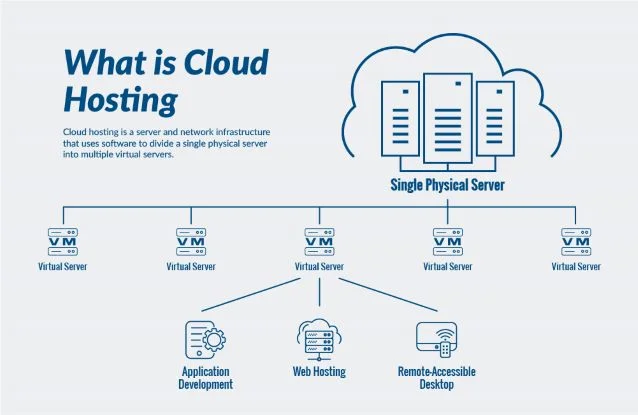
Cloud hosting changes this dynamic through virtualization.
Vertical vs. Horizontal Scaling
You should look for a provider that offers seamless vertical scaling (adding more power to an existing instance) and horizontal scaling (adding more instances to spread the load).
The Power of Auto-Scaling
Manual scaling is fine for predictable growth, but what happens when a marketing campaign goes viral overnight? This is where auto-scaling becomes non-negotiable.
Auto-scaling monitors your traffic and resource usage in real-time. If your CPU usage hits a defined threshold (say, 80%), the system automatically spins up additional resources to handle the load. Once the traffic creates a lull, the system scales back down to save you money. For growing sites and e-commerce stores, this elasticity prevents crashes during critical moments.
2. Uptime Guarantees & Redundancy
When your website is down, you are losing money and reputation. While no provider can genuinely guarantee 100% uptime forever, you need to scrutinize their Service Level Agreement (SLA).
Decoding the Nines
Uptime is usually expressed in “nines.”
- 99.9% uptime: Allows for about 8.76 hours of downtime per year.
- 99.99% uptime: Allows for only 52.56 minutes of downtime per year.
The difference between three nines and four nines is significant for mission-critical applications.
Redundancy Mechanisms
High uptime isn’t magic; it’s engineering. Look for providers that offer built-in redundancy. This means if one server fails, your traffic is instantly rerouted to a healthy server without interruption. Failover systems should be automatic. If a provider relies on a single point of failure, they aren’t offering true cloud reliability.
3. Performance Optimizations
Speed is a ranking factor for Google and a conversion factor for users. A delay of just one second can reduce conversions by 7%. Your cloud hosting environment plays a massive role in how fast your site loads.
Load Balancing
A load balancer acts as a traffic cop. It sits in front of your servers and distributes incoming requests across multiple instances. This ensures that no single server is overwhelmed, keeping response times low even under heavy load.
Content Delivery Network (CDN) Integration
While your main server lives in one location, your users are everywhere. A CDN stores cached versions of your static assets (images, CSS, JavaScript) on servers around the world. Look for a host that includes CDN integration to serve content from the location closest to the user, drastically reducing latency.
Storage Technology
Never settle for spinning hard disk drives (HDD). Solid State Drives (SSD) or Non-Volatile Memory Express (NVMe) drives are essential for modern cloud hosting. They offer significantly faster read/write speeds, which translates to faster database queries and quicker page loads.
Caching Layers
Advanced cloud providers offer server-side caching mechanisms (like Varnish or Redis) out of the box. These technologies store frequently accessed data in memory, allowing your application to retrieve it instantly without hitting the database every time.
4. Advanced Security Features
The cloud is a prime target for cyberattacks. Security shouldn’t be an afterthought or a paid add-on; it should be baked into the infrastructure.
Firewalls and DDoS Protection
Your host should provide a robust web application firewall (WAF) to filter out malicious traffic. Additionally, Distributed Denial of Service (DDoS) protection is vital. This mitigates attacks that attempt to flood your server with traffic to knock it offline.
Network Isolation
Look for Virtual Private Cloud (VPC) capabilities. This allows you to isolate your cloud resources in a private network, giving you granular control over which IP addresses can access your databases and applications.
Automated Updates
Security breaches often occur due to outdated software. A good cloud host will handle OS-level security patching and updates automatically, closing vulnerabilities before hackers can exploit them.
5. Automated Backups & Disaster Recovery
Data loss can happen to anyone. Whether it’s a malicious hack, a failed update, or accidental deletion by a developer, you need a safety net.
Automated Scheduling
Do not rely on manual backups. Your hosting provider should offer automated daily (or even hourly) backups.
Easy Restoration
Having a backup is only half the battle; restoring it is the other half. Test the restoration process. Can you restore your site with a single click? Can you restore specific files, or do you have to roll back the entire server?
Snapshots
Snapshots are different from standard backups. They capture the state of your entire server at a specific moment. This is incredibly useful before deploying major code changes. If the update breaks your site, you can revert to the snapshot in minutes.
6. Flexible Pricing & Billing Models
Cloud pricing can be complex. Traditional hosting usually charges a flat monthly fee, but cloud hosting often introduces usage-based billing.
Pay-As-You-Go
This model charges you only for the resources (CPU, RAM, bandwidth) you actually consume. It is excellent for efficiency but requires monitoring to prevent surprise bills.
Flat Rate vs. Caps
Some providers offer “reserved instances” or flat-rate cloud plans which provide a set amount of resources for a fixed price. This offers budget predictability but might limit flexibility.
Transparency Tools
The best providers offer cost allocation tags and real-time billing dashboards. These tools help you see exactly which projects or services are driving up costs, allowing you to optimize your spending.
7. Developer Tools & APIs
For technical teams, access and automation are key features. A cloud host that caters to developers can speed up workflows significantly.
SSH and Git
Root access via SSH is a standard requirement for managing cloud servers. Furthermore, seamless integration with Git allows developers to deploy code directly from their repositories, streamlining the CI/CD (Continuous Integration/Continuous Deployment) pipeline.
Staging Environments
Testing changes on a live production site is a recipe for disaster. Look for hosts that offer one-click staging environments. These allow you to clone your site, test updates safely, and then push the changes to live with confidence.
API Access
If you are building complex applications, you might need to manage your infrastructure programmatically. A robust API allows your team to automate server creation, scaling, and management without ever logging into a dashboard.
8. Control Panel & User Interface
Not everyone is a command-line expert. The usability of the management console matters, especially for smaller teams without a dedicated DevOps engineer.
Ease of Use
A clean, intuitive dashboard allows you to monitor server health, manage billing, and configure settings without navigating a maze of technical menus.
Dashboard Monitoring
You need visibility into your system. Real-time graphs showing CPU usage, memory consumption, and disk I/O help you identify bottlenecks before they crash your site.
One-Click Installers
Even in cloud environments, having one-click installers for popular software like WordPress, Magento, or Docker can save hours of setup time.
9. Managed vs. Unmanaged Options
This is a fundamental choice that dictates how much work your team will have to do.
Unmanaged Hosting
You get the infrastructure (the operating system and the hardware), and the rest is up to you. You patch the security, you set up the firewall, and you fix it when it breaks. This is cheaper but requires significant technical expertise.
Managed Hosting
The provider handles the heavy lifting. They manage the OS updates, security patches, backups, and performance tuning. This costs more but frees up your team to focus on developing your application rather than managing servers.
For many businesses, the premium for managed hosting pays for itself by eliminating the need to hire a full-time sysadmin.
10. Global Data Centers & Geographic Coverage
Latency is determined by physics: the distance data has to travel between the server and the user.
If your primary audience is in London, hosting your site on a server in California will result in a noticeable lag. Top-tier cloud providers have data centers located strategically across the globe (North America, Europe, Asia, Australia).
Geo-Targeting
Choose a provider that allows you to select your specific data center location. If you have a global audience, combined with the CDN features mentioned earlier, this ensures a fast experience for users regardless of their location.
11. Security Compliance & Certifications
For industries dealing with sensitive user data, compliance isn’t optional—it’s the law.
Regulatory Standards
If you handle credit card data, you need a PCI-DSS compliant environment. If you are in healthcare, HIPAA compliance is mandatory. If you operate in Europe, GDPR adherence is required.
Don’t assume a cloud provider is compliant just because they are big. specialized compliance often requires specific architectural configurations. Check their certifications page to ensure they meet the standards of your specific industry (such as ISO/IEC 27001).
12. Customer Support & SLA Commitments
When your server goes down at 3:00 AM on a Sunday, you don’t want to be talking to a chatbot.
24/7 Availability
Support must be available around the clock. Check reviews to see if “24/7” actually means “someone is there,” or if it just means “you can submit a ticket and wait.”
Communication Channels
Does the provider offer live chat and phone support? For critical issues, email tickets are often too slow.
Dedicated Account Managers
For enterprise-level plans, look for providers that offer a dedicated account manager. Having a single point of contact who understands your specific infrastructure history can drastically reduce resolution times.
Summary: A Checklist for Success
Choosing the right cloud hosting is a balancing act between performance, cost, and ease of use. By prioritizing the features listed above, you can build a resilient foundation for your digital presence.
As you evaluate potential partners, keep this quick checklist handy:
- Scalability: Can it handle sudden traffic spikes automatically?
- Reliability: Is the uptime guarantee 99.9% or higher?
- Speed: Does it use SSDs, caching, and CDNs?
- Security: Are firewalls and automated backups included?
- Support: Can I reach a human being instantly if the site goes down?
The cloud offers limitless potential for your business, but only if you build on the right ground.
Frequently Asked Questions
What features should cloud hosting have?
At a minimum, cloud hosting should offer auto-scaling to handle traffic spikes, automated backups for data safety, SSD storage for speed, and a robust firewall for security. Detailed monitoring dashboards and 24/7 support are also critical for maintaining uptime.
Which cloud hosting features matter most for small businesses?
For small businesses, managed services and predictable billing are often the most important features. A managed service removes the technical burden of server maintenance, while predictable billing prevents surprise costs. Automated backups are also essential to protect business data without requiring a dedicated IT staff.
Is managed cloud hosting worth the extra cost?
For most businesses that do not have a dedicated DevOps team, yes. The cost of managed hosting is usually lower than the salary of a system administrator. It allows you to focus on your core business goals—marketing, sales, and product development—rather than worrying about server updates and security patches.