How to Choose the Best Web Hosting for Your Website in 2026
Building a website is one of the most exciting steps for any business owner or creative professional. You’ve got your domain name picked out, your branding ideas ready, and your content strategy in place. But before you launch, there’s one critical decision that can make or break your online success: choosing the right web host.
In 2026, the digital landscape is faster and more competitive than ever. Web hosting isn’t just about renting space on a server anymore; it’s the engine that powers your site’s speed, security, and search engine ranking. A poor hosting choice can lead to slow load times, frequent downtime, and frustrated visitors who click away before your page even loads. Conversely, the right host acts as a silent partner in your success, ensuring your site runs smoothly while you focus on growing your business.
Whether you are launching your first blog, scaling a small business, or building a complex eCommerce store, this guide is for you. We will walk you through everything you need to know about how to choose the best web hosting for your website in 2026, breaking down complex technical jargon into simple, actionable advice. By the end of this post, you’ll have the confidence to select a provider that fits your needs, budget, and long-term goals.
Understand Your Website Needs First
Before you start comparing price tags or reading reviews, you need to conduct a quick audit of what you actually need. Hosting is not a one-size-fits-all solution. The best web hosting for your website depends entirely on what you are building.
Website Type
Different websites consume resources differently.
- Blogs and Personal Sites: If you are starting a travel blog or a personal portfolio, your resource needs will likely be low initially.
- Small Business Websites: A brochure-style site for a local bakery or law firm needs reliability but usually doesn’t require massive server power.
- eCommerce Stores: Online shops (like those built on WooCommerce or Shopify) are resource-intensive. They require high security for processing payments and fast speeds to prevent cart abandonment.
- Portfolios and Media Sites: If you are a photographer or videographer, you will need hosting that offers generous storage and fast bandwidth to display high-resolution media without lag.
Expected Traffic & Scalability
Are you expecting 100 visitors a month or 100,000? A brand-new blog doesn’t need the same horsepower as a viral news site. However, you must consider scalability. If your marketing campaign takes off, can your host handle the sudden spike in traffic, or will your site crash? Look for providers that offer easy upgrade paths.
Technical Skill Level
Be honest about your technical abilities.
- Beginner: Look for “Managed” hosting or providers with a user-friendly control panel (like cPanel) and 1-click installers.
- Developer: If you are comfortable with command lines and server configuration, you might prefer unmanaged hosting which offers more control at a lower price.
Budget Planning
Hosting can cost anywhere from $2 a month to $200+ a month. While it is tempting to go for the cheapest option, remember that you often get what you pay for. Extremely cheap hosts may overcrowd their servers, leading to slow speeds. Determine a realistic monthly budget that balances cost with performance.
Types of Web Hosting You Can Choose in 2026
The hosting market has evolved significantly. Understanding the types of web hosting available is the first step in narrowing down your options.
Shared Hosting
Think of shared hosting like living in a college dormitory. You have your own room (website), but you share common resources like the kitchen and bathroom (CPU, RAM, bandwidth) with hundreds of other students (websites).
- Pros: Most affordable option; beginner-friendly.
- Cons: If another site on the server gets a traffic spike, your site might slow down.
- Best for: Personal blogs, small portfolios, and brand-new websites.
VPS Hosting (Virtual Private Server)
VPS hosting is like owning a condo in a large building. You still share the physical structure (server), but you have dedicated resources that no one else can touch.
- Pros: Better performance; more control; scalable.
- Cons: Slightly more expensive; may require some technical knowledge.
- Best for: Growing businesses, high-traffic blogs, and developers.
Cloud Hosting
Cloud hosting is the modern standard. Instead of relying on one physical server, your website is hosted on a cluster of interconnected servers. If one server fails, another instantly takes over.
- Pros: Incredible reliability; easily scalable (pay for what you use); high uptime.
- Cons: Pricing can be variable based on usage.
- Best for: Startups, SaaS companies, and websites with fluctuating traffic.
Dedicated Hosting
This is owning a single-family home. You rent an entire physical server exclusively for your website. You have total control over the environment.
- Pros: Maximum performance and security; total customization.
- Cons: Expensive; requires server management skills.
- Best for: Large enterprises and massive eCommerce sites.
Managed Hosting
Managed hosting isn’t a server type but a service level. The provider handles all technical maintenance—updates, backups, security patching—so you don’t have to.
- Pros: Hassle-free; expert support; optimized for specific platforms.
- Cons: More expensive than unmanaged plans.
- Best for: Business owners who don’t want to deal with IT tasks.
WordPress Hosting
Specifically optimized for WordPress sites, this can be shared or managed. The servers are configured to make WordPress run faster and more securely.
- Pros: Pre-installed WordPress; automatic updates; specialized support.
- Cons: Locked into using WordPress only.
- Best for: Anyone building a site on WordPress.
Key Factors to Consider When Choosing Web Hosting
Knowing how to choose web hosting requires looking beyond the marketing copy. Here are the specific metrics and features you need to evaluate.
4.1 Performance & Speed
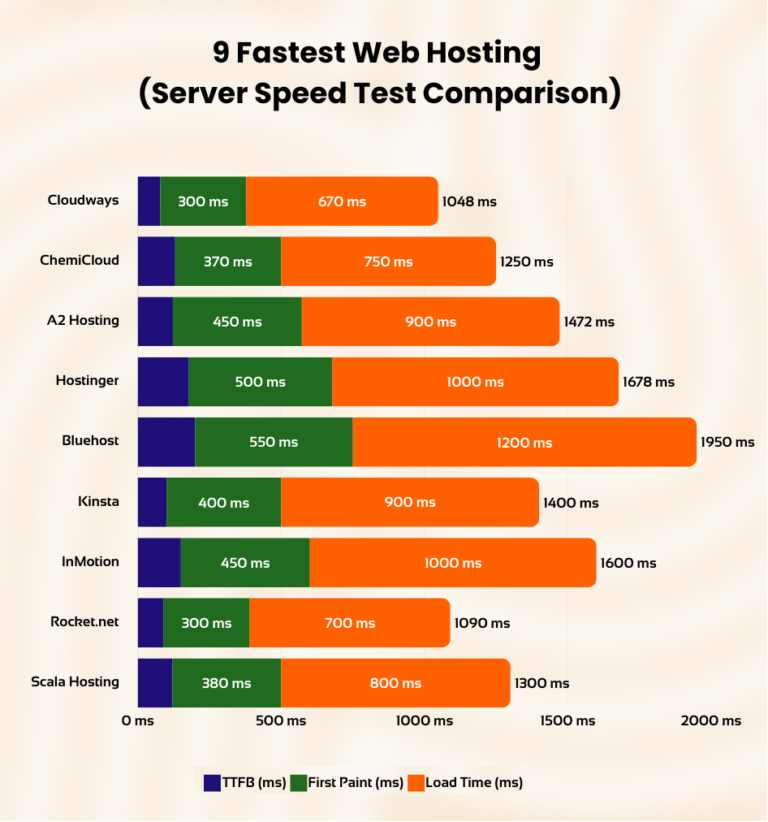
Speed is a ranking factor for Google and a crucial element of user experience.
- SSD vs NVMe Storage: Avoid hosts that still use old HDD (Hard Disk Drives). Look for SSD (Solid State Drives) at a minimum. In 2026, the gold standard is NVMe storage, which is significantly faster than standard SSDs.
- Server Location & CDN: Choose a host with data centers close to your target audience. If your readers are in New York, a server in London will cause latency. Additionally, check if they include a Content Delivery Network (CDN), which caches your site on servers globally to speed up loading times for international visitors. Fast web hosting is non-negotiable in 2026.
4.2 Uptime & Reliability
If your site is down, you are losing money and credibility.
- Uptime Guarantees: Look for a 99.9% uptime guarantee or higher. This allows for about 8 hours of downtime per year. The best uptime web hosting providers often promise 99.99%.
- Infrastructure Quality: Check if they use Tier 3 or Tier 4 data centers, which have redundant power and cooling systems to prevent outages.
4.3 Security Features
Cyber threats are constantly evolving. Your host is your first line of defense.
- SSL Certificates: An SSL certificate (that little padlock in the browser bar) is essential for security and SEO. Most reputable hosts now offer free Let’s Encrypt SSL certificates.
- Backups & Malware Protection: Ensure the host provides automatic daily backups. You don’t want to lose your entire website due to a hacking attempt or a bad update. Look for built-in firewalls and malware scanning to ensure secure web hosting.
4.4 Pricing & Renewal Costs
Hosting pricing can be tricky.
- Introductory vs Renewal Pricing: Many hosts offer a low introductory rate (e.g., $2.99/mo) that jumps significantly upon renewal (e.g., to $10.99/mo). Always check the renewal price before signing up.
- Hidden Fees: Watch out for add-on costs for “essential” features like email accounts, domain privacy, or backups that other hosts might include for free. Finding affordable web hosting means looking at the total cost of ownership, not just the sticker price.
4.5 Customer Support
When your site breaks at 3 AM, you need help immediately.
- Live Chat, Phone, Ticket Systems: Test their support before you buy. Is the live chat a bot or a human? Do they offer 24/7 hosting support? Read reviews to see if current customers feel supported during technical crises.
Best Web Hosting for Different Use Cases
To make your decision easier, here are recommendations based on common user profiles.
Best Web Hosting for Beginners
If you are just starting, you need simplicity and support. Look for shared hosting providers that offer a free domain name for the first year, a drag-and-drop website builder, and 24/7 chat support.
- Look for: One-click installs, intuitive dashboards, and educational resources.
Best Web Hosting for Small Businesses
Reliability is key here. You cannot afford downtime during business hours. A high-end shared plan or a starter VPS plan is usually the sweet spot.
- Look for: Email hosting included (so you can have name@yourbusiness.com), daily backups, and security firewalls.
Best Web Hosting for WordPress
Since WordPress powers over 40% of the web, many hosts specialize in it. Managed WordPress hosting is often worth the extra cost for the speed optimization and security handling.
- Look for: Staging environments (to test changes before going live), automatic plugin updates, and caching tools.
Best Web Hosting for eCommerce Websites
For online stores, speed and security are paramount. Slow load times kill sales. You need a robust solution like a VPS or dedicated Cloud hosting.
- Look for: PCI compliance (for payment security), dedicated IP addresses, and high-performance server specs.
Best Web Hosting for High-Traffic Websites
If you are receiving hundreds of thousands of visitors, shared hosting will crash your site. You need Enterprise-level Cloud or Dedicated hosting.
- Look for: Load balancing, auto-scaling capabilities, and premium support with dedicated account managers.
Web Hosting Features That Matter in 2026
Technology moves fast. Here are the modern features you should expect from top-tier hosts this year.
- AI-Powered Performance Tools: Many hosts now use AI to monitor server loads and optimize resource allocation in real-time, preventing bottlenecks before they happen.
- Automated Backups: Manual backups are a thing of the past. Your host should be taking snapshots of your site daily, allowing you to “rewind” your site to a previous version with one click.
- Website Builders: Even traditional hosts now offer sophisticated AI website builders to help you get a site up in minutes without coding.
- Free Domain & Email Hosting: To stay competitive, many providers are bundling a free domain registration and professional email accounts into their base plans.
Red Flags to Avoid When Choosing a Hosting Provider
Not all hosts have your best interests at heart. Watch out for these warning signs.
- Unlimited Claims Without Limits: If a host promises “Unlimited Storage” and “Unlimited Bandwidth” for $2/mo, read the Terms of Service. There is always a “fair use” policy that limits you if you use too many resources.
- Poor Customer Reviews: Look specifically for reviews about support and billing. If people complain about being overcharged or ignored, stay away.
- No Upgrade Path: Your goal is to grow. If a host only offers shared hosting and has no VPS or Cloud options to upgrade to later, you will have to go through the pain of migrating to a new host when you outgrow them.
- Weak Refund Policies: A confident host offers a 30-day (or longer) money-back guarantee. If they have a “no refunds” policy, consider it a major red flag.
Comparison Checklist: Choosing the Best Web Hosting
Use this checklist when comparing your top three choices.
- Performance: Do they use NVMe storage and offer a CDN?
- Price: Is the renewal price within your budget? Are essential features included?
- Scalability: Can you upgrade to a VPS or Cloud plan easily?
- Support: Is support available 24/7 via a channel you are comfortable with?
- Security: Are SSL, backups, and firewalls included for free?
- Ease of Use: Does the control panel look intuitive?
Frequently Asked Questions (FAQ)
Q1. How do I choose the best web hosting in 2026?
Start by defining your website needs (traffic, type, budget). Prioritize speed (NVMe storage), uptime (99.9%+), and security. Read recent reviews and check the renewal prices, not just the introductory offers.
Q2. Which type of web hosting is best for beginners?
Shared hosting is generally the best starting point because it is affordable and requires very little technical knowledge. Managed WordPress hosting is also excellent if you plan to use WordPress.
Q3. Is shared hosting still good in 2026?
Yes, for small to medium websites. Modern shared hosting is much faster and more secure than it used to be. However, it is not suitable for high-traffic sites or large online stores.
Q4. What is the best web hosting for WordPress websites?
Managed WordPress hosting is the superior choice. It includes server-level caching, automatic updates, and expert support specific to the WordPress platform.
Q5. How much should I pay for web hosting?
For a starter blog or small site, expect to pay $3–$10 per month. For a business site or growing store, budget $15–$50 per month for decent VPS or Managed hosting.
Q6. Does web hosting affect SEO?
Absolutely. Google considers page speed and uptime as ranking factors. A slow host or one that frequently goes offline will hurt your search engine rankings.
Q7. Can I change my hosting provider later?
Yes, you can migrate your website to a new host at any time. Many hosting providers even offer free migration services to help you switch over without downtime.
Final Thoughts: Securing Your Digital Foundation
Choosing the right web hosting provider is an investment in your digital future. It’s the foundation upon which your brand, content, and sales are built. By focusing on performance, security, and scalability rather than just the lowest price, you set yourself up for long-term success.
Take the time to review your needs, check the specs, and ask the right questions. Whether you choose a robust cloud solution or a friendly shared hosting plan, the right partner is out there.
Ready to get started? Take your shortlist of providers, run them through the checklist above, and launch your site with confidence.