Managed Web Hosting Explained: Features, Costs & Use Cases (2026)
Running a website in 2026 involves a lot more than just registering a domain and uploading a few files. Between security threats, necessary software updates, speed optimization, and server maintenance, managing a website can quickly become a full-time job.
This is where managed web hosting comes in. It’s the difference between renting an empty apartment where you fix the plumbing yourself, and staying in a full-service hotel where housekeeping handles everything.
For business owners, ecommerce brands, and growing blogs, the technical demands of keeping a site online can distract from the actual goal: growing the business. If you’ve ever lost sleep over a site crash or spent hours Googling how to fix a database error, you already know the pain points that managed hosting aims to solve.
In this comprehensive guide, we will break down exactly what managed web hosting is, how it differs from unmanaged options, the costs involved in 2026, and whether it’s the right investment for your specific needs.
What Is Managed Web Hosting in 2026?
In simple terms, managed web hosting is a service model where the hosting provider handles the setup, administration, management, and support of a server and/or application.
Instead of just renting space on a server (as you do with basic unmanaged hosting), you are renting the space plus a team of IT experts to keep that space secure, fast, and functional.
Why Managed Hosting is Growing in 2026
The internet landscape has changed. Cyberattacks are more sophisticated, Google’s Core Web Vitals demand lightning-fast speeds for SEO ranking, and software stacks are more complex.
In 2026, “uptime” isn’t just a technical metric; it’s a revenue requirement. Businesses are moving toward managed solutions because the cost of downtime—or a security breach—far outweighs the monthly fee of a managed plan. Automation and AI have also made managed hosting more affordable and proactive, predicting server issues before they even happen.
Who Should Consider Managed Hosting?
Managed hosting is ideal for:
- Small Business Owners: Who don’t have an in-house IT department.
- Ecommerce Stores: Where speed and security directly impact sales.
- High-Traffic Blogs: That need to handle traffic spikes without crashing.
- Agencies: Who manage multiple client sites and need reliability.
- Non-Technical Founders: Who want to focus on product, not infrastructure.
How Managed Web Hosting Works
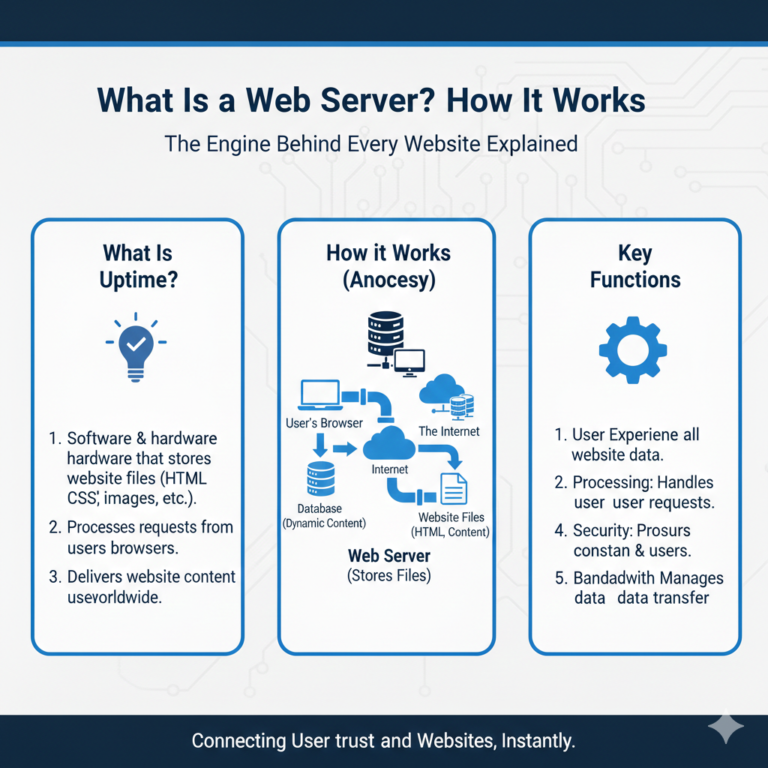
Understanding how managed web hosting works requires looking at the division of labor. In a standard unmanaged environment, the host ensures the data center has power and the hardware is turned on. Everything else is on you.
In a managed environment, the provider steps in to handle the operating system and the software layers.
Server Setup & Configuration
When you sign up, you don’t need to use command-line interfaces (CLI) to install your operating system, control panel, or web server software (like Apache or Nginx). The provider configures the environment to be production-ready immediately.
Automated Updates and Maintenance
Servers require constant patching. Operating systems need security updates, PHP versions need upgrading, and plugins need monitoring. Managed hosts automate these updates. In 2026, many providers use “visual regression testing” AI, which updates your site, checks if the update broke anything visually, and rolls it back automatically if it detects an issue.
Role of the Hosting Provider vs. Website Owner
| Responsibility | Unmanaged Hosting | Managed Hosting |
| Hardware Replacement | Provider | Provider |
| OS Updates | You | Provider |
| Security Patches | You | Provider |
| Backups | You (Manual) | Provider (Automated) |
| Performance Tuning | You | Provider |
| Content Updates | You | You |
What Is Included in Managed Web Hosting?
While features vary by provider, standard managed web hosting features generally focus on five key pillars.
1. Server Monitoring
Your host watches your server 24/7/365. If a service stops running (like your database crashing), they often reboot it before you even notice. They monitor uptime, CPU usage, and RAM to ensure your site is healthy.
2. Security & Malware Protection
Security is perhaps the biggest selling point. Managed plans include active firewalls, DDoS protection, and malware scanning. If your site gets hacked, most managed providers will clean it for free—a service that can cost hundreds of dollars with third-party security firms.
3. Automatic Backups
Disasters happen. You might delete a critical file, or a bad update might break your checkout page. Managed hosts perform daily (sometimes hourly) backups and store them off-site. Restoring your site usually takes just one click.
4. Performance Optimization
Managed hosts configure the server specifically for the platform you are using (like WordPress, Magento, or Drupal). They implement server-level caching (like Varnish or Redis) and content delivery networks (CDNs) so you don’t have to fiddle with caching plugins.
5. Technical Support
This isn’t just “reset your password” support. Managed support teams are typically engineers who understand code. They can help troubleshoot why a specific query is slowing down your database or help you configure a complex SSL certificate.
Types of Managed Web Hosting
Not all managed hosting is the same. The types of managed hosting available depend on the underlying infrastructure.
Managed Shared Hosting
This is the entry-level tier. You share a server with other users, but the host manages the technical aspects. It’s affordable but has performance limits.
- Best for: New blogs, small portfolios.
Managed VPS Hosting
A Virtual Private Server (VPS) gives you dedicated resources within a shared environment. You get a “slice” of a server that is yours alone.
- Best for: Growing businesses, sites with moderate traffic.
Managed Cloud Hosting
Your site lives on a cluster of servers (the cloud) rather than a single physical machine. It scales easily—if you get a traffic spike, you can instantly add more resources.
- Best for: SaaS platforms, viral content sites, unpredictable traffic.
Managed Dedicated Server Hosting
You rent an entire physical server. No sharing resources with anyone. The host manages the hardware and OS, but the machine is exclusively yours.
- Best for: Large enterprises, massive ecommerce stores, highly regulated industries.
Managed vs Unmanaged Hosting (2026 Comparison)
When deciding between managed hosting vs unmanaged hosting, it comes down to a trade-off between control/cost and convenience/time.
Cost Differences
Unmanaged hosting is cheaper. You can find VPS plans for as little as $5/month. Managed hosting typically starts around $25–$30/month and goes up significantly from there. You are paying for the human labor and software automation involved in management.
Technical Skill Requirements
Unmanaged hosting requires you to be a sysadmin. You need to know Linux commands, how to configure firewalls, and how to debug server logs. Managed hosting requires zero server-side technical skills.
Performance & Control
Unmanaged hosting gives you “root access,” meaning you can change anything you want. Managed hosting often restricts root access to prevent you from accidentally breaking the server configuration. However, managed hosts usually offer better “out of the box” performance because their stack is professionally tuned.
Security Responsibility
With unmanaged hosting, if you get hacked, it’s your problem. With managed hosting, security is a shared responsibility, but the heavy lifting (server hardening) is done by the host.
Managed Web Hosting Pricing in 2026
Managed web hosting cost has stabilized in recent years, but it remains a premium product compared to commodity hosting.
Average Price Ranges
- Entry-Level (Managed WordPress/Shared): $15 – $35 per month.
- Mid-Range (Managed VPS/Cloud): $50 – $150 per month.
- High-End (Dedicated/Enterprise): $250 – $1,000+ per month.
What Affects Pricing?
- Traffic Limits: Many managed plans cap the number of monthly visits.
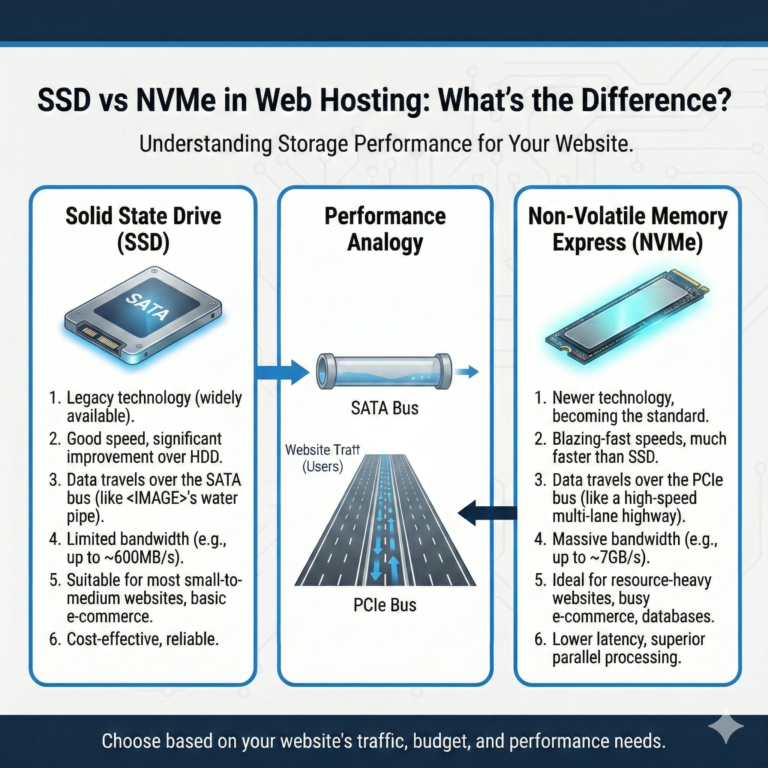
- Storage Type: NVMe SSD storage is faster but more expensive than standard SSD.
- Support Level: “Priority” support often costs extra.
- Number of Sites: Single-site plans are cheaper; agency plans for 10+ sites cost more.
Hidden Costs to Watch Out For
- Overage Fees: If you exceed your bandwidth or visitor cap, you may be charged automatically.
- Email Hosting: Unlike cheap shared hosting, many premium managed hosts do not include email hosting. You may need to pay separately for Google Workspace or Outlook.
- Migration Fees: While many offer free migrations, some charge for complex site moves.
Pros and Cons of Managed Web Hosting
To summarize the benefits of managed hosting against the drawbacks:
Advantages for Businesses
- Time Savings: No time spent on server maintenance.
- Reliability: Higher uptime guarantees (SLAs).
- Scalability: Easier to upgrade during growth spurts.
- Expertise: Access to support teams who specialize in your platform.
- Speed: Server-level caching is faster than plugin-based caching.
Limitations & Trade-offs
- Higher Cost: Significantly more expensive than DIY hosting.
- Plugin Restrictions: Some managed hosts ban certain plugins that conflict with their internal caching or security tools.
- Less Control: You likely won’t have root access to the server, limiting custom software installations.
Who Needs Managed Web Hosting? (Use Cases)
Let’s look at specific scenarios to answer who needs managed web hosting.
Small Businesses
If you run a plumbing company, a law firm, or a dental practice, your website is your digital business card. You cannot afford for it to be offline, but you also can’t justify hiring an IT person. Managed hosting is the perfect middle ground.
Ecommerce Stores (WooCommerce/Magento)
For online stores, speed equals money. A one-second delay in page load time can reduce conversions by 7%. Managed hosting provides the high-performance architecture needed to handle checkout processes securely and quickly.
SaaS Platforms
Software-as-a-Service companies need high availability. Managed cloud hosting allows them to scale resources up and down based on user demand without managing the physical infrastructure.
High-Traffic Blogs
When a blog post goes viral, cheap shared hosting will crash (the “Reddit hug of death”). Managed hosts use elastic resources to absorb traffic spikes, ensuring you don’t lose ad revenue during your biggest moments.
Agencies
Digital agencies often manage dozens of client sites. Managed hosting provides a dashboard to manage all these sites in one place, with easy billing and support, allowing the agency to focus on design and marketing rather than server administration.
Is Managed Hosting Worth It in 2026?
The big question: Is managed hosting worth it?
ROI Analysis
Calculate your hourly rate. If your time is worth $50/hour, and you spend just two hours a month fixing server issues or updating plugins, you have “spent” $100. A managed hosting plan might cost $30. In this scenario, the ROI is immediate.
Time vs Cost Comparison
If you are a student or a hobbyist with plenty of time to learn Linux and a tight budget, managed hosting is likely not worth it. Unmanaged is a great learning tool.
However, for any revenue-generating website, the cost of managed hosting is essentially an insurance policy. It insures you against data loss, downtime, and slow speeds.
Growth Readiness
Unmanaged hosting can bottleneck growth. When you are ready to scale, moving from a DIY server to a larger cluster is difficult. Managed hosts are built to scale with you, often requiring just a plan upgrade to handle millions of new visitors.
Best Managed Web Hosting Providers (2026 Overview)
When looking for the best managed web hosting providers, the market is crowded. Rather than listing specific companies (as rankings change monthly), here is what you should look for in a top-tier provider in 2026.
What to Look for in a Provider
- Platform Specialization: Do they specialize in your CMS (e.g., WordPress, Magento)? Generalist hosts are rarely as good as specialists.
- Support Channels: Do they have 24/7 live chat? Test it before you buy. Ask a technical question and see if they copy-paste a generic answer or give a real solution.
- Technology Stack: Look for Nginx or LiteSpeed servers, PHP 8.3+ support, and built-in CDNs.
- Backups: Ensure backups are off-site and retained for at least 14-30 days.
Key Features Checklist
- Free SSL Certificates
- Staging Environments (to test changes before going live)
- Malware removal guarantee
- Global data center locations
- Migration assistance
Frequently Asked Questions (FAQ)
Here are answers to the most common questions about managed hosting.
Q1. What is managed web hosting in simple terms?
It is a “concierge” hosting service where the provider handles all technical server maintenance, updates, security, and performance optimization, allowing you to focus solely on your website content.
Q2. Is managed hosting better than shared hosting?
Generally, yes. Managed hosting offers better performance, tighter security, and superior support compared to standard shared hosting. However, it is more expensive.
Q3. How much does managed hosting cost in 2026?
Prices range from $15/month for entry-level managed WordPress hosting to over $200/month for managed dedicated servers. Most small businesses should budget between $30 and $60 per month.
Q4. Is managed web hosting good for WordPress?
Yes, Managed WordPress Hosting is specifically tuned for the platform, offering features like automatic core updates, WP-CLI, and server-level caching that make WordPress significantly faster and more secure.
Q5. Can beginners use managed hosting?
Absolutely. It is actually better for beginners than unmanaged hosting because the provider handles the difficult technical tasks. You typically get an easy-to-use dashboard rather than a command line.
Q6. Does managed hosting include security and backups?
Yes. Almost all reputable managed hosting plans include automated daily backups and proactive security measures like firewalls and malware scanning.
Q7. Is managed hosting worth the extra cost?
For businesses and professionals, yes. The time saved on maintenance and the prevention of revenue-losing downtime usually justifies the higher monthly fee compared to cheap hosting.
Final Thoughts: Should You Choose Managed Hosting?
Choosing the right host is one of the most critical decisions you will make for your website.
Choose Managed Hosting If:
- You are running a business, ecommerce store, or high-traffic blog.
- You have no desire to learn how to manage a server or use a command line.
- You have a budget of at least $25/month for hosting.
- You value peace of mind and want expert support on standby.
Stick to Unmanaged/Basic Hosting If:
- You are launching a personal hobby site with zero budget.
- You want to learn server administration and Linux.
- You need total root access to install custom, non-standard software.
In 2026, the speed and security of your website are not just technical details—they are competitive advantages. Managed web hosting is the investment that secures those advantages, letting you get back to what you do best: running your business.