Hosting Buying Checklist 2026: What to Check Before Choosing a Web Host
Choosing a web host feels a lot like buying a car. On the surface, they all seem to do the same thing: get you from point A to point B (or in this case, get your website online). But once you pop the hood, the differences in performance, reliability, and long-term costs become glaringly obvious.
In 2026, the hosting landscape is more competitive and complex than ever. With the rise of AI-driven site builders, decentralized cloud networks, and ever-evolving Google Core Web Vitals, picking the wrong provider isn’t just an inconvenience—it’s a liability. A poor choice can tank your SEO rankings, frustrate your visitors with slow load times, and even compromise your data security.
This comprehensive hosting buying checklist is designed to prevent those costly mistakes. Whether you are launching a personal blog, a bustling e-commerce store, or a corporate portfolio, this guide breaks down exactly what to check before buying hosting. We will cut through the marketing jargon and focus on the technical specs that actually impact your bottom line.
By following this step-by-step guide on how to choose web hosting, you will gain the confidence to select a partner that supports your growth, rather than stifling it.
Step 1 �� Define Your Website Requirements
Before you even look at a pricing page, you need to understand what you are building. The biggest mistake beginners make is buying a plan based on price alone, only to realize it doesn’t support the software or traffic volume they need.
Determine Your Website Type
The technical demands of a static portfolio are vastly different from a dynamic online store.
- Blog/Portfolio: Usually lightweight. Shared hosting is often sufficient.
- Small Business Site: Needs reliability and email hosting. A Virtual Private Server (VPS) or premium shared hosting is ideal.
- E-commerce (WooCommerce/Shopify): Demands high security, SSL, and fast database processing. Managed WordPress or Cloud hosting is recommended.
- Enterprise/SaaS: Requires custom configurations, root access, and scalability. Dedicated servers or advanced Cloud infrastructure are necessary.
Estimate Traffic Expectations
Hosting plans often have “caps” on visitors or bandwidth.
- Low Traffic (<10k visits/month): Entry-level plans.
- Medium Traffic (10k-50k visits/month): Mid-tier plans with caching.
- High Traffic (50k+ visits/month): Scalable cloud solutions or dedicated resources.
Set a Realistic Budget
Be honest about what you can afford, but remember: in hosting, you typically get what you pay for. A $2/month plan might save money now but cost you sales later due to downtime.
- Shared: $2 – $10/month
- VPS: $20 – $80/month
- Dedicated: $100+ /month
Creating a hosting requirements checklist based on these three pillars ensures you filter out 90% of the wrong options immediately.
Step 2 – Performance & Speed Evaluation
Speed is currency on the internet. In 2026, user patience is at an all-time low. If your site takes more than two seconds to load, bounce rates skyrocket, and Google will penalize your search rankings. Your fastest hosting checklist must prioritize hardware and infrastructure.
Server Hardware: SSD vs. NVMe
Hard drives are not created equal.
- HDD (Hard Disk Drive): Obsolete for hosting. Avoid providers that use these.
- SSD (Solid State Drive): The standard. Fast and reliable.
- NVMe (Non-Volatile Memory Express): The gold standard. NVMe drives are significantly faster than standard SSDs, offering quicker read/write speeds that are crucial for database-heavy sites like online stores.
Recommendation: Look for providers explicitly stating they use NVMe storage.
RAM and CPU Allocation
Shared hosting means you share resources. However, good providers guarantee a specific allocation (e.g., 2GB RAM, 2 CPU Cores). Avoid hosts that are vague about these limits, as your site will slow down if a neighbor on the server gets a traffic spike.
Content Delivery Network (CDN) Integration
A CDN stores copies of your site on servers around the world. When a user visits, the content is served from the location closest to them.
- Check: Does the host include a free CDN (like Cloudflare) or easy integration? This is non-negotiable for hosting speed comparison.
[Compare Hosting Plans]
Step 3 – Uptime & Reliability Guarantees
If your site is down, you are closed for business. Reliability is the bedrock of a successful online presence.
The Service Level Agreement (SLA)
Most hosts advertise “99.9% uptime.” But what does that actually mean?
- 99.9% Uptime: Your site can be down for roughly 43 minutes per month.
- 99.99% Uptime: Your site can be down for only 4 minutes per month.
- 99.999% Uptime: “Five nines” reliability—practically zero downtime.
Crucial Check: Read the SLA (Service Level Agreement). A reliable hosting provider will offer financial credit if they fail to meet their uptime guarantee. If the policy says “we aim for” rather than “we guarantee,” look elsewhere.
Proactive Monitoring
Does the host wait for you to complain that the server is down, or do they fix it before you notice? Look for “24/7 server monitoring” in the feature list.
Real-world example: Imagine running a Black Friday sale. If your hosting uptime guarantee fails during peak traffic, you lose immediate revenue and long-term customer trust.
Step 4 – Server Location & Global Coverage
Latency is the delay between a user clicking a link and the server responding. Physical distance matters. If your server is in New York and your user is in Tokyo, data has to travel halfway across the world.
Data Center Locations
When evaluating hosting server location, check if the provider allows you to choose your data center.
- Local Audience: Choose a server in the same country.
- Global Audience: Choose a central hub (like Frankfurt for Europe or Singapore for Asia) and combine it with a robust CDN.
CDN Reach
While server location is primary, global hosting coverage is supported by the CDN. Ensure the host’s CDN partner has nodes (servers) in your target regions.
Step 5 – Security & Backup Protection
In an era of rampant cyberattacks, security features are not “add-ons”—they are essentials. Your secure web hosting checklist should be rigorous.
SSL Certificates
Google flags sites without SSL (HTTPS) as “Not Secure.”
- Requirement: The host should provide a free SSL certificate (usually Let’s Encrypt) and handle the auto-renewal. Never pay extra for a basic SSL.
Firewalls and DDoS Protection
Your host should have network-level protection to stop malicious traffic before it hits your site. Look for Web Application Firewalls (WAF) and DDoS mitigation.
Malware Scanning and Removal
Some hosts scan for malware but charge you $150+ to remove it.
- Best Practice: Choose a host that includes free patching or removal services.
Automated Backups
This is your safety net.
- Frequency: Daily backups are preferred; weekly is the bare minimum.
- Storage: Backups should be stored on a remote server, not the same drive as your website.
- Restoration: Check if restoring a backup is a one-click process or a paid service. Hosting backup features vary wildly, so read the fine print.
Step 6 – Scalability & Upgrade Flexibility
You hope your website grows. Your hosting plan needs to grow with it.
Vertical vs. Horizontal Scaling
- Vertical Scaling: Adding more power (RAM/CPU) to your existing server.
- Horizontal Scaling: Adding more servers to spread the load.
One-Click Upgrades
When your blog post goes viral, you don’t have time to migrate to a new server. Scalable hosting plans allow you to upgrade your resources instantly via the dashboard to handle traffic spikes.
The “Unlimited” Myth
Be wary of plans promising “Unlimited Bandwidth” or “Unlimited Storage.” There is always a fair usage policy buried in the Terms of Service. If you exceed hidden limits, they may throttle your speed or ask you to upgrade. Understanding hosting upgrade options upfront prevents nasty surprises.
[Check Hosting Deals]
Step 7 – Pricing Transparency & Renewal Costs
The hosting industry is notorious for low introductory rates that skyrocket upon renewal.
Intro Pricing vs. Renewal Rates
That big “$2.99/mo” sticker usually applies only if you pay for 3 years upfront. When that term ends, the renewal price might jump to $10.99/mo.
- Action: Always check the “Regular Rate” or hosting renewal cost before buying. Calculate the total cost over 5 years, not just the first year.
Hidden Fees
Watch out for upsells pre-checked in your cart:
- Domain privacy protection
- SiteLock security essentials
- Professional email (which you might get cheaper elsewhere)
Refund Policy
A 30-day or 45-day money-back guarantee is standard. Avoid hosts with “no refunds” policies. Don’t fall into cheap hosting traps—transparency is worth paying for.
Step 8 – Customer Support Quality
You likely won’t care about support until your site crashes at 3 AM on a Sunday. Then, it becomes the most important factor.
Availability & Channels
- Live Chat: Is it 24/7? Is it a bot or a human?
- Ticket System: Good for complex technical issues.
- Phone: Rare nowadays, but valuable for immediate crises.
Technical Expertise
Test them before you buy. Go to their live chat and ask a technical question (e.g., “Do you support PHP 8.3 and MariaDB 10.6?”).
- Good Sign: They answer directly.
- Bad Sign: They copy-paste a generic link to a knowledge base article.
Best hosting support isn’t just polite; it’s knowledgeable. Hosting customer service should be a partner in your success.
Step 9 – Control Panel & Ease of Use
How will you actually manage your website?
cPanel vs. Custom Dashboards
- cPanel/Plesk: The industry standards. If you learn cPanel once, you can use it on almost any host. It simplifies file management, email creation, and database handling.
- Custom Dashboards: Many managed hosts (like Kinsta or SiteGround) build their own. These are often more user-friendly and modern but can make switching hosts slightly harder later due to the learning curve of a new system.
One-Click Installers
Ensure they have a “Softaculous” or similar installer to set up WordPress, Joomla, or Magento in seconds. Hosting control panel comparison is vital for beginners who don’t want to use the command line. A beginner-friendly hosting interface saves hours of frustration.
Step 10 – Migration, Backups & Exit Strategy
Always plan your exit before you enter.
Free Migration
If you already have a website, does the new host offer free migration?
- Manual: You move files yourself (risky for beginners).
- Automated Plugin: Easy but can fail with large sites.
- Expert Migration: The host’s team moves it for you. This is the gold standard for a hosting migration checklist.
Data Ownership
Ensure the Terms of Service state clearly that you own your data.
Easy Cancellation
Can you cancel from the dashboard, or do you have to call a retention team? Avoid hosts that hold your data hostage. Switching hosting providers should be a right, not a battle.
[View Best Providers]
Summary Checklist Table
Use this quick reference table to score potential hosts.
| Feature Category | What to Look For (Pass Criteria) | Red Flags (Fail Criteria) |
|---|---|---|
| Performance | NVMe Storage, Latest PHP Version, NGINX/LiteSpeed Server | HDD Storage, Old PHP versions |
| Uptime | 99.9% Guarantee with SLA credits | “Aim for” uptime, no financial backing |
| Security | Free SSL, WAF, Daily Automated Backups | Paid SSL, Manual Backups only |
| Support | 24/7 Live Chat, Technical staff | Email only, 24+ hour response time |
| Pricing | Clear renewal rates, Money-back guarantee | Hidden setup fees, exorbitant renewal hikes |
| Scalability | One-click resource upgrades | Forced migration to dedicated server too early |
FAQs – Hosting Buying Checklist
What is the most important factor when buying hosting?
While speed and support are critical, reliability (uptime) is the most important. A fast website is useless if it is offline. Always prioritize a host with a proven track record of 99.9% uptime or higher.
Is cheap hosting good for beginners?
Cheap hosting (shared hosting) is a great starting point for hobbyists and new blogs. However, be aware of the trade-offs: slower speeds during peak times and limited support. If you are running a business, investing in mid-tier hosting is usually safer.
How much hosting resources do I need?
For a new WordPress blog, 1GB of RAM and 1 CPU core is usually enough. For an e-commerce site, aim for at least 4GB of RAM and 2-4 CPU cores to handle simultaneous transactions smoothly.
What uptime percentage should I look for?
Look for 99.9% as a minimum baseline. For business-critical sites, 99.99% is the target. Avoid anything lower, as 99% uptime means your site could be down for over 3 days a year.
Should I choose cloud hosting or shared hosting?
- Shared Hosting: Cheapest, easiest, but resources are shared with others. Good for low traffic.
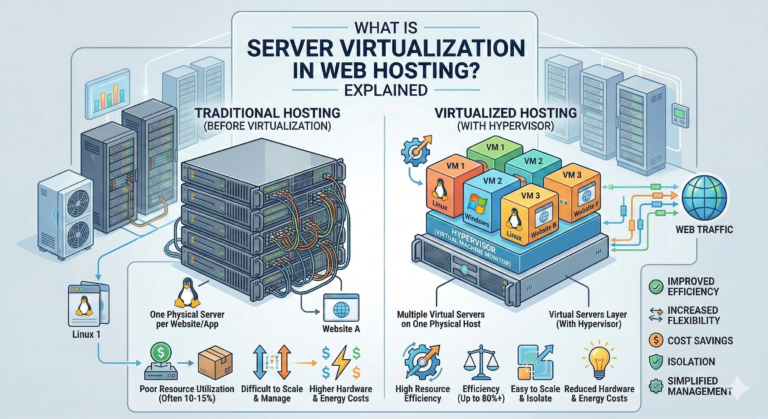
- Cloud Hosting: More stable, scalable, and faster. If one server fails, another takes over. Best for growing sites and businesses.
How do I compare hosting pricing fairly?
Ignore the bold “monthly” price. Look at the renewal price and the term length (e.g., 36 months). Calculate the total cost of ownership for 3 to 5 years to get a true comparison.
Can I change hosting later without losing SEO?
Yes! If done correctly, migrating hosts has zero impact on SEO. In fact, if you move to a faster host, your SEO rankings will likely improve. Ensure you use a 301 redirect strategy if URLs change, though typically, migrating keeps URLs identical.
Conclusion
Selecting the right web host in 2026 isn’t about finding the provider with the flashiest Super Bowl ad. It is about matching your specific needs with a provider’s technical capabilities.
By following this hosting buying checklist, you move beyond the sales pitch and into the specs that matter: speed, security, support, and scalability. Don’t rush the process. A few hours of research now will save you hundreds of hours of troubleshooting (and potential lost revenue) down the road.
Ready to find your perfect match?