Cloud Hosting Pricing Guide 2026
Cloud hosting has revolutionized how businesses operate, offering unparalleled scalability and flexibility. But for many business owners and developers, receiving that monthly invoice can feel like decoding a foreign language. The promise of “pay for what you use” often clashes with the reality of complex billing structures, hidden fees, and unpredictable usage spikes.
Navigating cloud costs is no longer just an IT concern—it is a critical financial strategy. Whether you are running a startup on a bootstrap budget or managing enterprise-level infrastructure, understanding where your money goes is the first step toward controlling it.
This guide breaks down the mechanisms behind cloud hosting pricing as we head into 2026. We will dissect the pricing models of major providers, uncover hidden costs that inflate bills, and provide actionable strategies to optimize your spending without sacrificing performance. By the end, you will have the knowledge to predict your expenses accurately and choose the right hosting solution for your needs.
Why Cloud Hosting Pricing Is Complex
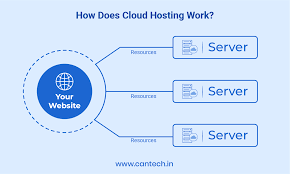
The primary reason cloud pricing feels so complicated is that it is rarely a single line item. Unlike traditional web hosting, where you might pay a flat fee of $20 a month for a server, cloud hosting is granular. You are essentially renting individual components of a computer—CPU cycles, RAM, storage space, and network throughput—by the second or hour.
Pay-as-you-go vs. fixed plans
Most major cloud providers operate on a utility model, similar to your electricity bill. You pay for exactly what you consume. If your application shuts down at night, you stop paying for the compute power. This offers immense flexibility but introduces volatility. If a post goes viral and traffic spikes, your bill spikes with it.
Fixed plans, often called “bundled” or “VPS” pricing (common with providers like DigitalOcean or Linode), offer a set amount of resources for a flat monthly fee. This simplifies budgeting but lacks the granular scalability of the pay-as-you-go model.
What affects cloud hosting costs
Several variables constantly interact to determine your final bill:
- Region: Hosting your server in Northern Virginia might cost less than hosting it in São Paulo or Tokyo due to local infrastructure and energy costs.
- Operating System: Linux servers are generally cheaper because they are open-source. Windows servers include licensing fees that are passed on to you.
- Redundancy: Replicating your data across multiple geographic zones for safety doubles or triples your storage and transfer costs.
Common Cloud Hosting Pricing Models
To get the best deal, you must match your workload to the right pricing model. Providers have developed several tiers to accommodate different usage patterns.
On-demand billing
This is the standard, most flexible rate. You spin up a server, use it, and terminate it. It is the most expensive per-hour option because you are paying for the privilege of leaving at any time without a contract. It is ideal for short-term projects, testing environments, or unpredictable workloads.
Reserved instances
If you know you will need a specific server 24/7 for the next year or three, you can commit to a “Reserved Instance” (RI). By signing a contract, providers offer significant discounts—often between 30% and 70% off the on-demand price. This is the gold standard for production databases and core application servers that must always be running.
Spot/discount pricing
Cloud providers have massive amounts of unused capacity sitting idle. To monetize this, they offer “Spot Instances” (AWS) or “Spot VMs” (Azure/GCP) at steep discounts, sometimes up to 90% off. The catch? The provider can reclaim the server with just a few minutes’ notice if they need the capacity back. This model is perfect for batch processing, data analysis, or background tasks that can be interrupted, but it is terrible for hosting a live website.
Managed vs. unmanaged pricing
Unmanaged hosting gives you the raw infrastructure (IaaS). You patch the OS, manage security, and handle updates. It is cheaper but labor-intensive. Managed hosting (PaaS) or managed databases charge a premium—often 20-50% more—but the provider handles backups, patching, and scaling. For many businesses, the extra cost is lower than the salary of a DevOps engineer required to manage the raw infrastructure.
Key Cost Components Explained
When you look at a cloud bill, it is usually broken down into specific resource categories. Understanding these helps you spot where the “leak” is in your budget.
Compute (CPU & RAM)
This is usually the largest portion of the bill. You pay for the virtual CPU (vCPU) and memory (RAM) your instance uses. Prices scale non-linearly; a machine with 64 vCPUs will cost significantly more than just 64 times the cost of a 1 vCPU machine, often due to the high-performance hardware required to support it.
Storage fees
Storage pricing depends on speed and accessibility:
- Block Storage (SSD/HDD): The “hard drive” attached to your server. You pay for the size of the disk you provision, regardless of whether it is full or empty. NVMe SSDs cost more than standard SSDs, which cost more than magnetic HDDs.
- Object Storage (S3/Blob): Used for files like images and backups. You pay for the total data stored.
- Archive Storage: Extremely cheap storage for data you rarely access (like compliance logs), but you pay a fee to retrieve it.
Bandwidth and data transfer
This is the silent budget killer. Inbound traffic (uploading data to the cloud) is usually free. Outbound traffic (data leaving the cloud to your users) is charged per gigabyte. If you run a video streaming site or a high-traffic image gallery, these “egress” fees can easily surpass your compute costs.
Load balancing and scaling
A load balancer distributes traffic across multiple servers to prevent crashes. Providers charge an hourly fee for the load balancer itself, plus a fee based on the amount of data processed by it.
Support and add-on services
Basic support is usually free but limited to documentation and forums. Business-tier support, which guarantees a response time of under an hour, can cost a flat fee (e.g., $100/month) or a percentage of your total monthly spend (e.g., 10%), whichever is higher.
Pricing Comparison Across Top Providers
While prices fluctuate, the structural differences between the “Big Three” and challenger providers remain distinct.
AWS Pricing Overview
Amazon Web Services (AWS) is the market leader with the most complex pricing.
- EC2 (Compute): offers hundreds of instance types optimized for memory, compute, or storage.
- S3 (Storage): features multiple tiers (Standard, Intelligent-Tiering, Glacier) to help automate cost savings.
- Cost-saving tips: AWS offers “Savings Plans,” which are more flexible than standard Reserved Instances. They allow you to commit to a specific dollar amount per hour rather than a specific server type, giving you the flexibility to upgrade servers while keeping the discount.
Google Cloud Pricing
Google Cloud Platform (GCP) is often favored by developers for its slightly simpler billing and strong data analytics focus.
- Compute Engine: Google offers “Sustained Use Discounts.” You don’t always need to sign a contract; if you run an instance for a significant portion of the month, Google automatically applies a discount to your bill.
- Custom Machine Types: Unlike AWS, GCP allows you to create custom server configurations (e.g., high CPU but low RAM), so you don’t pay for resources you don’t need.
Microsoft Azure Pricing
Azure is the go-to for enterprises heavily invested in the Microsoft ecosystem.
- Virtual Machines: Azure offers “Hybrid Benefit,” allowing you to use your existing on-premise Windows Server and SQL Server licenses in the cloud. This can drastically reduce the hourly rate of a Windows VM.
- Reserved Instances: Similar to AWS, Azure pushes heavily for 1-year or 3-year commitments for the best rates.
DigitalOcean & Budget Providers
For small to medium businesses (SMBs) and developers, providers like DigitalOcean, Linode (Akamai), and Vultr offer refreshing simplicity.
- Droplet Pricing: They typically offer a clear, bundled price. For example, $6/month might get you 1 vCPU, 1GB RAM, 25GB SSD, and 1TB of transfer.
- Simplified Billing: There are fewer hidden fees for bandwidth, and bills are generally predictable. However, they may lack the enterprise-grade features and infinite scalability of AWS or Azure.
Real-World Cost Examples
To make this concrete, let’s look at estimated monthly costs for four common scenarios in 2026.
Small business website
- Requirements: Low traffic, WordPress or static site.
- Setup: 1 small VPS or Lightsail instance, standard storage.
- Estimated Cost: $5 – $20 per month.
- Analysis: At this level, a fixed-price provider or a managed WordPress host is usually superior to raw AWS infrastructure.
E-commerce store
- Requirements: Magento or WooCommerce, database, reliable uptime, security.
- Setup: 1 App Server (medium), 1 Managed Database, Load Balancer, Object Storage for product images.
- Estimated Cost: $150 – $400 per month.
- Analysis: Managed databases add cost but prevent data loss. Costs rise as traffic (bandwidth) increases.
SaaS application
- Requirements: Microservices architecture, high availability, dev/test environments.
- Setup: Kubernetes cluster, multiple databases, Redis caching, CI/CD pipelines.
- Estimated Cost: $1,000 – $5,000+ per month.
- Analysis: The bill is split between production (expensive, reserved instances) and development (cheaper, spot instances).
High-traffic blog
- Requirements: Viral content, heavy caching.
- Setup: Small origin server, heavy use of Content Delivery Network (CDN).
- Estimated Cost: $50 for compute + $200+ for CDN/Bandwidth.
- Analysis: Here, compute is cheap, but data transfer drives the cost. Offloading traffic to a CDN like Cloudflare is essential to survival.
Cost Optimization Strategies
You don’t have to accept a high bill. Implementing these strategies can often reduce cloud spend by 20-40%.
Autoscaling best practices
Configure your autoscaling groups aggressively. If your traffic dips at 2 AM, your server count should drop to the bare minimum. Ensure your application can start up quickly so that new servers can handle sudden spikes without lag.
Use of reserved and spot instances
Adopt a “hybrid” purchasing strategy. Use Reserved Instances for your baseline load (the traffic you get every day) to secure a discount. Use Spot Instances for background processing or temporary spikes. Use On-Demand only for the unpredictable fluctuations in between.
Efficient storage choices
Move old data to cheaper tiers. If you have logs from two years ago, they shouldn’t be on an expensive SSD. Move them to AWS Glacier or Azure Archive storage. Also, ensure you delete “orphan” storage volumes—disks that were detached from a server when it was terminated but not deleted themselves.
Monitoring and alerts
Set up budget alerts in your cloud console. You should receive an email if your spending is projected to exceed your monthly budget by 50%, 80%, and 100%. Tools like AWS Cost Explorer or third-party platforms like CloudHealth can visualize where every penny is going.
Hidden Fees and Billing Traps
Even savvy architects get caught by these common billing traps.
Data egress charges
Moving data into the cloud is free. Moving it between servers in the same region is usually cheap. Moving it out to the internet or across regions is expensive. Architect your application to minimize cross-region data transfer.
API request costs
Services like S3 or NoSQL databases charge for every read/write request. If you have a poorly written script that pings your storage bucket 100 times a second to check for a file, you could rack up a massive bill even if the file size is small.
Unused resource charges
- Elastic IPs: An IP address attached to a running server is free. An IP address you reserved but aren’t using costs money.
- Load Balancers: You pay for them every hour they exist, even if no traffic is flowing through them.
- Snapshots: Daily backups are great, but if you never delete old ones, your storage costs will grow indefinitely.
How to Estimate Your Monthly Cloud Bill
Before you deploy, generate an estimate.
- Define your metrics: How many concurrent users? Average page size? Storage needs?
- Use official calculators:
- AWS Pricing Calculator
- Google Cloud Pricing Calculator
- Azure Pricing Calculator
- Step-by-step example:
- Scenario: A web app with 1TB storage and 5TB transfer.
- Select Compute: Choose an instance (e.g., t3.medium). Note the hourly price x 730 hours (average month).
- Select Storage: Add 1TB of SSD provisioned storage.
- Select Transfer: Add 5TB of outbound data transfer (Egress).
- Total: Sum these three for your baseline. Add 20% for buffers (backups, slight overages).
Take Control of Your Cloud Spend
As we move through 2026, cloud hosting remains the most powerful tool for business growth, but it requires active financial management. The days of “set it and forget it” are over. By understanding the pricing models, monitoring your usage, and optimizing your architecture for cost as well as performance, you can harness the power of the cloud without burning through your budget.
Start by auditing your current bill today. Look for zombie resources, unreserved baseline capacity, and expensive storage tiers. Your bottom line will thank you.
FAQs – Cloud Hosting Pricing in 2026
What affects cloud hosting costs most?
Compute power (CPU/RAM) and data transfer (bandwidth) are typically the biggest cost drivers. However, for storage-heavy applications, the cost of high-performance SSDs can also dominate the bill.
Is cloud hosting expensive?
It depends on how you use it. For small, predictable workloads, cloud hosting can be more expensive than traditional VPS hosting. However, for variable workloads or large-scale applications, the efficiency of scaling up and down often makes it cheaper than maintaining physical data centers.
How can I reduce my cloud bill?
Immediate wins include: 1) Rightsizing over-provisioned instances (don’t pay for a large server if a small one works). 2) Purchasing Reserved Instances or Savings Plans for long-term workloads. 3) Deleting unused resources like unattached storage volumes and idle load balancers.
Do cloud hosts offer pricing calculators?
Yes, all major providers (AWS, Google, Azure) offer detailed, publicly available pricing calculators. These tools allow you to input your specific resource needs and see an estimated monthly bill before you launch.
What is the cheapest cloud hosting option?
For simple projects, bundled cloud providers like DigitalOcean, Linode, or Vultr are usually the cheapest and most predictable. For enterprise workloads, AWS or Azure can be cheaper if managed correctly using spot instances and aggressive auto-scaling, but they have a higher barrier to entry.