How to Choose the Best Web Hosting Providers in 2026 (Expert Guide)
Your website’s host is its foundation. Pick the right one, and your site loads instantly, ranks higher on Google, and handles traffic spikes with ease. Pick the wrong one, and you face constant downtime, security breaches, and sluggish performance that drives visitors away.
As we move further into 2026, the hosting landscape has shifted. It’s no longer just about storage space and bandwidth. Modern hosting requires robust security against sophisticated cyber threats, eco-friendly infrastructure, and the ability to scale instantly as your business grows. Whether you are launching a personal portfolio or scaling a multinational eCommerce store, knowing how to choose web hosting providers in 2026 is critical to your digital success.
This guide cuts through the technical jargon and marketing noise. We will walk you through a proven, step-by-step process to evaluate performance, security, and value, ensuring you find the best web hosting providers in 2026 for your specific needs.
Step 1 – Define Your Website Requirements
Before you can compare providers, you need a clear picture of what your website actually needs. Overs-buying leads to wasted budget, while under-buying results in crashes. Start by creating a web hosting requirements checklist based on these three factors:
Website Type
The platform you build on dictates your hosting needs.
- Blogs and Portfolios: Usually lightweight. A simple shared hosting plan is often sufficient.
- Business Websites: Require higher uptime guarantees and email hosting capabilities.
- eCommerce Stores: Speed and security are non-negotiable here. You will need a plan that supports payment gateways and can handle simultaneous transactions.
- Web Apps: innovative applications often require root access and specific server configurations found in VPS or dedicated environments.
Expected Traffic
How many visitors do you expect?
- Low Traffic (<5,000 monthly visitors): Shared hosting is cost-effective.
- Medium Traffic (5,000–50,000 monthly visitors): Look for higher-tier shared plans or entry-level cloud hosting.
- High Traffic (50,000+ monthly visitors): You need dedicated resources—either a VPS or a dedicated server—to prevent slowdowns.
Storage and Bandwidth Needs
Storage refers to the space your files (images, code, videos) occupy. Bandwidth is the amount of data transferred between your site and users. If you plan to host high-resolution media, you need significantly more resources than a text-heavy blog. This assessment helps answer the common question: how much hosting do I need?
Step 2 – Understand Hosting Types
The market is flooded with types of web hosting providers, each catering to different use cases. Understanding the differences is key to making a smart investment. Here is a quick shared vs VPS vs cloud hosting breakdown.
Shared Hosting
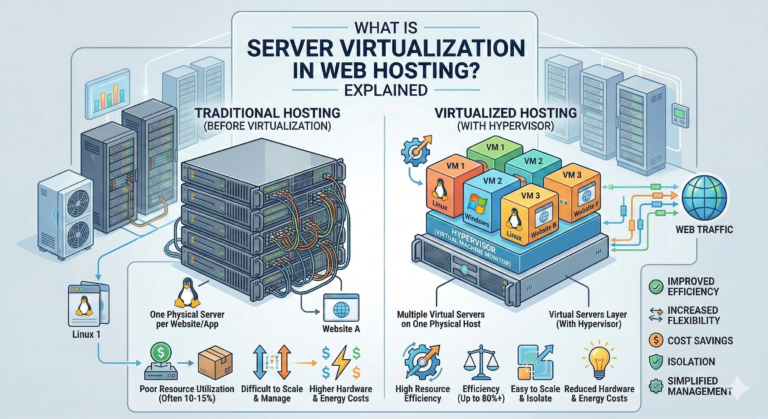
Think of this like renting a room in a shared house. You share resources (CPU, RAM) with other websites on the same server.
- Pros: Most affordable option; beginner-friendly.
- Cons: Performance suffers if a “neighbor” site gets a traffic spike; security risks are slightly higher.
- Best for: Personal blogs, small sites.
VPS Hosting (Virtual Private Server)
This is like owning a condo in a building. You still share the physical server, but you have dedicated resources that no one else can touch.
- Pros: Better performance; root access for customization; scalable.
- Cons: More expensive than shared; requires some technical knowledge.
- Best for: Growing businesses, high-traffic blogs.
Cloud Hosting
Cloud hosting uses a network of servers. If one server goes down, another takes over instantly.
- Pros: incredible reliability; easy scalability; pay-for-what-you-use pricing.
- Cons: Pricing can be unpredictable if traffic spikes.
- Best for: eCommerce, SaaS companies, sites with fluctuating traffic.
Dedicated Hosting
You rent the entire physical server. It’s like owning a detached house.
- Pros: Maximum performance and control; highest security.
- Cons: Expensive; requires server management skills.
- Best for: Enterprise-level sites, massive traffic volumes.
Managed WordPress Hosting
A service specifically optimized for WordPress sites. The provider handles updates, backups, and security caching.
- Pros: Blazing fast for WP; hands-off maintenance.
- Cons: Often limits plugin usage; more expensive than generic shared hosting.
- Best for: Serious WordPress users who want convenience.
Step 3 – Compare Performance & Speed
Speed is a ranking factor for search engines and a major user experience metric. When looking for the fastest hosting providers 2026, examine these technical specs:
Server Locations
Data has to travel physically. If your audience is in London, a server in Tokyo will cause latency (lag). The best web hosting providers in 2026 offer multiple data center locations so you can host your site close to your audience.
CDN Integration
A Content Delivery Network (CDN) stores copies of your site on servers around the world. A good host will include free Cloudflare or similar CDN integration, speeding up load times for international visitors.
NVMe SSD Storage
Old Hard Disk Drives (HDD) are obsolete for hosting. Even standard SSDs are becoming outdated. Look for NVMe SSD storage, which offers significantly faster read/write speeds, making your website feel snappy.
Uptime SLA
Uptime is the percentage of time your site is accessible. Look for a Service Level Agreement (SLA) of 99.9% or higher. In a web hosting speed comparison, reliable uptime is just as important as raw loading speed.
Step 4 – Analyze Pricing & Renewal Costs
Hosting pricing is notoriously confusing. A provider might advertise $2.99/month, but that’s only if you prepay for three years. This hosting price comparison 2026 tip will save you money: always check the renewal rate.
Intro Pricing vs. Renewal
It is standard practice for hosts to offer a deep discount for the first term. However, the price often jumps by 200-300% upon renewal. If you sign up at $3/month, you might be paying $10/month when the term ends. Factor this “real” price into your budget.
Hidden Add-ons
During checkout, uncheck boxes for “extras” you don’t need. Common upsells include:
- SiteLock security (often unnecessary if you use good plugins).
- Automated backups (some hosts charge, others include this for free).
- Professional email (you might prefer Google Workspace or Outlook instead).
Billing Cycles
While paying monthly offers flexibility, cheap web hosting providers usually reserve their best rates for annual or multi-year commitments. Decide if the upfront savings are worth being locked into a contract.
Step 5 – Security & Reliability Checklist
With cyberattacks on the rise, you need secure web hosting providers that take protection seriously. Do not compromise on these hosting security features:
- Free SSL Certificate: An SSL encrypts data between your site and the user. Google flags sites without it as “Not Secure.” It should be free and auto-renewing.
- Malware Scanning & Removal: Good hosts proactively scan for malicious code. The best ones will fix it for you, sometimes for an extra fee, but often included in managed plans.
- Automated Backups: If your site breaks, when was the last snapshot taken? Daily backups are the gold standard. Ensure you can restore them with one click.
- DDoS Protection: Distributed Denial of Service attacks can crash your site. Your host should have network-level protection to filter out malicious traffic before it hits your server.
Step 6 – Customer Support & Ease of Use
When your site goes offline at 2 AM, you don’t want to wait for an email reply. You need the best hosting support 2026 has to offer.
24/7 Support Channels
Live chat is essential for quick fixes. Phone support is a bonus. Test their responsiveness before you buy—send a sales question via chat and see how long it takes a human to reply.
Control Panel Usability
Most legacy hosts use cPanel, which is reliable but looks dated. Modern hosts often build custom dashboards that are more intuitive. Easy web hosting for beginners usually features a clean, simple interface where you can install WordPress, create emails, and manage domains without touching code.
Migration Help
Moving from another host? Look for providers offering free white-glove migration. They move your site for you, ensuring zero downtime.
Step 7 – Scalability & Upgrade Flexibility
Your goal is growth. Your hosting should support that, not hinder it. Scalable hosting providers allow you to upgrade resources seamlessly.
Resource Scaling
If a viral post drives massive traffic to your site, does your host shut you down for exceeding limits, or can you add more RAM and CPU instantly? Cloud hosting is particularly good for this “elastic” scaling.
Cloud Migration Options
If you start on shared hosting, check the upgrade path. Can you move to a VPS or Managed WordPress plan easily? The ability to upgrade hosting plan easily without migrating to a new company saves massive headaches down the road.
Step 8 – Reviews, Reputation & Trust Signals
Marketing copy always promises the world. Real user experiences tell the truth. When conducting a web hosting comparison guide, look at third-party sources.
Verified Reviews
Check platforms like Trustpilot and G2. Look for patterns in web hosting reviews 2026. Do multiple users complain about billing issues? Is support consistently praised? Ignore the 5-star reviews with no text; focus on the detailed 3 and 4-star reviews for a balanced view.
Uptime Reports
Independent sites track historical uptime for major hosts. If a provider claims 99.9% uptime but third-party trackers show 98%, avoid them. 98% uptime means your site is down for roughly 14 hours a month—unacceptable for a business.
Awards & Certifications
While some industry awards are “pay-to-play,” certifications for security (like ISO standards) or green hosting (carbon-neutral certifications) are good indicators of trusted hosting companies.
Step 9 – Trial, Refund & Contract Terms
What if you make a mistake? A solid hosting refund policy is your safety net.
Money-Back Guarantees
The industry standard is 30 days. Some web hosting trial plans extend this to 45 or even 90 days. Read the fine print: usually, domain registration fees are non-refundable.
Cancellation Policies
Some hosts make it incredibly difficult to cancel, requiring phone calls or hiding the button deep in the dashboard. Check the documentation or reviews to ensure you can leave easily if the service degrades.
Best Web Hosting Providers by Use Case (2026)
There is no single “best” host, only the best host for you. Here is a quick summary based on common needs:
- Best for beginners: Look for hosts with a custom dashboard, one-click installers, and a strong knowledge base. Best hosting for beginners prioritizes usability over raw power.
- Best for WordPress: Managed WordPress hosts offer speed tweaks and staging environments specifically for the platform. These are the best WordPress hosting providers for serious bloggers.
- Best for small business: Focus on uptime reliability and email inclusion.
- Best budget provider: Shared hosting with long-term contracts usually offers the lowest price per month.
- Best for global traffic: Cloud hosting with integrated CDNs ensures speed worldwide.
FAQs – How to Choose Web Hosting Providers
What should I look for when choosing a web hosting provider?
Prioritize uptime (reliability), speed (performance), and support quality. Security features like free SSL are mandatory. Finally, ensure the renewal price fits your budget, not just the introductory offer.
Which hosting provider is best in 2026?
The “best” provider depends on your needs. For general use, SiteGround and Bluehost remain popular. For performance, cloud options like Cloudways or Kinsta (for WordPress) are top-tier.
How much should I pay for web hosting?
- Shared: $3–$10/month.
- VPS: $20–$60/month.
- Managed WordPress: $25–$100+/month.
- Dedicated: $100+/month.
Does hosting provider affect website speed and SEO?
Yes. Google uses Core Web Vitals to rank sites. If your host has slow server response times (TTFB), your rankings will drop regardless of how good your content is.
Is cheap hosting reliable?
It can be, for small personal sites. However, cheap hosting often comes with crowded servers, leading to slower speeds during peak times. For businesses, “cheap” often ends up being expensive due to lost sales from downtime.
Can I switch hosting providers later?
Yes. Most quality hosts offer free migration services to help you switch. You are never permanently stuck with a provider.
Which hosting provider is best for beginners?
Bluehost and Hostinger are frequently cited as the best hosting for beginners due to their user-friendly interfaces and low entry costs.
Conclusion
Choosing the right web hosting provider is a strategic decision that impacts your brand’s reputation and bottom line. By defining your requirements, understanding the different hosting types, and rigorously vetting providers for security and support, you can secure a digital home that helps your business thrive.
Don’t just look at the price tag. Look at the value. A reliable host is a partner in your growth, working silently in the background to ensure your visitors have a seamless experience.
Ready to build your online presence? Take the criteria from this guide, compare your top three choices, and start your website with confidence today.