Terms Every Website Owner Should Understand
You have a brilliant business idea. You’ve secured the perfect brand name. You are ready to launch your presence online. But as soon as you start looking into building a website, you hit a wall of acronyms and technical speak.
Suddenly, you are being asked to choose between “shared” and “VPS” hosting, configure your “DNS,” and ensure your “SSL” is valid. For many beginners, this moment feels less like building a business and more like trying to learn a foreign language without a textbook.
Understanding website terminology is about more than just sounding smart in meetings with developers. It is about empowerment. When you understand the basics of how the web works, you can make better decisions for your business, save money on services you don’t need, and troubleshoot issues faster when they arise.
This guide acts as your translator. We have compiled a comprehensive glossary of the most important web basics, broken down into simple, plain English. Whether you are running a blog or a full-scale online store, these are the terms you need to know to navigate the digital world with confidence.
Domain & Website Basics
Before you can build a site, you need a place for it to live and a way for people to find it. These terms relate to the address and identity of your website.
Domain Name
Think of the internet as a giant map. Your domain name is your specific street address (e.g., google.com or yourbusiness.com). It is what users type into their browser to find you. Without a domain name, visitors would have to memorize a long string of numbers (an IP address) to visit your site.
DNS (Domain Name System)
If the domain name is the address, the DNS is the phonebook or GPS system. When someone types your domain name into a browser, the DNS explained simply is the system that translates that human-readable name into the computer-readable IP address where your website files are stored. If your DNS settings are wrong, it’s like having an address listed in the phonebook that leads to an empty lot.
Subdomain
A subdomain is a prefix added to your main domain name to organize a different section of your website. It functions as a separate entity under the primary brand. For example, if your main site is example.com, a subdomain might be blog.example.com or store.example.com.
URL (Uniform Resource Locator)
While people often use “domain” and “URL” interchangeably, they are different. The URL is the full specific address that leads to a specific page or file. It includes the protocol (https), the domain name, and the path.
- Domain:
yoursite.com - URL:
https://yoursite.com/about-us
Web Hosting Terms Explained
If the domain is your address, web hosting is the actual house where your website’s furniture (files, images, code) lives. Understanding web hosting terms helps you pick the right plan for your needs.
Shared Hosting
Shared hosting is the most affordable option and is popular for beginners. Think of it like living in an apartment complex. You have your own unit (website), but you share resources like water and electricity (server power and memory) with all your neighbors. If a neighbor throws a huge party (gets a massive spike in traffic), your apartment might get a little noisy or slow down.
VPS Hosting (Virtual Private Server)
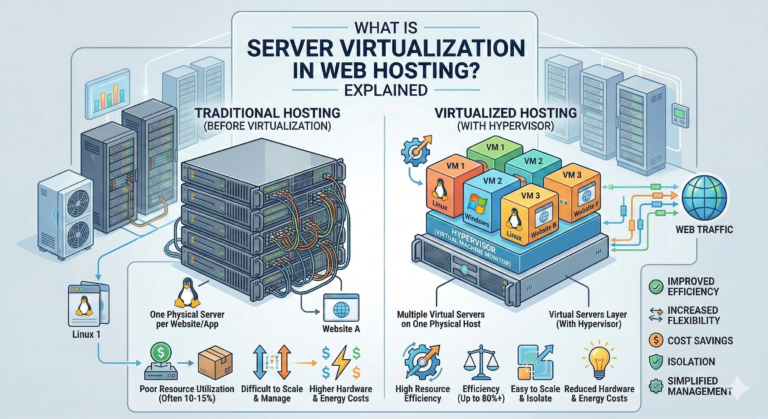
VPS hosting is the middle ground between shared and dedicated hosting. It is like owning a townhouse. You still share the building (physical server) with others, but you have a dedicated portion of resources that are strictly yours. Your neighbors’ habits won’t affect your website’s performance nearly as much as they would in shared hosting.
Cloud Hosting
Cloud hosting is a modern solution where your website isn’t stored on just one physical server. Instead, it lives on a network (or “cloud”) of connected servers. If one server fails or gets overwhelmed, another one instantly steps in to take the load. This is excellent for reliability and scalability.
Bandwidth
Bandwidth refers to the amount of data that can be transferred between your website and your visitors in a specific amount of time. Think of it like the width of a pipe. A wider pipe (more bandwidth) allows more water (traffic and data) to flow through at once without clogging. If you have low bandwidth and high traffic, your site may crash.
Storage (Disk Space)
Storage is simply the amount of space you have on the server to hold your files—your images, videos, text, and emails. It is exactly like the hard drive space on your laptop. Text takes up very little space, while high-resolution video takes up a lot.
Website Performance & Speed Terms
Nobody likes a slow website. These website speed terms refer to how fast your content loads for your visitors.
CDN (Content Delivery Network)
What is a CDN? Imagine you own a pizza shop in New York. If a customer in London orders a pizza, it will be cold by the time it arrives. A CDN is like opening franchise locations in London, Tokyo, and Sydney. It is a network of servers located around the world that store copies of your website’s static files (like images). When a user visits your site, the CDN serves the content from the server closest to them, making the site load much faster.
Cache
Caching is a mechanism that temporarily stores data so it can be retrieved faster the next time it is needed. Browsers do this to save time. When you visit a site for the first time, your browser downloads the logo. The next time you visit, the browser loads the logo from its local cache rather than downloading it again from the server.
Latency
Latency is the delay between a user’s action (clicking a link) and the web application’s response. It is often referred to as “lag.” High latency means the site feels sluggish; low latency means it feels snappy and responsive.
Uptime
Uptime is a measure of the time your website is operational and accessible to visitors, usually expressed as a percentage. Hosting companies often promise “99.9% uptime.” If a host has poor uptime, it means your “shop” is randomly closed during business hours.
Security & Privacy Terms
Keeping your visitors safe is non-negotiable. These website security terms are essential for protecting your data and your reputation.
SSL (Secure Sockets Layer)
What is an SSL certificate? It is a digital certificate that authenticates your website’s identity and enables an encrypted connection. It protects sensitive information (like credit card numbers) from being intercepted by hackers. You can tell a site has SSL if the URL starts with https and shows a padlock icon in the browser bar.
HTTPS (Hypertext Transfer Protocol Secure)
HTTPS is the secure version of HTTP, the primary protocol used to send data between a web browser and a website. The ‘S’ stands for ‘Secure.’ It means all communications between your browser and the website are encrypted. Google prioritizes HTTPS websites in search rankings.
Firewall
A firewall is a security system that monitors and controls incoming and outgoing network traffic. It acts like a security guard at the door of your server, blocking malicious traffic or hackers while letting legitimate visitors through.
Malware
Malware (malicious software) is an umbrella term for any software designed to cause damage to a computer, server, or computer network. This includes viruses, ransomware, and spyware.
Backup
A backup is a copy of your entire website stored separately from the live version. If your site gets hacked or you accidentally delete a critical file, a backup allows you to restore the site to a previous state. Always ensure your host provides automatic backups.
SEO & Marketing Terms
Building a site is step one; getting people to visit is step two. SEO terms for beginners focus on how to get found on Google.
Keywords
Keywords are the words and phrases that searchers enter into search engines. When we talk about search engine optimization basics, we talk about optimizing your content so it matches these keywords. For example, if you sell running shoes, “best marathon running shoes” is a target keyword.
Backlinks
A backlink is a link from another website to yours. Search engines view backlinks as “votes of confidence.” If a reputable site like the New York Times links to your blog, it signals to Google that your content is trustworthy, which boosts your rankings.
SERP (Search Engine Results Page)
SERP stands for Search Engine Results Page. It is the page you see after you type a query into Google. Your goal is to rank as high as possible on the SERP, ideally in the top three positions.
Meta Tags
Meta tags are snippets of text that describe a page’s content. They don’t appear on the page itself but only in the page’s source code and on the SERP. The Meta Title and Meta Description are the two most important ones—they are the preview text users read before deciding to click on your link.
Core Web Vitals
Core Web Vitals are a set of specific factors that Google considers important in a webpage’s overall user experience. They measure speed, responsiveness, and visual stability. If your site shifts around while loading or takes too long to become interactive, your Core Web Vitals score will drop, potentially hurting your SEO.
Content Management & Development Terms
How do you actually build and update the site? That is where these terms come in.
CMS (Content Management System)
What is CMS? It is software that allows you to create, manage, and modify content on a website without needing specialized technical knowledge or coding skills. Instead of writing code to publish a blog post, you just type into an editor and hit “Publish.”
WordPress
WordPress is the most popular CMS in the world, powering over 40% of all websites. It is open-source, meaning it is free to use and modify. When learning WordPress terminology, remember that it is the engine running the site.
Plugins
Plugins are like apps for your website. They are pieces of software that “plug in” to your WordPress site to extend functionality. Need a contact form? There is a plugin for that. Need to improve SEO? There is a plugin for that too.
Themes
A theme creates the overall look and feel of your website. It controls the design, layout, colors, and fonts. Changing your theme changes how your site looks on the front end without deleting your content.
HTML/CSS
HTML (HyperText Markup Language) provides the structure of the page (headlines, paragraphs, images). CSS (Cascading Style Sheets) provides the style (colors, fonts, spacing). If a website were a house, HTML would be the bricks and wood frames, and CSS would be the paint and carpet.
eCommerce Website Terms
If you are selling products, you need to know these specific online store terminology concepts.
Payment Gateway
A payment gateway is the technology that captures and transfers payment data from the customer to the acquirer. It validates the customer’s card details securely and ensures the funds are available. Examples include Stripe, PayPal, and Square.
SSL Checkout
While your whole site should have SSL, it is critical for the checkout page. SSL checkout ensures that credit card numbers entered by customers are encrypted and cannot be stolen during the transaction.
PCI Compliance
PCI Compliance (Payment Card Industry Data Security Standard) is a set of security standards designed to ensure that all companies that accept, process, store, or transmit credit card information maintain a secure environment.
Analytics & Tracking Terms
You can’t improve what you don’t measure. These website analytics terms help you track success.
Google Analytics
Google Analytics is a free web analytics service offered by Google that tracks and reports website traffic. It tells you how many people visited, where they came from, and what they did on your site.
Bounce Rate
What is bounce rate? It represents the percentage of visitors who enter the site and then leave (“bounce”) rather than continuing to view other pages within the same site. A high bounce rate might indicate that your content isn’t relevant or your page loads too slowly.
Conversion Rate
The conversion rate is the percentage of visitors who complete a desired action (a “conversion”). This could be buying a product, signing up for a newsletter, or filling out a contact form. If 100 people visit and 5 buy, your conversion rate is 5%.
Traffic Source
Traffic source tells you where your visitors originated. Common sources include:
- Organic: From search engines.
- Direct: Typed your URL directly.
- Social: Clicked a link on Facebook/Twitter.
- Referral: Clicked a link on another website.
Frequently Confused Website Terms
Even experienced users mix these up. Let’s clear the air.
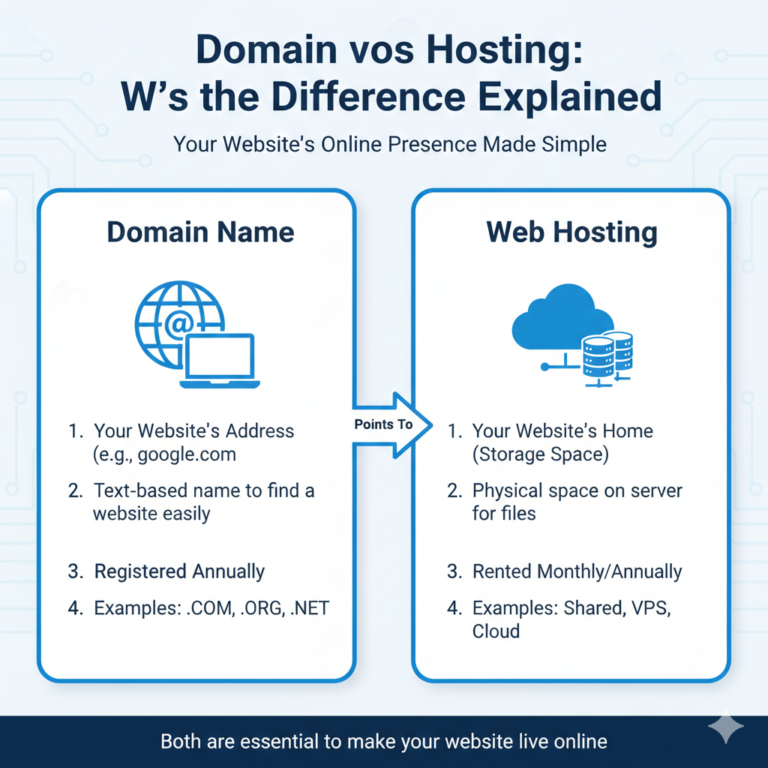
Hosting vs Domain
This is the most common confusion.
- Domain: The address (e.g., 123 Main Street).
- Hosting: The physical house where your furniture lives.
You need both to have a website, but they are often purchased from different companies.
Bandwidth vs Storage
- Storage: The size of your closet. How much stuff (files) can you keep?
- Bandwidth: The width of your front door. How many people (visitors) can enter and leave at once?
Cache vs CDN
- Cache: Keeping a copy of a file in the user’s browser so it doesn’t have to be downloaded again.
- CDN: Keeping copies of files on servers all over the world so the download distance is shorter.
Both improve speed, but they work in different ways.
FAQ – Website Terminology
What are the most important website terms to know?
For a beginner, the absolute essentials are Domain, Hosting, CMS (like WordPress), SSL (for security), and SEO (to get found). Understanding these five creates a solid foundation for launching a site.
What is the difference between hosting and a domain?
Your domain is your digital address (like website.com), while hosting is the rented space on a server where your website’s files and images are stored. You pay rent for hosting, and you pay a registration fee for the domain.
What website terms should beginners learn first?
Start with URL, Browser, Server, and DNS. Once you understand how a user gets to your site, move on to content terms like CMS and Theme.
Why is SSL important for websites?
SSL encrypts data between your site and the user. It is crucial because it protects sensitive info from hackers, builds trust with visitors (giving you the green padlock icon), and helps your site rank higher on Google.
What does bandwidth mean in hosting?
Bandwidth determines how much data can be transferred between your site and visitors. Higher bandwidth allows for more visitors at one time and faster loading of large files like videos.
What is SEO in simple terms?
SEO (Search Engine Optimization) is the process of improving your website so that search engines like Google can understand it better and rank it higher in search results. It involves using the right keywords, getting backlinks, and ensuring your site is fast.
Conclusion
The world of website ownership is vast, but you don’t need to be a computer scientist to succeed. By familiarizing yourself with this website glossary, you have already taken the first step toward digital literacy. You are no longer just nodding along when a developer talks about “DNS propagation” or “SSL certificates”—you understand the mechanics of your own business.
Keep this guide bookmarked. As you grow your online presence, you will likely encounter these terms again. The more comfortable you become with the language of the web, the more control you will have over your digital success.
Ready to learn more? If you are ready to put these terms into action, check out our step-by-step tutorial on launching your first