What Is DNS and How Does It Work in Web Hosting?
When you type a website address into your browser, something happens behind the scenes to connect you to that site. That “something” is DNS—a critical piece of infrastructure that makes the internet usable.
If you’ve ever wondered how your browser knows where to find a website, or why changes to your domain sometimes take hours to appear, understanding DNS is key. It’s one of the most fundamental concepts in web hosting basics, yet it often gets overlooked.
This guide breaks down what DNS is, how it works, and why it matters for anyone managing a website. Whether you’re launching your first site or troubleshooting a technical issue, knowing how DNS operates will help you make smarter decisions about your online presence.
What Does DNS Stand For?
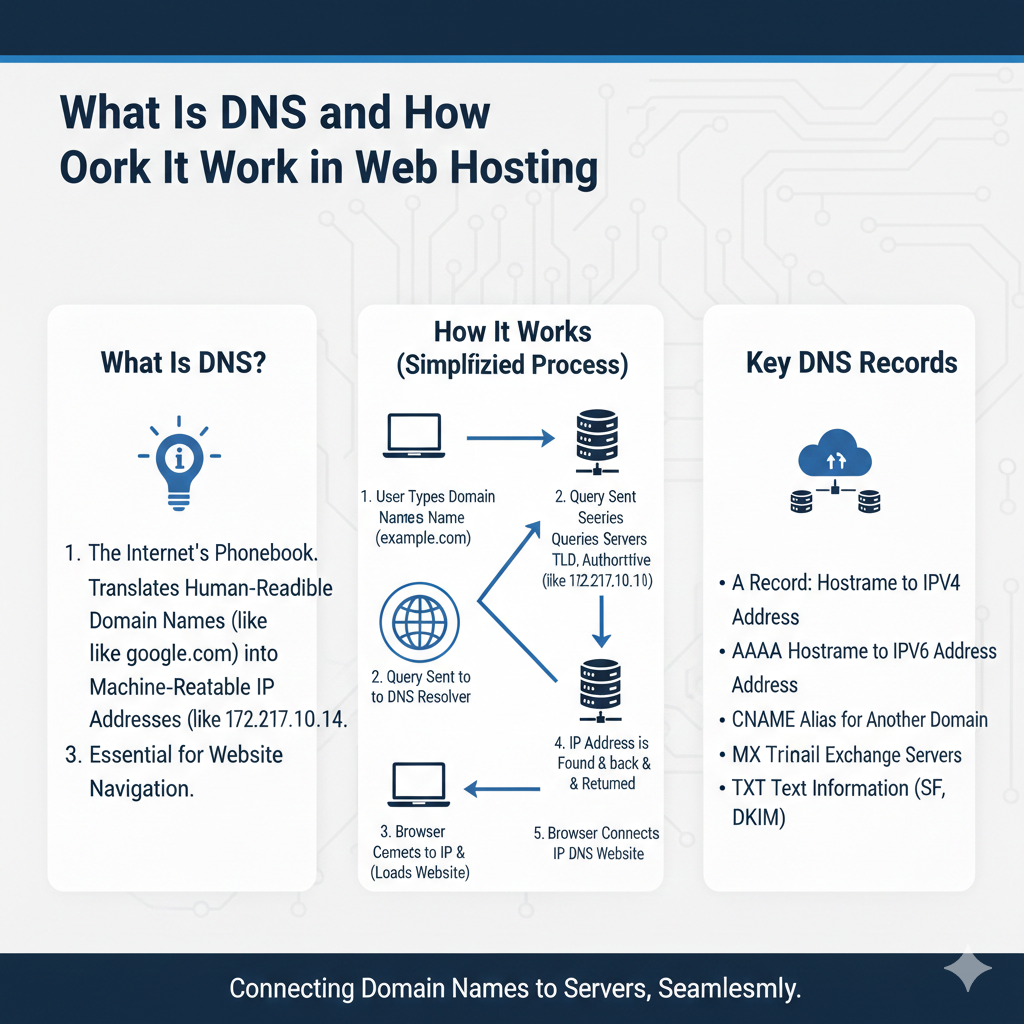
DNS stands for Domain Name System. It’s often described as the internet’s phonebook because it translates human-readable domain names (like example.com) into machine-readable IP addresses (like 192.0.2.1).
Without DNS, you’d need to memorize long strings of numbers just to visit your favorite websites. DNS automates this translation, making the web accessible and user-friendly.
Why DNS Is Important for Websites
DNS is essential because it bridges the gap between what humans understand and what computers need. When someone types your domain into a browser, DNS directs that request to the correct server where your website is hosted.
Without DNS:
- Domain names wouldn’t resolve to websites
- Browsers couldn’t locate servers
- The internet as we know it wouldn’t function
DNS is the invisible system that makes website accessibility possible. It connects users to your content seamlessly, without requiring any technical knowledge on their part.
Understanding how DNS fits into web hosting basics helps you grasp how the different components of your online presence work together.
How DNS Works (Step-by-Step)
DNS resolution happens in milliseconds, but several steps occur behind the scenes. Here’s how the process unfolds:
User Enters Domain
The process starts when someone types a domain name into their browser or clicks a link. The browser needs to find what an IP address is associated with that domain to load the website.
DNS Resolver Queries
The browser sends a query to a DNS resolver, usually operated by your internet service provider (ISP). The resolver acts as a middleman, searching for the IP address on behalf of the browser.
Root Name Servers
If the resolver doesn’t have the answer cached, it contacts a root name server. Root servers are the starting point of the DNS hierarchy. They don’t know the IP address, but they direct the resolver to the appropriate TLD server.
TLD Servers
TLD stands for Top-Level Domain. These servers handle extensions like .com, .org, or .net. The TLD server directs the resolver to the authoritative name server for the specific domain.
Authoritative Name Server
This server holds the actual DNS records for the domain. It knows the IP address and returns it to the resolver.
IP Address Returned
The resolver sends the IP address back to the browser, which then connects to the web server and loads the website. All of this happens in fractions of a second.
This multi-step process ensures accuracy and efficiency across billions of DNS queries every day.
What Is a DNS Record?
DNS records are instructions stored on authoritative name servers. They tell the DNS system how to handle requests for a domain. Different record types serve different purposes:
A Record: Maps a domain to an IPv4 address. This is the most common DNS record type and directly connects a domain to a server.
CNAME Record: Creates an alias for another domain. For example, www.example.com can point to example.com using a CNAME.
MX Record: Specifies mail servers for a domain. This record ensures emails sent to your domain reach the correct server.
TXT Record: Stores text information, often used for verification purposes or email authentication protocols like SPF and DKIM.
NS Record: Identifies the authoritative name servers for a domain. These records delegate DNS management to specific servers.
Each record type plays a role in how your domain functions, from website hosting to email delivery.
DNS Propagation Explained
When you make changes to your DNS records—like updating nameservers or modifying an A record—those changes don’t take effect instantly. This delay is called DNS propagation.
DNS propagation occurs because DNS information is cached at multiple levels: on your ISP’s resolver, on CDN nodes, and even in your browser. These caches help speed up DNS lookups, but they also mean updates take time to spread across the internet.
Typically, DNS propagation takes 24 to 48 hours, though changes often appear much faster. The exact timing depends on TTL (Time to Live) settings, which determine how long DNS records are cached.
During propagation, some users might see the old version of your site while others see the new one. This is normal and resolves itself as caches refresh.
Understanding DNS propagation is especially important when migrating hosting providers or updating server infrastructure, as timing can affect website availability.
DNS and Website Performance
DNS plays a direct role in how quickly your website loads. Every time someone visits your site, a DNS lookup must occur before the browser can connect to your server.
DNS Lookup Time: The time it takes to resolve a domain to an IP address adds to your overall page load speed. Faster DNS providers reduce this delay.
CDN Influence: Content delivery networks (CDNs) often include DNS optimization as part of their service. They use anycast routing to direct users to the nearest DNS server, minimizing lookup times.
Impact on Speed: While DNS lookups usually take only a few milliseconds, optimizing DNS can still improve performance—especially for first-time visitors whose browsers haven’t cached your DNS information yet.
Choosing a reliable DNS provider and configuring your records efficiently contributes to better hosting performance factors and a smoother user experience.
For sites using cloud infrastructure, DNS performance becomes even more critical, as traffic may be distributed across multiple servers or regions.
Common DNS Issues
DNS problems can prevent your website from loading correctly. Here are some common issues and what causes them:
DNS Not Resolving: If your domain isn’t resolving, the DNS records might be missing or misconfigured. This can happen after transferring a domain or changing hosting providers.
Incorrect Nameservers: Your domain must point to the correct nameservers for DNS records to work. If nameservers are outdated or wrong, visitors won’t reach your site.
Cache Problems: Sometimes, old DNS information gets stuck in caches. Flushing your local DNS cache or waiting for propagation to complete usually fixes this.
Most DNS issues are temporary and resolve within hours. However, checking your DNS settings carefully when making changes can help you avoid downtime.
DNS vs Hosting – What’s the Difference?
DNS and web hosting are related but serve different functions.
DNS translates your domain name into an IP address. It tells browsers where to find your website.
Hosting is the physical or virtual server where your website files are stored. It provides the resources needed to run your site.
You can change your DNS settings without switching hosting providers, and vice versa. They work together, but they’re separate services.
Understanding the difference between domain and hosting helps clarify how these pieces fit into your website’s infrastructure.
FAQs About DNS
Is DNS part of hosting?
No, DNS is separate from web hosting. However, many hosting providers include DNS management as part of their service. You can use third-party DNS providers while keeping your hosting elsewhere.
Can I change DNS without changing hosting?
Yes. You can update your nameservers or DNS records without moving your website to a new host. This is common when using a CDN or switching DNS providers.
How long does DNS propagation take?
DNS propagation typically takes 24 to 48 hours, though changes often appear sooner. The exact time depends on TTL settings and how quickly caches refresh.
What is an A record?
An A record maps a domain name to an IPv4 address. It’s the most commonly used DNS record and connects your domain directly to a web server.
What are nameservers?
Nameservers are specialized servers that store DNS records for your domain. They respond to DNS queries and direct traffic to the correct IP address.
Can I use multiple nameservers?
Yes, and it’s recommended for redundancy. Most domains use at least two nameservers to ensure reliability in case one fails.
What happens if my DNS records are wrong?
Incorrect DNS records can prevent your website from loading or cause emails to fail. Double-check your settings and allow time for propagation after making changes.
Do I need to renew DNS separately from my domain?
No. DNS management is tied to your domain registration. As long as your domain is active, your DNS records remain functional.
Understanding DNS Strengthens Your Web Presence
DNS might operate behind the scenes, but it’s the foundation of how the internet connects users to websites. Knowing how it works gives you more control over your site’s performance, security, and availability.
Whether you’re setting up a new domain, troubleshooting an issue, or optimizing for speed, a solid grasp of DNS makes the process smoother. It’s one of those technical concepts that, once understood, demystifies a lot of what happens when you manage a website.
If you’re ready to dive deeper into how websites function, exploring topics like IP addresses and server infrastructure will build on what you’ve learned here.