What Is Cloud Hosting? A Practical Beginner’s Guide
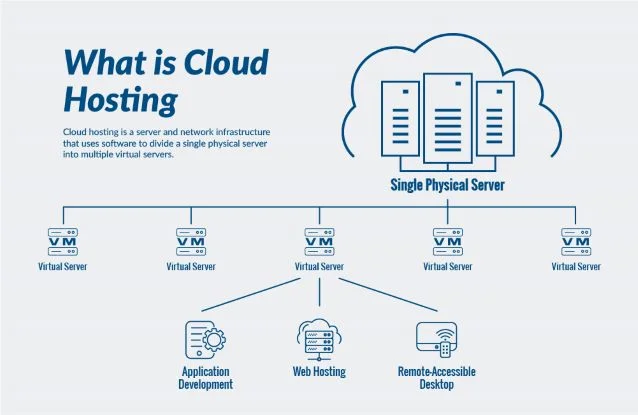
Cloud hosting uses virtualised computing infrastructure to provide resources for a website or application. Depending on the service, you might buy a virtual machine, a managed website plan or several components such as storage, a database and a load balancer.
The term does not tell you exactly what is included. In particular, a website on one cloud virtual machine is not automatically copied across several regions or ready to keep running through every failure.
Start with the product, not the label
Two companies can advertise cloud hosting while selling quite different services. Before comparing prices, work out which type of product you are considering.
| Product | What you might receive | What to clarify |
|---|---|---|
| Managed cloud website hosting | A prepared application environment with a management dashboard | Which website, maintenance, backup and recovery tasks the provider covers |
| Cloud virtual machine | A virtual server with selected resources | Who installs, secures and operates the application |
| A deployment built from cloud services | Separate compute, storage, database and networking components | How the components connect, scale, fail and appear on the bill |
A VPS can run on cloud infrastructure, so cloud and VPS are not always mutually exclusive options. If you need a simpler introduction to the server itself, see what a VPS does.
How does a cloud-hosted website work?
Visitors still use a domain name to reach the website. The application runs on the infrastructure you or the managed provider have configured. A small setup might use one virtual machine; a larger one might separate the application, database and uploaded files.
A load balancer can distribute requests between suitable application instances. That only helps when the application and its data are designed for the arrangement. Adding more web servers does not by itself make a single overloaded database faster.
As an illustration, imagine a store with repeatable application servers and a separately managed database. More application instances might help during a sale, but checkout queries and stock updates still need enough database capacity. This is a hypothetical example, not a measured customer result.
Scaling needs rules and limits
Vertical scaling means changing the resources available to a server, such as selecting a larger machine. Depending on the product, it can involve a restart or migration.
Horizontal scaling means changing the number of application instances. It can require shared storage, appropriate session handling, health checks and a way to distribute requests.
Automatic scaling adds policies and operational controls to that process. It needs supported services, configuration and sufficient quota. Scaling also takes time; it is not a promise that any traffic spike can be absorbed instantly.
Ask the provider what the plan actually scales, what triggers a change, which limits apply and what happens to the cost. Then test the behaviour for your application.
Cloud hosting is not the same thing as a CDN
A content delivery network can cache suitable content at locations closer to visitors. That does not mean every part of a cloud-hosted website automatically runs from the nearest location.
Dynamic pages, logged-in actions and database work may still depend on the application’s origin infrastructure. A CDN and cloud hosting can be used together, but they solve different parts of the delivery problem.
The DNS guide explains how a domain reaches the services behind a website.
What happens if something fails?
That depends on the product and architecture. A redundant service may be able to replace or fail over a failed component. A single-machine deployment can still experience an interruption.
Read the availability agreement for the service and configuration you will use. Check its measurement, exclusions and remedies. An infrastructure SLA does not automatically guarantee that your application, plugins or database queries will work correctly.
Also separate redundancy from backup. A second copy that immediately replicates changes can replicate a mistake too. Keep recoverable backups with appropriate retention and test the full restoration process.
Understand the bill before increasing capacity
Some cloud plans have a fixed subscription. Others charge for individual resources or usage. Your cost may include compute, persistent storage, backups, public addresses, data transfer, managed databases, load balancing and support.
Write down a normal-month estimate and a busy-month estimate. Check what remains billable when an application is idle or a virtual machine is stopped. Billing alerts are useful, but find out whether they only notify you or actually enforce a spending limit.
Usage-based pricing can suit an uneven workload. It can also be harder to predict than a fixed plan. Neither billing model is automatically cheaper without considering how the application runs.
Who manages security and maintenance?
The provider and customer have different responsibilities, and the split changes by service. With an unmanaged virtual machine, operating-system and application maintenance can remain yours. A managed service can take on more work without taking responsibility for every setting or user permission.
Before deployment, identify who handles updates, credentials, network access, monitoring and recovery. Hosting on cloud infrastructure does not remove the need to maintain your WordPress plugins or protect administrator accounts.
When is it worth considering?
Cloud products can be useful when you need particular infrastructure services, flexible capacity or a deployment design your current plan cannot support. They can also help a technical team provision environments consistently.
For a small website with predictable needs, a suitable shared hosting plan or another managed service may be easier to operate. Do not add components simply because they are available.
Five questions to ask a provider
- What exactly is included, and what does my team still manage?
- Which resources can change, and does changing them interrupt service?
- Which failures does the included architecture handle?
- How do backups, retention and restoration work?
- What would a normal month, a busy month and a recovery event cost?
Once you have those answers, test a small representative deployment before committing a production website. Compare the result with the alternatives in our shared vs cloud vs VPS guide.
Explore the cloud hosting guides for related topics. When you compare provider reviews, distinguish published specifications from actual test results and check the date of any pricing information.