Hosting Glossary 2026: Essential Web Hosting Terms Every Beginner Should Know
Starting a website is an exciting journey, but it often feels like learning a new language. You open a hosting provider’s page, and suddenly you’re bombarded with acronyms like DNS, SSL, VPS, and terms like “bandwidth” and “uptime.” If you feel overwhelmed, you aren’t alone.
Understanding these terms is crucial, not just for passing a tech quiz, but for making smart decisions about your online presence. Choosing the wrong hosting plan because you misunderstood “shared hosting” versus “VPS” can lead to slow loading speeds, security vulnerabilities, or paying for resources you don’t need.
This hosting glossary is designed to cut through the jargon. We have broken down the most essential web hosting terms into clear, beginner-friendly categories. Whether you are launching a personal blog, a business site, or an online store, this guide will empower you to navigate the world of web hosting with confidence.
Domain & Website Basics
Before you can host a website, you need to understand the fundamental identity of your site. These domain hosting terms refer to how people find you on the internet.
DNS (Domain Name System)
Think of DNS as the phonebook of the internet. Computers communicate using numbers called IP addresses (like 192.168.1.1), but humans prefer names like “google.com.” The DNS translates the human-readable domain name into the IP address of the server where the website lives. Without DNS, you would have to memorize complex strings of numbers to visit your favorite sites.
Domain Name
Your domain name is your website’s address on the internet. It is what users type into their browser bar to find you (e.g., example.com). It serves as your unique identity online. A domain name is different from web hosting; think of the domain as your street address and hosting as the actual house where your furniture (files) is stored.
Nameservers
Nameservers are a specialized part of the DNS system. They act like a traffic cop, directing visitors who type in your domain name to the specific server where your website data is hosted. When you change web hosts, you typically need to update your nameservers to point to the new host.
Subdomain
A subdomain is a prefix added to your main domain name to create a separate section of your website. For example, if your main domain is mysite.com, a subdomain could be blog.mysite.com or shop.mysite.com. Subdomains are often used to organize different parts of a website or to set up staging environments.
URL (Uniform Resource Locator)
A URL is the full web address used to locate a specific page or file on the internet. It includes the protocol (https://), the domain name (example.com), and the path to a specific page (/about-us). While a domain name is just the main address, the URL gives the exact location of specific content.
Hosting Types Explained
Not all hosting is created equal. Understanding these hosting types is vital because they determine the performance, cost, and control you have over your website.
Cloud Hosting
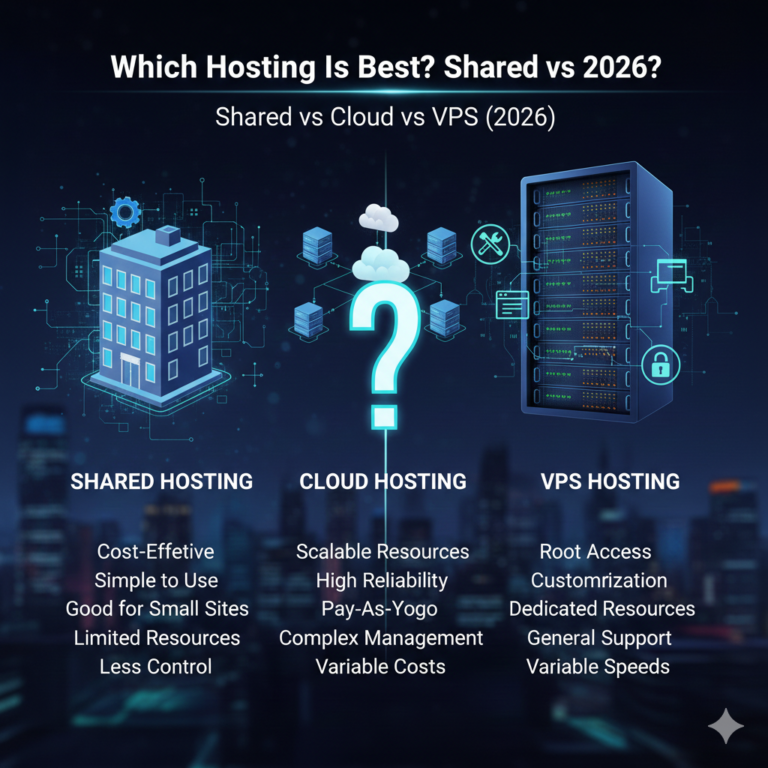
Cloud hosting utilizes a network of virtual servers that tap into an underlying network of physical servers. Instead of relying on a single machine, your site draws resources from a cluster of servers. This means if one server fails, another kicks in immediately. It is highly scalable, making it perfect for sites with fluctuating traffic.
Dedicated Hosting
In dedicated hosting, you rent an entire physical server exclusively for your website. You do not share resources with anyone else. This offers the highest level of performance, security, and control but comes with a higher price tag and requires more technical knowledge to manage.
Managed Hosting
Managed hosting is a service where the hosting provider handles the technical setup and maintenance of the server. This includes updates, backups, security scanning, and performance monitoring. It allows business owners to focus on their content rather than server management. It is popular for WordPress users (Managed WordPress Hosting).
Reseller Hosting
Reseller hosting allows you to buy hosting resources in bulk and resell them to your own clients for a profit. It essentially lets you start your own small web hosting business without the cost of building your own data center. Web designers and agencies often use this to offer hosting as an add-on service.
Shared Hosting
Shared hosting is the most common and affordable entry point for beginners. In this setup, multiple websites reside on a single physical server and share its resources (CPU, RAM, storage). It is cost-effective but can be slower if neighboring sites experience high traffic spikes.
VPS Hosting (Virtual Private Server)
VPS hosting is a middle ground between shared and dedicated hosting. While you still share a physical server with others, the server is virtually partitioned into private sections. You get dedicated resources (like RAM and CPU) that other users on the same physical machine cannot touch. It offers better stability and speed than shared hosting.
Server & Infrastructure Terms
When you buy hosting, you are essentially renting space on a computer. These server hosting terms describe the physical and virtual machinery powering your site.
Bandwidth
Bandwidth refers to the amount of data that can be transferred between your website, users, and the internet within a specific time frame. If your website has high bandwidth, it can transmit more data at once, allowing for faster loading times and more simultaneous visitors. Think of it like the width of a pipe; a wider pipe allows more water to flow through.
CPU (Central Processing Unit)
The CPU is the “brain” of the server. It handles all the processing tasks, such as executing scripts and database queries. A more powerful CPU allows your website to handle more complex tasks and dynamic content without slowing down.
Data Center
A data center is a physical facility that houses the servers, storage systems, and networking equipment needed to keep websites online. These facilities have robust power backups, cooling systems, and security measures. The geographic location of the data center affects your site speed; the closer the server is to your visitor, the faster the site loads.
IP Address (Internet Protocol Address)
An IP address is a unique string of numbers separated by periods (e.g., 192.0.2.1) that identifies a device on the internet. Every server has an IP address. In shared hosting, you might share an IP address with other sites, whereas a dedicated IP address is unique to your account.
RAM (Random Access Memory)
RAM is the temporary memory your server uses to process active tasks. When a visitor loads your website, the server uses RAM to run the scripts required to display the page. More RAM means your server can handle more simultaneous processes and visitors without crashing.
Server
A server is a powerful computer designed to store website files and deliver them to users over the internet. It runs 24/7. When someone types your domain into their browser, the server “serves” the requested files back to their computer.
SSD / NVMe (Solid State Drive / Non-Volatile Memory Express)
These terms refer to the type of storage drive used in the server. SSDs are much faster and more reliable than traditional Hard Disk Drives (HDDs) because they have no moving parts. NVMe is a newer, even faster technology for SSDs. Hosting plans using NVMe storage will typically load websites significantly faster than those using older HDDs.
Performance & Speed Terms
Speed is a ranking factor for Google and a crucial element of user experience. These hosting performance terms explain what makes a site fast.
Caching
Caching is the process of storing copies of files in a temporary storage location (cache) so they can be accessed more quickly. Instead of generating a page from scratch every time a user visits, the server delivers the cached version. This significantly reduces server load and improves page speed.
CDN (Content Delivery Network)
A CDN is a network of servers distributed globally. When you use a CDN, copies of your website’s static content (images, CSS, JavaScript) are stored on these servers. When a user visits your site, the content is delivered from the server geographically closest to them, drastically reducing loading times.
Core Web Vitals
Core Web Vitals are a set of specific factors that Google considers important in a webpage’s overall user experience. They measure dimensions of web usability such as load time (LCP), interactivity (INP), and visual stability (CLS). Good hosting directly impacts your ability to score well on these metrics.
Latency
Latency is the delay before a transfer of data begins following an instruction for its transfer. In simpler terms, it’s the time it takes for a signal to travel from a user’s computer to the server and back. High latency leads to “lag.” Choosing a server location close to your audience is the best way to reduce latency.
TTFB (Time to First Byte)
TTFB measures the time it takes for a user’s browser to receive the very first byte of data from the web server after making a request. A low TTFB indicates a responsive server. It is a key indicator of your server’s processing power and network speed.
Uptime
Uptime is the percentage of time a server is operational and accessible. Hosting providers often guarantee a certain uptime (e.g., 99.9%). If a server has 99.9% uptime, it means your site might be down for about 8 hours per year. 100% uptime is virtually impossible due to maintenance needs.
Security & Protection Terms
Keeping your data and your visitors safe is non-negotiable. Here are the hosting security terms you need to know.
Backup
A backup is a copy of your website files and database stored separately from your live site. If your site is hacked or you accidentally delete a critical file, you can restore your site to a previous state using a backup. Good hosts offer automatic daily backups.
DDoS (Distributed Denial of Service)
A DDoS attack is a malicious attempt to disrupt the normal traffic of a targeted server by overwhelming it with a flood of internet traffic. DDoS protection services filter out this malicious traffic to keep your site online during an attack.
Encryption
Encryption is the process of encoding information so that only authorized parties can access it. In web hosting, this typically refers to encrypting data transmitted between the user’s browser and the server, ensuring that sensitive info like credit card numbers cannot be intercepted.
Firewall
A firewall is a network security system that monitors and controls incoming and outgoing network traffic based on predetermined security rules. A Web Application Firewall (WAF) specifically protects web applications by filtering and monitoring HTTP traffic between a web application and the Internet.
Malware
Malware is short for “malicious software.” It includes viruses, worms, trojans, ransomware, and spyware designed to damage or gain unauthorized access to a computer system. Hosting providers often include malware scanning tools to detect and remove these threats.
SSL (Secure Sockets Layer)
SSL is a standard security technology for establishing an encrypted link between a web server and a browser. An SSL certificate activates the padlock icon in the browser address bar and allows the use of HTTPS. It is essential for trust and is a ranking factor for SEO.
Control Panel & Management Terms
You manage your hosting account through a dashboard. These server management terms relate to the tools you will use daily.
cPanel
cPanel is the most popular control panel in the web hosting industry. It provides a graphical interface and automation tools designed to simplify the process of hosting a website. You use it to manage domains, install software like WordPress, create email accounts, and manage databases.
Cron jobs
A Cron job is a Linux command used for scheduling tasks to be executed sometime in the future. It is often used to automate repetitive tasks, such as sending out scheduled emails, checking for updates, or clearing cache at specific intervals.
File Manager
The File Manager is a tool within your control panel (like cPanel) that allows you to access, upload, delete, and organize the files on your server directly from your web browser, without needing a separate FTP client.
FTP (File Transfer Protocol)
FTP is a standard network protocol used for the transfer of computer files between a client and server on a computer network. You use an FTP client (like FileZilla) to upload your website files from your computer to your hosting server.
Plesk
Plesk is another widely used web hosting control panel, similar to cPanel but with a different interface. It is available for both Linux and Windows servers, whereas cPanel is Linux-only. It is known for its user-friendly interface.
SSH (Secure Shell)
SSH is a cryptographic network protocol for operating network services securely over an unsecured network. It provides a secure channel over an unsecured network in a client-server architecture. Advanced users use SSH to manage their server via command line, offering more control than a standard graphical interface.
Email & Database Terms
Websites are more than just HTML files; they often rely on databases and communication tools.
IMAP (Internet Message Access Protocol)
IMAP is an email retrieval protocol. Unlike POP3, IMAP syncs your email across all devices. If you read an email on your phone, it is marked as read on your laptop too. The emails are stored on the server, not just downloaded to one device.
MySQL
MySQL is the most popular open-source relational database management system. It is used by WordPress and many other applications to store and retrieve data (like your blog posts, user comments, and product details).
phpMyAdmin
phpMyAdmin is a free software tool written in PHP, intended to handle the administration of MySQL over the Web. It provides a visual interface to manage your databases, run queries, and export/import data without using command lines.
POP3 (Post Office Protocol version 3)
POP3 is an older email protocol that downloads emails from the server to a single local device and then deletes them from the server (usually). It is good if you have limited server storage, but bad if you want to access email from multiple devices.
PostgreSQL
PostgreSQL is a powerful, open-source object-relational database system. It is known for its reliability, feature robustness, and performance. While MySQL is more common for simple sites, PostgreSQL is often favored for complex applications requiring advanced data integrity.
SMTP (Simple Mail Transfer Protocol)
SMTP is the standard protocol for sending emails across the internet. While IMAP and POP3 are for receiving, SMTP handles the outgoing mail. Hosting providers provide SMTP settings so you can send emails from your custom domain address.
Cloud & Advanced Hosting Terms
As technology evolves, so does the terminology. These cloud hosting terms are for those looking at more modern or complex setups.
Auto scaling
Auto scaling is a method used in cloud computing where the number of active servers scales up or down automatically based on the current load. If your site goes viral, auto scaling adds more resources instantly to handle the traffic, then reduces them when traffic drops to save costs.
Containers
Containers are lightweight packages of application code together with dependencies like specific versions of programming language runtimes and libraries required to run your software services. Docker is a famous container platform. They allow apps to run reliably when moved from one computing environment to another.
Hybrid cloud
A hybrid cloud is a computing environment that combines a public cloud and a private cloud by allowing data and applications to be shared between them. This gives businesses greater flexibility and more deployment options.
Kubernetes
Kubernetes is an open-source platform for managing containerized workloads and services. It facilitates both declarative configuration and automation. It basically manages your containers (see above) to ensure they are running correctly and efficiently across your server infrastructure.
Load balancer
A load balancer distributes incoming network traffic across multiple servers. This ensures that no single server bears too much demand. By spreading the work evenly, load balancers improve application responsiveness and increase availability.
Virtual machine (VM)
A virtual machine is a digital version of a physical computer. Virtualization software allows you to run multiple VMs on a single physical machine. Each VM has its own operating system and functions separately from the others. VPS hosting is built on VM technology.
Billing & Support Terms
Finally, the business side of hosting. Understanding these terms can save you money and headaches.
Add-ons
Add-ons are extra services or features that you can purchase in addition to your base hosting plan. Common add-ons include automated backups, advanced security suites, professional email services, or premium SSL certificates. Be careful to check which add-ons are automatically checked during checkout.
Money-back guarantee
Many hosting providers offer a risk-free trial period, typically ranging from 30 to 90 days. If you cancel within this window, you can receive a full refund of your hosting fees (though usually not domain registration fees).
Renewal pricing
This is a common industry practice where the introductory price for your first term is significantly lower than the price you pay when the plan renews. For example, you might pay $2.99/mo for the first year, but $8.99/mo upon renewal. Always check the renewal rate before signing up.
SLA (Service Level Agreement)
An SLA is a formal contract between a service provider and a customer that defines the level of service expected. In hosting, the SLA typically guarantees a certain uptime percentage (e.g., 99.9%) and outlines the compensation (usually service credits) if the provider fails to meet that standard.
Support ticket
A support ticket is a digital record of an interaction between a customer and the support team. When you have a complex issue that can’t be resolved via live chat, you submit a ticket. It allows for detailed tracking of the issue and communication until it is resolved.
Beginner Tips for Understanding Hosting Terms
Navigating the sea of jargon can be tough, but keeping a few tips in mind will help you make better choices.
Avoid marketing jargon
Hosting companies love buzzwords. Terms like “Unlimited Bandwidth” or “Unlimited Storage” often come with fair usage policies buried in the fine print. “Unlimited” usually means “unlimited until you use too much.” Always read the Terms of Service to understand the actual limits.
How to read hosting plans
When comparing plans, focus on the specs that matter to your project.
- Look at the RAM and CPU: These determine speed and stability.
- Check the storage type: Always prefer NVMe or SSD over HDD.
- Verify the renewal price: Don’t just look at the big, bold introductory price.
- Check for included security: SSL and backups should ideally be free.
FAQs – Hosting Glossary
What are the most important hosting terms for beginners?
The absolute essentials are Domain Name (your address), Shared Hosting (the entry-level plan type), SSL (security), Bandwidth (data transfer allowance), and Uptime (reliability). Understanding these five will get you through 90% of the initial setup process.
What is the difference between hosting and domain?
A domain name is your address on the internet (e.g., google.com), while web hosting is the physical space (server) where your website’s files live. You need both to have a functioning website. Think of the domain as your home address and hosting as the actual house.
What does bandwidth mean in hosting?
Bandwidth refers to the volume of data that can be transmitted from your server to your visitors in a given amount of time. Every time someone visits your page, they download data. If you have low bandwidth and high traffic, your site may slow down or become unavailable.
Is cloud hosting better than shared hosting?
Generally, yes, cloud hosting performs better. It is more scalable, reliable, and faster because it uses a network of servers. However, Shared Hosting is usually cheaper and easier for beginners to manage. Cloud hosting is better for growing sites, while shared is fine for new, small blogs.
What does uptime percentage mean?
Uptime is the amount of time a server is operational. A 99.9% uptime guarantee is the industry standard, meaning your site should not be down for more than about 43 minutes a month. High uptime is critical for professional businesses.
What is cPanel used for?
cPanel is a user interface used to manage your web hosting server. It allows you to do complex tasks with simple clicks, such as creating email accounts (name@yourdomain.com), installing WordPress, managing databases, and checking visitor statistics.
How much hosting storage do I need?
For a standard small business website or blog, 5GB to 10GB of storage is usually plenty. Text and code take up very little space. High storage requirements are only necessary if you are hosting large video files or high-resolution photography portfolios directly on your server.
Final Thoughts
Mastering web hosting terms gives you the upper hand when building your digital presence. You no longer have to guess which plan fits your needs or what a support agent is telling you. By understanding the difference between DNS and URL, or Shared and Cloud hosting, you can optimize your site for speed, security, and growth without breaking the bank.
Ready to put this knowledge to the test? Don’t let the jargon stop you from starting.