Hosting FAQ: Everything You Need to Know
Starting a website is an exciting venture, but the technical jargon can quickly become overwhelming. If you’ve ever found yourself staring blankly at terms like “VPS,” “bandwidth,” or “uptime,” you aren’t alone. For many new business owners and bloggers, the world of web hosting feels like a complex puzzle missing a few pieces.
Understanding the basics of hosting is critical because your host acts as the foundation of your online presence. Choose the right one, and your site will be fast, secure, and always available. Choose the wrong one, and you might face constant downtime, slow loading speeds, and security vulnerabilities that drive visitors away.
This guide is designed for complete beginners and non-technical users who want to make informed decisions without getting a degree in computer science. By the end of this post, you’ll understand exactly how hosting works, which type fits your budget, and how to spot a reliable provider. Let’s clear up the confusion and get your website online with confidence.
What Is Web Hosting? (Beginner Explanation)
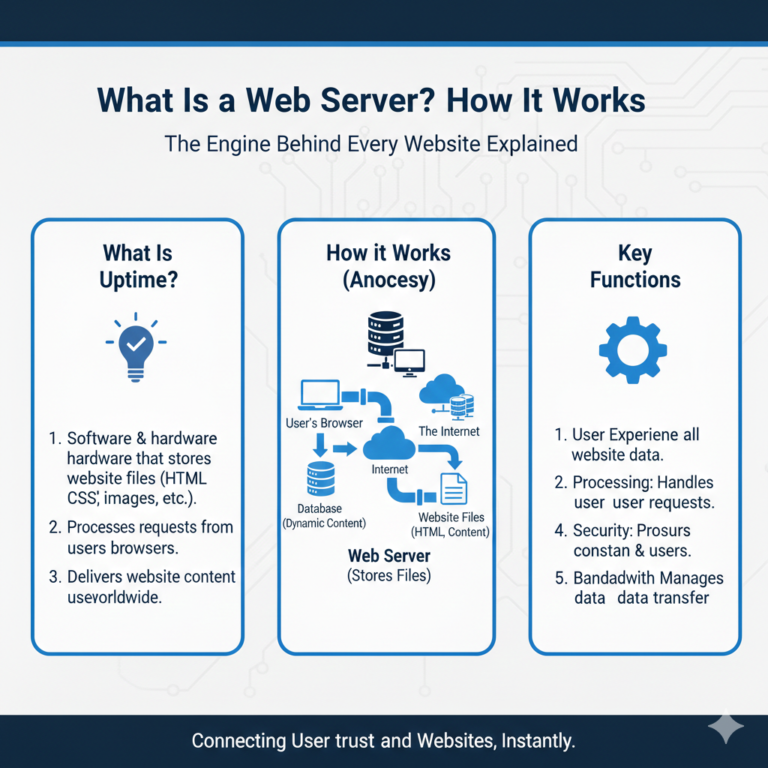
At its core, web hosting is a service that allows you to publish a website on the internet. When you sign up for a hosting service, you are essentially renting space on a physical server where you can store all the files and data necessary for your website to function.
Think of it like building a house. Your domain name (e.g., yoursite.com) is the street address that tells people where to go. The website content is the actual house—the furniture, walls, and decorations. Web hosting is the plot of land underneath that house. Without the land, you have nowhere to build.
How does web hosting work?
When a user wants to view your website, they type your domain name into their browser. Their computer connects to the server where your website is hosted. The server then retrieves your stored files (images, HTML, code) and delivers them to the user’s browser, displaying your site.
This process happens in milliseconds. However, the quality of that “land” matters. High-quality hosting ensures that the connection is stable and fast, while poor hosting can lead to delays. If you are asking “what is web hosting” for the first time, just remember: it’s the home for your digital files.
What Are the Different Types of Web Hosting?
Not all land is the same. You wouldn’t build a skyscraper on a sandy beach, and you wouldn’t build a garden shed on a concrete foundation meant for a mall. Similarly, there are different types of web hosting designed for different needs.
Shared Hosting
Shared hosting is like living in an apartment building. You have your own unit (website), but you share resources like water, electricity, and the elevator (CPU, RAM, and bandwidth) with hundreds of other neighbors.
- Pros: It is the most affordable option, making it ideal for beginners.
- Cons: If a neighbor throws a loud party (gets a massive spike in traffic), it might slow down your site.
VPS Hosting (Virtual Private Server)
VPS hosting is like owning a townhouse or condo. You still share the physical building (server) with others, but you have dedicated resources that are strictly yours. No one else’s usage impacts your performance.
- Pros: Better performance and stability than shared hosting.
- Cons: Slightly more expensive and may require a bit more technical know-how.
Cloud Hosting
Cloud hosting is a modern solution where your site isn’t stored on a single physical server. Instead, it operates across a network of interconnected servers. If one server goes down, another instantly takes over.
- Pros: incredibly reliable and scalable. If your traffic spikes, the cloud adjusts instantly.
- Cons: Pricing can sometimes be variable based on usage.
Dedicated Hosting
Dedicated hosting is like owning a large, detached house on a private estate. You rent the entire physical server. No sharing, no fighting for resources. It’s all yours.
- Pros: Maximum performance, security, and control.
- Cons: Expensive and requires technical management skills.
Managed WordPress Hosting
This is a concierge service specifically for WordPress sites. The host handles technical aspects like updates, security, and caching specifically optimized for the WordPress platform.
- Pros: Hassle-free and fast.
- Cons: Usually more expensive than generic shared hosting.
When comparing shared vs VPS vs cloud hosting, consider your traffic levels. New blogs work fine on shared hosting, while growing businesses often need the power of VPS or Cloud.
How Much Does Web Hosting Cost?
Pricing is often the biggest factor for new website owners. The web hosting cost per month varies significantly depending on the type of hosting you choose and the length of your contract.
Monthly Pricing Ranges
- Shared Hosting: $2 – $10 per month.
- VPS Hosting: $20 – $60 per month.
- Dedicated Hosting: $80 – $300+ per month.
Renewal Costs
This is the most common trap for beginners searching for cheap web hosting. Many providers offer an attractive introductory rate (e.g., $2.99/mo) for the first term. However, when that term expires, the price often jumps to the “regular” rate, which can be two or three times higher. Always check the renewal price before signing up.
Hidden Fees
Be on the lookout for extra costs during checkout. Some hosts will automatically check boxes for add-ons like “SiteLock Security,” “Daily Backups,” or “Domain Privacy.” While these are useful, you should decide if you need them rather than paying for them accidentally.
Which Hosting Is Best for Beginners?
If you are launching your first site, you don’t need the raw power of a dedicated server. The best hosting for beginners strikes a balance between affordability, support, and usability.
Ease of Use
Look for a host that offers a user-friendly control panel, such as cPanel or a custom dashboard. You want easy web hosting that allows you to install WordPress with a single click, create professional email addresses easily, and manage files without writing code.
Support
When things go wrong—and they eventually will—you need help fast. Look for providers with 24/7 customer support via live chat. Test their response time before you buy. A provider that takes 20 minutes to answer a simple pre-sales question will likely be frustrating to deal with during an actual emergency.
Scalability
You might be small now, but you plan to grow. Good beginner hosting allows you to upgrade from a shared plan to a VPS seamlessly as your traffic increases, without needing to move your entire website manually.
How Does Hosting Affect Website Speed and SEO?
Your choice of host has a direct impact on how Google ranks your website. Search engines prioritize user experience, and page speed is a major factor in that experience.
Server Performance
If your host uses outdated hardware or overloads their servers, your website will load slowly. This high “Time to First Byte” (TTFB) signals to Google that your site is sluggish. Since users tend to abandon sites that take more than three seconds to load, hosting affects website speed significantly.
Hosting and SEO
Beyond speed, uptime is crucial for SEO. If your host frequently goes offline (downtime), Google can’t crawl your site, and users can’t visit it. Frequent downtime can cause your rankings to plummet. Furthermore, server location matters. If your audience is in the US but your server is in Europe, the physical distance can cause lag. A host with a Content Delivery Network (CDN) can help mitigate this by serving your site from servers closer to the user.
How Secure Is Web Hosting?
Cybersecurity is no longer optional. A secure hosting provider offers built-in tools to protect your data and your visitors’ information.
SSL Certificates
An SSL certificate encrypts the connection between your website and the visitor’s browser. It turns the “http” in your URL into “https” and displays a padlock icon. Google flags sites without SSL as “Not Secure,” which scares away visitors. Most reputable hosts now include a free SSL certificate.
Backups
Imagine spending months building your site, only to have it vanish due to a hacker or a software error. Web hosting security must include regular, automated backups. Check if your host offers daily or weekly backups and if they charge a fee to restore them.
Malware Protection
Good hosts actively scan their servers for malicious code and viruses. They should have firewalls in place to prevent attacks before they reach your website.
Do I Need a Domain Name and Hosting Together?
A common point of confusion is the domain and hosting difference. As mentioned earlier, the domain is your address, and hosting is your land. You need both to have a functioning website.
Domain vs. Hosting
You can purchase your domain name from one company (a registrar) and your hosting from another. This is often a smart strategy because it gives you more control. If you ever want to change web hosting providers, you don’t have to worry about transferring your domain at the same time.
Bundles
However, many beginners prefer to buy domain and hosting together for simplicity. Many hosting companies offer a “Free Domain for Year 1” as a perk for signing up. This is convenient, just remember that you will have to pay the renewal fee for the domain after the first year.
Can I Upgrade or Change Hosting Later?
You are never married to your hosting provider. If you outgrow your plan or become dissatisfied with the service, you can move.
Scaling
If your blog post goes viral and you suddenly get 50,000 visitors in a day, a shared plan might crash. Most hosts allow you to upgrade hosting plan tiers instantly to handle the load.
Migration
If you want to leave your provider entirely, you will need to migrate your site. This involves moving your files and database to a new server. Many high-quality hosts offer free migration services where their team handles the technical transfer for you, ensuring zero downtime.
What Features Should I Look for in a Hosting Provider?
With thousands of companies competing for your business, filtering through the noise is tough. When evaluating the best hosting features, prioritize these specific technical specs:
- Uptime Guarantee: Look for 99.9% or higher. Anything less is unreliable.
- Storage Type: Ensure they use SSD or NVMe storage, which is much faster than traditional HDD drives.
- Bandwidth: This is the amount of data your site can transfer. “Unmetered” bandwidth is standard for shared plans and is usually sufficient for small to medium sites.
- Customer Reviews: Don’t just look at the star rating; read the text. Look for complaints about reliable web hosting or support responsiveness.
FAQ – Web Hosting Questions (High-Intent SEO)
Q1: What is the best web hosting for small businesses?
The best hosting for small businesses typically offers a mix of speed, security, and scalability. VPS or high-tier shared hosting plans from reputable providers like SiteGround, Bluehost, or WP Engine are popular choices because they offer room to grow without the high cost of a dedicated server.
Q2: How much does web hosting cost per year?
For a basic shared hosting plan, expect to pay between $30 and $100 for the first year due to introductory discounts. Upon renewal, this often increases to $100–$180 per year. Specialized managed hosting can cost between $300 and $600 per year.
Q3: Is free web hosting safe?
Generally, no. Free web hosting usually comes with severe limitations: slow speeds, forced advertisements on your site, no customer support, and poor security. For a professional or business site, free hosting is rarely worth the risk.
Q4: Can I host more than one website on one hosting plan?
Yes, but it depends on your specific plan. The cheapest entry-level plans often allow only one website. However, mid-tier “Plus” or “Pro” plans usually allow for unlimited websites on a single account.
Q5: How do I choose the right hosting provider?
Identify your needs first. If you are a beginner, prioritize support and ease of use. If you are a developer, prioritize root access and server specs. Always check renewal prices and uptime guarantees before committing.
Q6: Does hosting affect SEO rankings?
Yes. Slow loading times and frequent downtime caused by poor hosting will negatively impact your Google rankings. Secure hosting with SSL is also a ranking factor.
Q7: Can I transfer my website to another host?
Yes, you can change web hosting providers at any time. You will need to move your website files and database to the new server and update your domain’s DNS settings. Many hosts offer free migration services to help with this.
Q8: Do hosting providers offer backups and security?
Most reputable hosts offer basic security and backups, but the frequency varies. Some back up weekly, while others back up daily. Always confirm if the backup service is free or a paid add-on.
Make Your Choice with Confidence
Navigating the world of servers and domains doesn’t have to be scary. By understanding the basics—what hosting is, the types available, and the features that matter—you are already ahead of most beginners. Remember that your hosting choice is the foundation of your online success. It impacts your speed, your security, and your ability to grow.
Don’t let analysis paralysis stop you. Assess your budget, estimate your traffic, and pick a reliable web hosting provider that offers the support you need. The internet is waiting for your website—go get it online.
Ready to build your site? Compare our top-rated hosting plans today to find the perfect home for your new website.