What Is a Data Center in Web Hosting? Explained
When you visit a website, have you ever stopped to wonder where it actually lives? The answer lies in something called a data center—a physical facility that powers the digital world. Without data centers, websites wouldn’t load, emails wouldn’t send, and cloud apps wouldn’t function.
If you’re exploring web hosting options or just curious about how the internet works behind the scenes, understanding data centers is a great place to start. They’re the backbone of modern web hosting, storing everything from your favorite blog posts to massive e-commerce platforms.
In this guide, we’ll break down what a data center is, what it contains, why its location matters, and how it supports the websites you visit every day. By the end, you’ll have a clear picture of how these facilities keep the internet running smoothly.
See also: Web Hosting Infrastructure: How Servers, RAM, CPU & Storage Work
What Is a Data Center?
A data center is a secure, climate-controlled facility designed to house servers, networking equipment, and the critical infrastructure that powers websites and online services. Think of it as a fortified warehouse full of computers working around the clock to keep the internet alive.
These facilities are built to handle massive amounts of data while maintaining strict security and environmental controls. They protect hardware from physical threats like fire, flooding, and unauthorized access. They also ensure optimal operating conditions through advanced cooling systems and backup power supplies.
Data centers form the foundation of , connecting your website to users around the globe. Hosting providers rent space in these facilities to store client websites on powerful servers that stay online 24/7.
What Does a Data Center Contain?
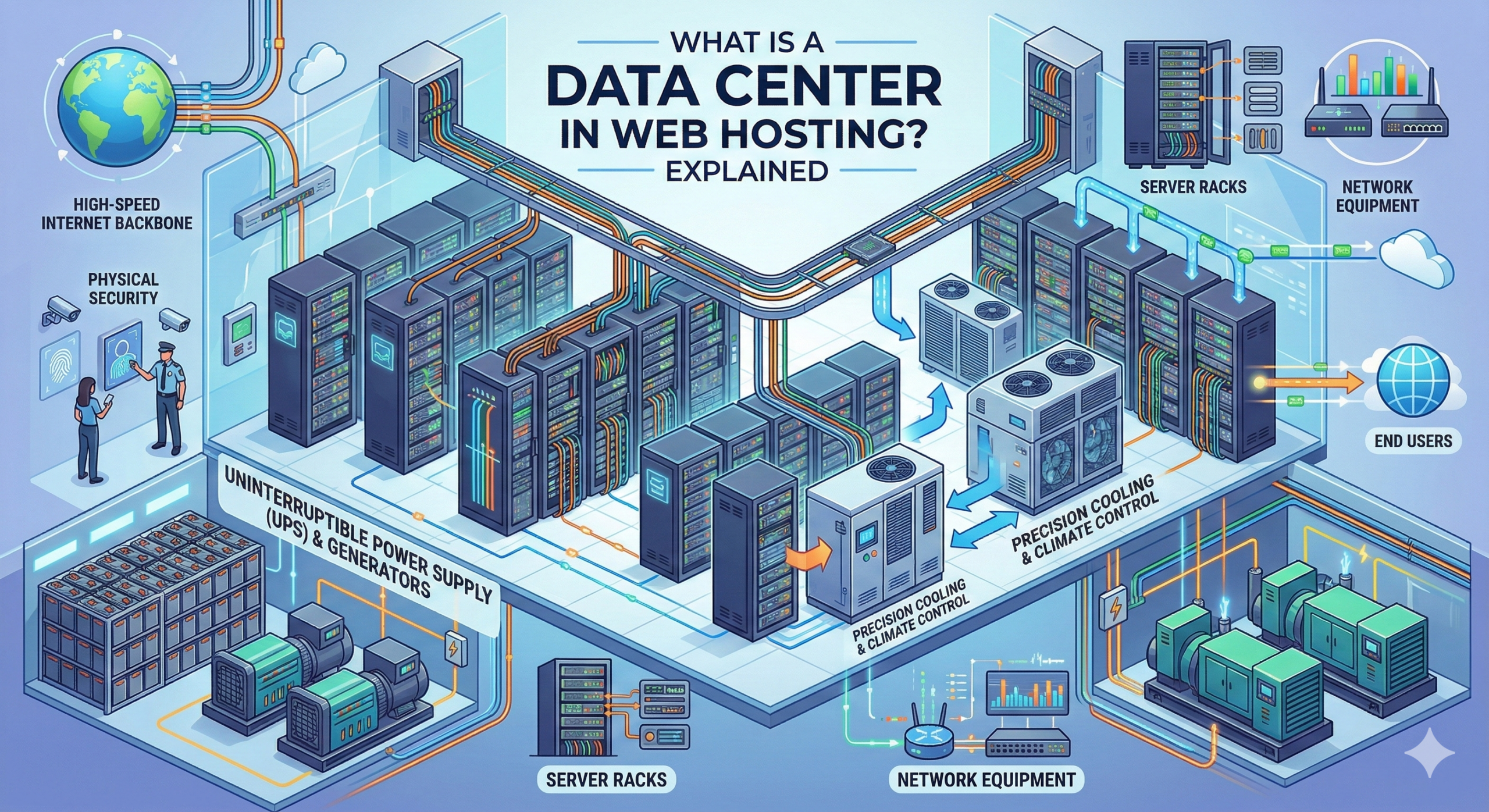
Data centers are packed with specialized equipment designed to keep websites running reliably. Here’s what you’ll typically find inside:
Server Racks
Rows of server racks hold the physical machines that store website files and process requests. Each server handles specific tasks, from hosting websites to managing databases. Understanding helps clarify how these machines serve content to visitors.
Cooling Systems
Servers generate significant heat when operating continuously. Data centers use industrial-grade air conditioning, liquid cooling, or advanced airflow management to maintain safe temperatures. Without proper cooling, equipment would overheat and fail.
Backup Power
Uninterruptible Power Supply (UPS) systems provide instant backup when main power fails. Diesel generators kick in for extended outages, ensuring servers never go dark. This redundancy keeps websites accessible even during power grid failures.
Network Connectivity
High-speed internet connections link data centers to the global network. Multiple fiber optic lines from different providers create redundant pathways, so if one connection fails, others take over seamlessly.
Fire Suppression
Water-based sprinklers would destroy electronic equipment, so data centers use specialized suppression systems. These release gases that extinguish fires without damaging servers or corrupting data.
See also: What Is a Web Server? How It Works Explained
Physical Security
Biometric scanners, security cameras, and armed guards protect against unauthorized access. Many facilities use mantrap entry systems that only allow one person through at a time after identity verification.
The combination of these elements creates an environment where can operate efficiently and safely, delivering consistent performance for hosted websites.
Why Data Center Location Matters
Where your website’s data center sits on the map affects how quickly your site loads for visitors. Here’s why location is more than just geography:
Latency and Load Times
Data travels at the speed of light, but distance still matters. When someone requests your website, signals must travel from their device to your server and back. The farther that journey, the longer it takes. A data center in New York will serve New York visitors faster than one in Tokyo.
Regional Performance
If most of your audience lives in a specific region, choosing a nearby data center improves their experience. E-commerce sites targeting European customers benefit from European data centers, while businesses serving Australian markets should consider Sydney or Melbourne facilities.
SEO and Geographic Targeting
Search engines consider server location when ranking websites for local searches. A business targeting Canadian customers may rank better in Canadian search results when hosted on Canadian servers. This doesn’t guarantee top rankings, but it can provide a slight edge in competitive markets.
Modern helps solve location challenges by distributing your website across multiple data centers. This ensures visitors always connect to the nearest server, regardless of where they’re located.
Site reliability also depends on data center quality. Facilities with robust infrastructure deliver better , keeping your site accessible when visitors need it most.
What Is Data Center Redundancy?
Redundancy means having backup systems ready to take over when primary systems fail. Data centers build redundancy into every critical component to prevent outages.
Power Redundancy
Beyond UPS batteries and generators, redundant data centers have multiple power feeds from separate electrical grids. If one power source fails, others instantly compensate. Some facilities even generate their own power to eliminate dependency on local utilities.
Network Redundancy
Multiple internet service providers connect to the facility through different physical routes. If one provider experiences an outage or a fiber line gets cut, traffic automatically routes through alternative connections. This prevents network failures from taking your website offline.
Storage Redundancy
Modern replicate data across multiple drives or locations. When one drive fails, copies on other drives keep your website running without data loss. This applies to both traditional hard drives and newer solid-state storage.
Geographic Redundancy
The most robust setups mirror entire data centers across different geographic regions. If a natural disaster affects one facility, a replica facility in another location can take over operations within minutes.
This layered approach to redundancy dramatically reduces the risk of downtime. While no system is 100% failure-proof, properly redundant data centers come remarkably close to continuous operation.
See also: What Is RAM in Web Hosting? Explained for Beginners
What Is CPU in Web Hosting? How It Affects Performance
Tier Levels of Data Centers
The Uptime Institute created a classification system to help organizations evaluate data center reliability. These tier levels range from basic to enterprise-grade:
Tier I: Basic Capacity
Tier I facilities provide fundamental infrastructure with single power and cooling paths. They have no redundant components, making them vulnerable to both planned and unplanned outages. Expect about 99.67% uptime, which translates to roughly 28 hours of downtime per year.
Tier II: Redundant Components
These data centers add redundant power and cooling components but still use single distribution paths. They offer better availability than Tier I, achieving approximately 99.75% uptime with about 22 hours of annual downtime.
Tier III: Concurrently Maintainable
Tier III facilities have multiple power and cooling distribution paths, with only one active at a time. Staff can perform maintenance without shutting down operations. This tier delivers around 99.98% uptime, limiting downtime to roughly 1.6 hours per year.
Tier IV: Fault Tolerant
The highest tier features fully redundant infrastructure with multiple active power and cooling distribution paths. These facilities can withstand any single equipment failure without impacting operations. They achieve 99.99% uptime, with less than 30 minutes of annual downtime.
Most shared hosting providers use Tier III facilities, which balance cost and reliability well for typical websites. Mission-critical applications that can’t tolerate downtime often require Tier IV infrastructure, though it comes at a premium price.
How Data Centers Support Cloud Hosting
Cloud hosting has transformed how websites use data center resources. Instead of relying on one physical server in one location, cloud hosting distributes your website across multiple servers in multiple data centers.
This approach offers several advantages. If one server experiences issues, others seamlessly handle its workload. Traffic spikes that would overwhelm a single server get distributed across many machines, maintaining performance during busy periods.
Cloud providers operate networks of data centers across different continents. Your website might simultaneously exist in facilities in Virginia, London, Singapore, and São Paulo. Content delivery networks (CDNs) use this distribution to serve website files from the location closest to each visitor.
The flexibility of cloud infrastructure lets you scale resources instantly. Need more processing power during a product launch? The cloud allocates additional servers within seconds. When traffic returns to normal levels, those resources get released for other users.
This shared infrastructure model makes enterprise-grade data center technology accessible to small businesses and individuals. You get the benefits of Tier III or Tier IV facilities without building your own.
Data Center vs Server – What’s the Difference?
These terms sometimes get used interchangeably, but they describe different things. Understanding the distinction helps when discussing hosting options.
A server is a single computer designed to process requests and deliver content. It’s a physical or virtual machine with a processor, memory, storage, and network connection. Your website files live on a server, and that server responds when someone visits your site.
A data center is the building that houses hundreds or thousands of servers. It provides the environment, power, cooling, and connectivity those servers need to operate. The data center is the facility; the server is the equipment inside.
When a hosting provider says “our data center,” they’re referring to the physical location where their servers live. When they mention “your server,” they’re talking about the specific machine allocated to host your website.
Some hosting plans give you a dedicated server—one machine entirely for your use. Others use shared servers, where multiple websites run on the same machine. Both scenarios still involve servers housed in data centers.
Learning more about clarifies how these individual machines fit into the larger data center ecosystem.
See also: The Evolution of Web Hosting: From Shared Servers to Cloud Infrastructure
FAQs About Data Centers
Are data centers secure?
Yes, professional data centers implement multiple security layers. Physical security includes biometric access controls, 24/7 surveillance, and security personnel. Digital security features firewalls, intrusion detection systems, and encrypted connections. Most facilities also maintain certifications like ISO 27001 or SOC 2, which verify their security practices meet industry standards.
What is a Tier III data center?
A Tier III data center offers concurrently maintainable infrastructure with multiple power and cooling distribution paths. Staff can perform maintenance or replace equipment without taking systems offline. These facilities deliver approximately 99.98% uptime, making them suitable for businesses that need high reliability without the cost of Tier IV infrastructure.
Does data center location affect SEO?
Data center location can influence SEO in two ways. First, search engines may favor locally hosted websites for region-specific searches, though this is a minor ranking factor. Second, server location affects page load speed, which is a confirmed ranking signal. Faster-loading sites tend to rank better, and proximity between server and visitor improves speed.
How do cloud providers use multiple data centers?
Cloud providers operate networks of data centers across different geographic regions. They replicate your data across these facilities and use load balancing to distribute traffic efficiently. If one data center fails, others automatically handle its workload. This geographic distribution also enables faster content delivery by serving files from the location nearest to each visitor.
Can I choose my data center location?
Most hosting providers let you select your preferred data center location during signup. Shared hosting plans might offer fewer choices, while cloud and dedicated hosting typically provide more options. Choose a location near your primary audience for optimal performance. If you need global reach, consider providers with data centers on multiple continents or use a CDN to supplement a single location.
Make an Informed Hosting Decision
Data centers form the invisible infrastructure that makes the internet possible. These facilities protect your website, ensure consistent performance, and keep your content accessible to visitors worldwide.
When evaluating hosting providers, consider their data center quality, locations, and redundancy measures. Look for providers with Tier III or higher facilities, especially if uptime is critical for your business. Check whether they offer data center locations that align with your audience’s geography.
Understanding data centers helps you ask better questions and choose hosting that truly meets your needs. The right infrastructure keeps your website fast, secure, and online when visitors need it most.