What Is a Data Center? Facility, Location and Website Reliability
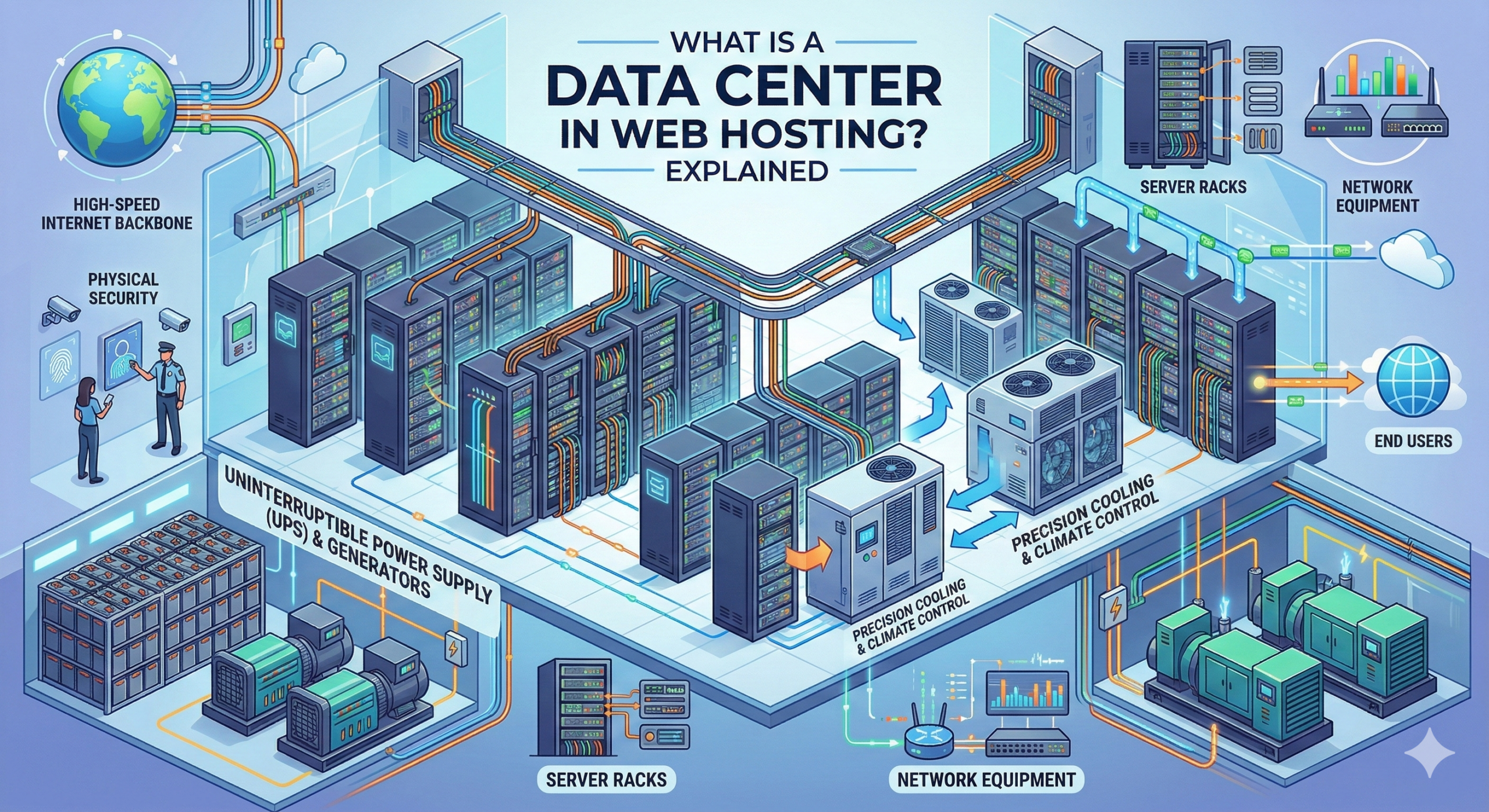
A data center is a physical facility that houses computing and networking equipment. Your hosting provider may own a facility, rent space in one or use another company’s infrastructure services.
The building and its supporting systems matter, but they are only part of website reliability. A well-equipped facility cannot repair an application error or create a missing backup.
What the facility provides
Servers need power, cooling, network connections and a controlled physical environment. Facilities organise these through equipment racks, electrical systems, cooling arrangements and access procedures.
The specific design varies. Do not assume every supplier has the same generator coverage, independent network routes, physical security or maintenance procedures. AWS’s data-center overview introduces the main facility components.
Separate the facility from the service
| Layer | Example question |
|---|---|
| Facility | How are power, cooling and connectivity maintained? |
| Hosting platform | What happens when a physical machine or storage service fails? |
| Application | Can the website continue or recover, including its data? |
| Operations | Who detects the problem, acts and verifies recovery? |
A spare power component addresses a different problem from a second application instance. A replica can also copy accidental deletion, so replication and backup serve different recovery purposes.
Location affects the path, not just the map pin
Distance and network routing can influence latency, but the nearest city is not automatically the fastest service. The application may also contact a database or third-party service somewhere else.
A CDN can serve eligible cached content closer to users without moving the entire application. Confirm the placement of the origin, database and backups separately. The international hosting guide provides a service-location worksheet.
Interpret redundancy claims narrowly
Ask which component is redundant, which failures it addresses and how a switch is initiated. Establish whether recovery is automatic, manual or dependent on an additional service.
Two locations are not useful failover by themselves. Data consistency, routing, capacity and the recovery procedure all need an understood design. Test the supported recovery process rather than assuming a provider’s facility count protects your particular plan.
A tier label is not your website’s uptime
If a supplier claims a facility classification or certification, ask for current evidence identifying the site and scope. Do not convert that label into a guaranteed application-availability percentage.
This article’s earlier fixed tier-to-uptime table has been removed because it did not establish the availability of a hosting product or website. Use the uptime guide to compare defined measurements and the actual service promise instead.
Ask about the operating boundary
Find out who owns the hosting account, who can restore data and how support escalates an incident beyond the reseller. Maintain access to your own recovery copies where the service design allows it.
Use the backup and recovery checks before relying on a resilience claim. The useful answer explains what happens to your site during a specific failure, not merely which building contains a server.