Shared, VPS and Cloud Hosting: A Two-Part Decision
“Shared,” “VPS” and “cloud” are not three perfectly separate boxes. A virtual server can run on cloud infrastructure, and shared hosting can use cloud resources behind the provider’s service. First understand what each product gives you.
Make two decisions: which resource and configuration boundary the application needs, and who will operate it. This avoids buying more control than your team can maintain or assuming a cloud label guarantees resilience.
Decision one: allocation and control
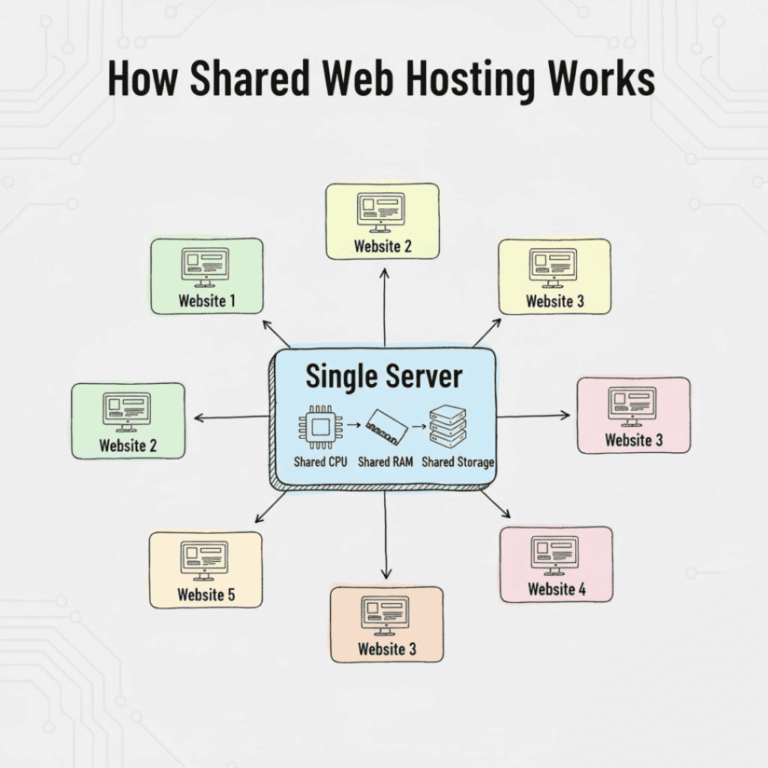
Shared hosting generally provides an account within a provider-controlled environment. You use supported software and stay within account limits. Check those limits rather than estimating capacity from the number of websites on a server.
A VPS gives a virtual environment with product-specific allocations and access. Shared versus dedicated CPU, storage arrangements and tenancy can differ. It is incorrect to promise that every VPS eliminates all contention or provides identical isolation.
Cloud describes an infrastructure and service arrangement. The actual product may offer configurable capacity and usage-based billing, but scaling behavior, quotas, billing and failure handling still require verification.
Decision two: operating work
List patching, deployment, monitoring, backups, restoration and incident response. Confirm the supplier’s scope for each layer, including runtime, CMS, extensions and custom code.
The management responsibility guide explains why a managed shared plan and an unmanaged VPS can leave very different duties with the customer. More administrative access also needs an operator.
Check the application before comparing price
Record required versions, dependencies, scheduled work and external connections. An unsupported component may rule out a product even when the headline capacity looks sufficient.
The broader architecture comparison adds dedicated-server considerations. Use the limits guide to identify execution constraints that disk space does not reveal.
Compare recovery and growth
Ask what happens when a node fails and when more capacity is needed. Verify whether the proposed change requires restart, migration or a separate purchase. Automatic failover is an architectural property to check, not a universal cloud feature.
Keep a recovery copy and test it independently of any upgrade claim. Replication and backups address different failure situations and do not replace each other.
Use a matched cost and acceptance record
Price the same workload, support, recovery and operating effort. Include normal and busy usage, commitment and renewal. Do not compare a narrow server fee with an entire managed package.
The shared, VPS and cloud comparison offers a further decision route. Choose after the essential requirements pass, using evidence from the application instead of fixed price bands, assumed speed tiers or a universal hosting winner.