What Is an IP Address in Web Hosting? (Beginner Guide)
Every website on the internet has a unique address that helps browsers find and load it. That address is called an IP address, and understanding how it works is one of the fundamental web hosting basics you should know.
If you’ve ever wondered how your browser knows exactly where to go when you type in a website name, or why some hosting plans offer a “dedicated IP” while others don’t, you’re in the right place.
This guide breaks down everything you need to know about IP addresses in web hosting—what they are, how they work, the different types available, and whether they affect your website’s performance or SEO. By the end, you’ll have a clear understanding of this essential piece of web infrastructure and how it impacts your site.
What Does IP Address Mean?
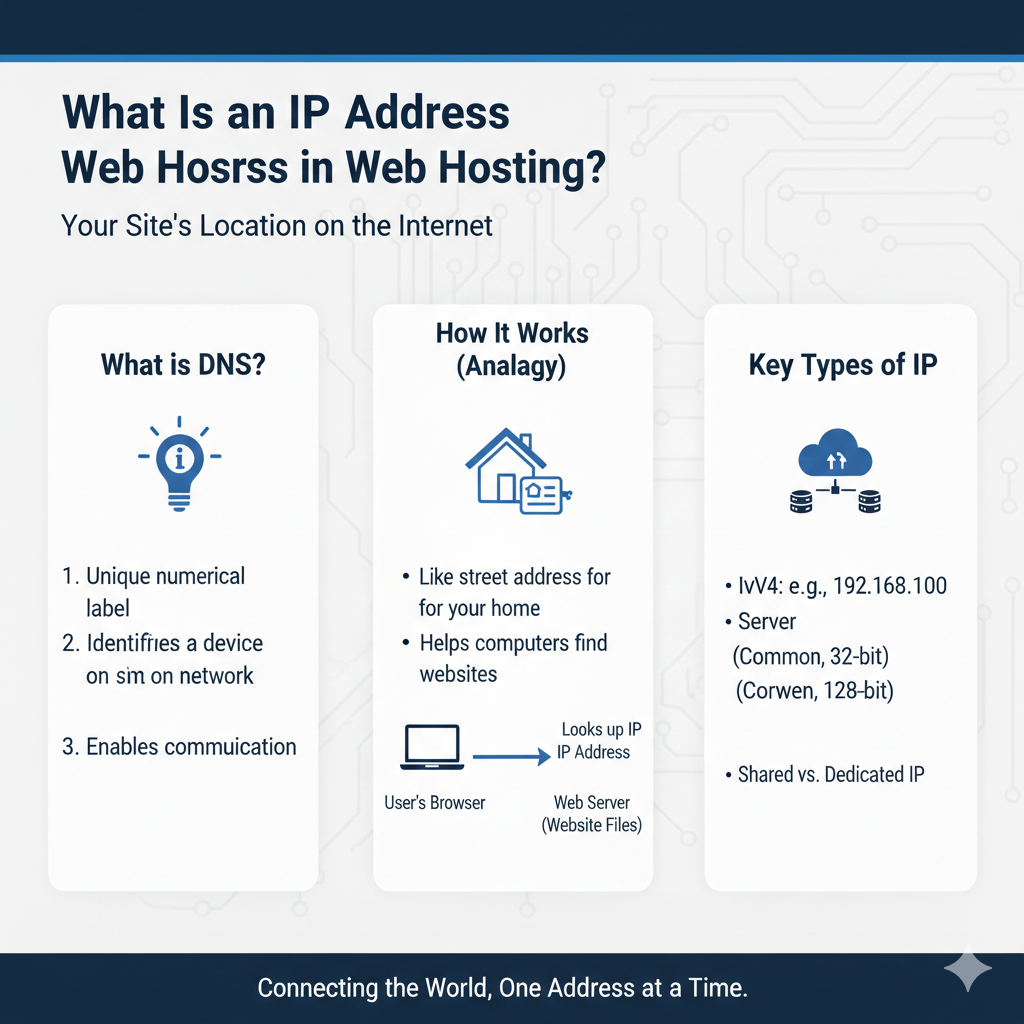
IP stands for Internet Protocol. An IP address is a unique numerical label assigned to every device or server connected to the internet. Think of it like a house address—just as your home needs a street address so mail carriers know where to deliver packages, your website needs an IP address so browsers know where to find it.
Without IP addresses, the internet wouldn’t function. They allow devices to communicate with each other and ensure that when you request a webpage, the data gets sent to the right place.
An IP address typically looks like a series of numbers separated by periods, such as 192.168.1.1. This format is what most people are familiar with, though newer versions use a different structure (more on that later).
How IP Addresses Work in Hosting
When you type a website URL into your browser, a lot happens behind the scenes to load that page. Here’s the simplified version:
- You enter a domain name (like example.com) into your browser
- Your browser contacts a DNS (Domain Name System) server
- The DNS server translates the domain name into an IP address
- Your browser uses that IP address to connect to the web server
- The server sends back the website files, and the page loads on your screen
This process happens in milliseconds. The DNS acts like a phonebook for the internet, matching easy-to-remember domain names with their corresponding IP addresses. To learn more about this translation process, check out our guide on how DNS works.
Every time someone visits your website, this same chain of events occurs. The IP address is what makes it all possible.
Types of IP Addresses
Not all IP addresses are created equal. There are several different types, each serving a specific purpose. Let’s break down the main categories you should know about.
IPv4 vs IPv6
IPv4 is the original IP address format and the one most people recognize. It uses four sets of numbers ranging from 0 to 255, separated by periods. An example would be 192.0.2.1.
The problem? IPv4 only allows for about 4.3 billion unique addresses. That might sound like a lot, but with billions of devices now connected to the internet, we’ve essentially run out of available IPv4 addresses.
IPv6 was created to solve this problem. Instead of four number groups, IPv6 uses eight groups of hexadecimal characters separated by colons. An example looks like this: 2001:0db8:85a3:0000:0000:8a2e:0370:7334.
IPv6 provides a virtually unlimited number of addresses—enough to assign one to every grain of sand on Earth and still have plenty left over. While IPv6 adoption is growing, IPv4 is still widely used, and most hosting providers support both formats.
Public vs Private IP
Public IP addresses are visible to the outside world. They’re what allow your website to be accessed by anyone on the internet. Your hosting provider assigns your website a public IP address so visitors can find and load your site.
Private IP addresses are used within local networks and aren’t accessible from the internet. For example, your home router assigns private IP addresses to devices like your laptop, phone, and smart TV. These devices can communicate with each other locally, but they all share the same public IP address when connecting to the internet.
For web hosting purposes, you’re primarily concerned with public IP addresses, as those are what make your site accessible online.
Shared IP vs Dedicated IP
When you sign up for web hosting, you’ll typically get one of two IP address setups: shared or dedicated. Understanding the difference is important for choosing the right hosting plan.
Shared IP Address
With a shared hosting model, multiple websites live on the same server and share the same IP address. This is the most common and affordable option, especially for small websites, blogs, and new businesses.
Think of it like living in an apartment building. Multiple residents share the same street address, but each has their own unit number (in this case, domain name) to distinguish them.
Pros of shared IP:
- Lower cost
- Easier to set up
- Perfectly suitable for most websites
Cons of shared IP:
- If one website on the server gets blacklisted, it could potentially affect others
- Less control over server resources
Dedicated IP Address
A dedicated IP means your website is the only one using that specific IP address. This is more common with dedicated server hosting or VPS plans.
Using the apartment analogy again, a dedicated IP is like having your own standalone house with a unique street address that no one else shares.
Pros of dedicated IP:
- Better email deliverability and reputation
- Required for certain SSL certificates (though not necessary with modern hosting)
- Allows you to access your site via IP address instead of domain name
- More control and isolation from other websites
Cons of dedicated IP:
- Higher cost
- Not necessary for most websites
When You Need a Dedicated IP
Most websites don’t need a dedicated IP address. However, there are a few situations where it makes sense:
- Email reputation: If you send a high volume of emails from your domain, a dedicated IP can improve deliverability and protect your sender reputation
- FTP access: Some users prefer accessing their server via IP address before DNS propagation is complete
- Running custom applications: Certain applications or services may require a dedicated IP to function properly
- Compliance requirements: Some industries have regulations that necessitate dedicated resources
If you’re just starting out with a blog, portfolio, or small business website, a shared IP is perfectly fine and won’t limit your site’s performance.
Does an IP Address Affect SEO?
This is one of the most common questions website owners ask, and the short answer is: not directly.
Google has confirmed that sharing an IP address with other websites doesn’t hurt your search rankings. The search engine is sophisticated enough to understand that shared hosting is normal and doesn’t penalize sites for it.
However, there are some indirect ways your IP address situation could impact SEO:
Server reputation matters. If your website shares an IP address with spam sites or websites engaged in malicious activity, search engines might flag the entire IP as suspicious. This is rare with reputable hosting providers, who actively monitor and manage their servers.
Spam neighbors are a risk. While Google won’t penalize you for simply sharing an IP, if the server you’re on hosts problematic websites, it could affect your site’s reputation over time. Quality hosting providers take steps to prevent this.
Server performance impacts rankings. Site speed is a confirmed ranking factor, and server quality plays a big role in how fast your site loads. Choosing a hosting provider with solid infrastructure and hosting performance factors matters more than whether you have a shared or dedicated IP.
The bottom line: Focus on choosing a reliable hosting provider with good server performance and security practices. The type of IP address you have is far less important than the quality of your hosting infrastructure.
How to Find Your Website’s IP Address
Curious what your website’s IP address is? Here are three simple ways to find it:
1. Use the Ping Command
Open your computer’s command prompt (Windows) or terminal (Mac/Linux) and type:
ping yourdomain.com
Replace “yourdomain.com” with your actual domain name. The IP address will be displayed in the results.
2. Check Your Hosting Dashboard
Most hosting providers display your IP address in your account dashboard or control panel. Look for sections labeled “Server Information,” “Account Details,” or “Domain Management.”
3. Use DNS Lookup Tools
Several free online tools can look up your website’s IP address instantly. Popular options include:
- WhatsMyDNS.net
- DNSChecker.org
- MXToolbox.com
Simply enter your domain name, and these tools will show you the associated IP address along with other DNS information.
FAQs About IP Addresses
What is the difference between DNS and IP?
DNS (Domain Name System) is like a phonebook that translates human-readable domain names (like google.com) into IP addresses (like 172.217.164.46). The IP address is the actual numerical address of the server, while DNS is the system that helps browsers find that address. You need both working together for websites to load properly.
Do I need a dedicated IP for SEO?
No, you don’t need a dedicated IP address for SEO purposes. Google doesn’t use IP addresses as a ranking factor, and sharing an IP with other websites won’t hurt your search rankings. Focus instead on site speed, quality content, and choosing a reliable hosting provider.
Can two websites share the same IP?
Yes, absolutely. This is exactly how shared hosting works. Hundreds or even thousands of websites can share the same IP address on a single server. The server uses the domain name in the request to determine which website to load.
What is IPv6?
IPv6 is the newest version of the Internet Protocol, designed to replace IPv4. While IPv4 uses 32-bit addresses (allowing for about 4.3 billion unique addresses), IPv6 uses 128-bit addresses, providing virtually unlimited possibilities. IPv6 addresses look different too—they use hexadecimal characters separated by colons instead of decimal numbers separated by periods.
How do I change my IP address?
For your website, you can’t directly change the IP address—it’s assigned by your hosting provider. However, you can request a new IP address by contacting your hosting support team. Some providers offer this as a paid add-on. You might also get a new IP address if you migrate to a different server or hosting provider. Keep in mind that changing your IP address requires updating your DNS records, which can take 24-48 hours to propagate fully across the internet.
Understanding IP Addresses Helps You Make Better Hosting Decisions
IP addresses are a fundamental part of how the internet works, connecting browsers to websites in milliseconds. While you don’t need to be an expert in networking to run a successful website, understanding the basics helps you make informed decisions about your hosting setup.
For most website owners, a shared IP address on a quality hosting plan is perfectly sufficient. Save your budget for things that truly matter—like reliable uptime, fast server performance, and excellent customer support.
As your site grows and your needs evolve, you can always upgrade to a dedicated IP or more robust hosting solution. The key is starting with a solid foundation and a hosting provider that offers room to scale.
Now that you understand what IP addresses are and how they work in web hosting, you’re better equipped to choose the right hosting plan for your needs and troubleshoot any issues that come up along the way.