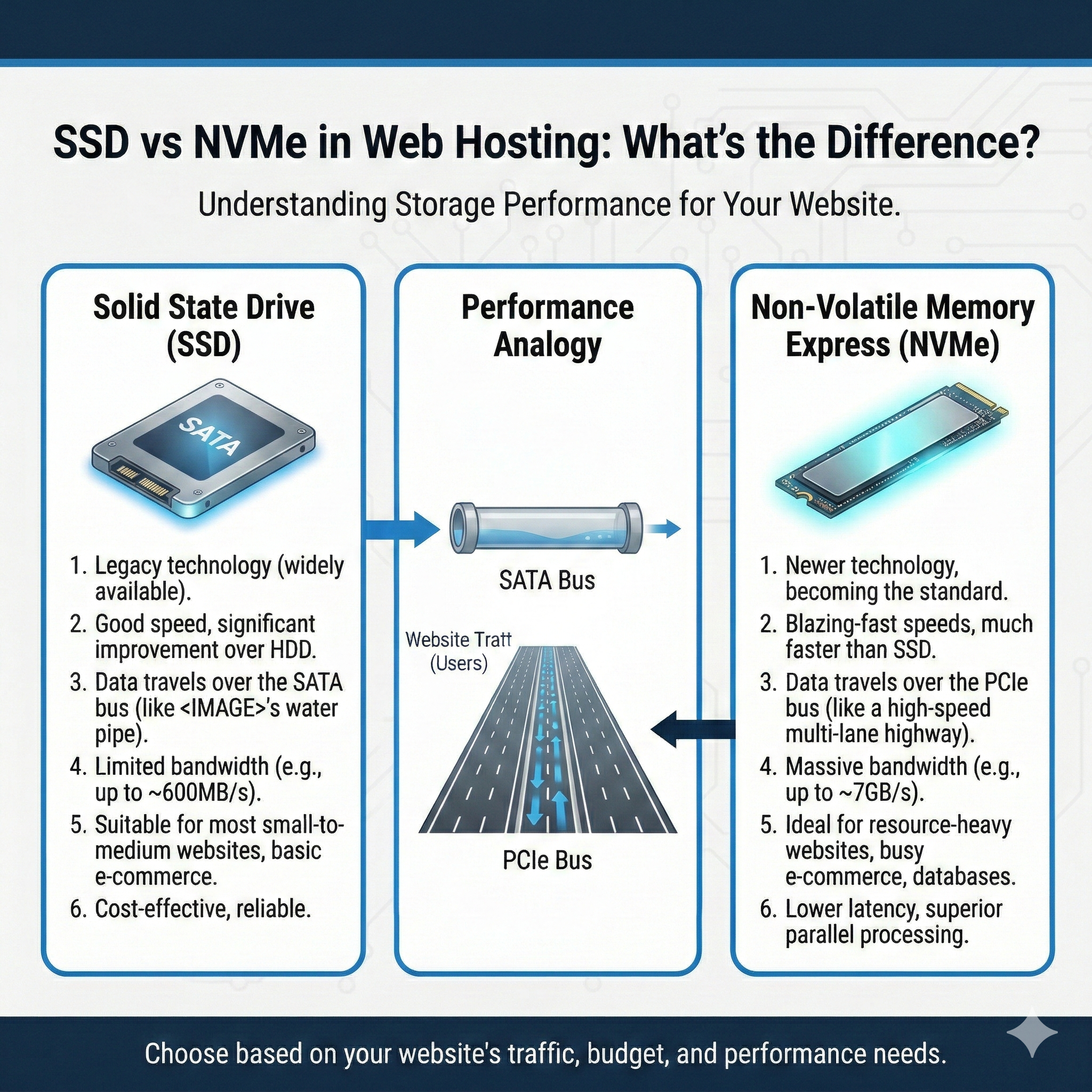
SSD vs NVMe in Web Hosting: What’s the Difference?
When choosing a web hosting plan, storage type might seem like a technical detail you can skip over. But if your website loads slowly or struggles under traffic, the culprit could be outdated storage technology.
Two terms you’ll see often are SSD and NVMe. Both are solid-state storage options that dramatically outperform traditional hard disk drives (HDDs). But they’re not the same—and understanding the difference can help you choose the right hosting plan for your needs.
This guide breaks down how SSD and NVMe storage work, what sets them apart, and which one makes sense for your website.
What Is SSD in Web Hosting?
SSD stands for Solid State Drive. Unlike traditional HDDs, which use spinning platters and mechanical read/write heads, SSDs store data on flash memory chips. This eliminates moving parts and allows for much faster data retrieval.
For web hosting, that speed matters. When someone visits your site, the server needs to pull files, images, and database records. SSDs handle these requests significantly faster than HDDs, reducing page load times and improving overall performance.
SSDs have become the standard in modern web hosting infrastructure. Most shared hosting, VPS, and cloud hosting plans now include SSD storage by default. They’re reliable, affordable, and a major step up from older HDD-based hosting.
What Is NVMe?
NVMe stands for Non-Volatile Memory Express. It’s not a type of drive—it’s a communication protocol designed specifically for high-speed flash storage.
Traditional SSDs connect to servers using older interfaces like SATA, which were originally built for HDDs. NVMe, on the other hand, connects directly to the server’s PCIe (Peripheral Component Interconnect Express) bus. This direct connection allows data to travel much faster, with lower latency and higher throughput.
Think of it this way: SATA is like a two-lane road, while NVMe is a multi-lane highway. Both get you to your destination, but one does it much faster—especially under heavy traffic.
NVMe drives are often paired with other high-performance server performance components like increased RAM and powerful CPUs to maximize speed and responsiveness.
SSD vs NVMe – Key Differences
Here’s a side-by-side comparison of SSD and NVMe storage:
| Feature | SSD | NVMe |
| Speed | Fast | Very Fast |
| Latency | Low | Extremely Low |
| Cost | Lower | Higher |
| Best For | Standard websites | High-traffic sites & apps |
Both options are far superior to HDDs. But if you’re running a high-traffic website, ecommerce store, or web application, NVMe’s performance advantage can make a noticeable difference.
How Storage Type Affects Website Speed
Storage type plays a direct role in how quickly your website responds to user requests. Here’s how it impacts key performance areas:
Database Queries
Dynamic websites rely on databases to serve content. Every time a visitor loads a page, the server queries the database for information like posts, product listings, or user data. Faster storage means faster database reads and writes, which translates to quicker page generation.
Page Load Time
When someone visits your site, the server retrieves HTML, CSS, JavaScript, images, and other assets. NVMe storage can deliver these files faster than traditional SSDs, especially when handling multiple requests simultaneously.
File Access
If your site includes downloadable files, media libraries, or frequently updated content, storage speed affects how quickly those files can be accessed and served to visitors.
Ecommerce Performance
Online stores process a high volume of transactions, customer data, and product images. Slow storage can create bottlenecks during checkout or inventory updates. NVMe storage helps maintain smooth performance even during peak shopping periods.
For growing websites, upgrading to VPS hosting performance or cloud hosting infrastructure with NVMe can provide the speed and scalability needed to handle increased traffic.
Is NVMe Worth the Extra Cost?
NVMe hosting typically costs more than standard SSD hosting. Whether it’s worth the investment depends on your website’s needs.
Personal Blogs
If you’re running a small blog with moderate traffic, standard SSD storage is more than sufficient. The performance difference won’t be noticeable to most visitors.
Business Websites
For corporate sites with steady traffic and multimedia content, SSDs provide reliable performance at a lower cost. Upgrading to NVMe makes sense if you’re experiencing slow load times or plan to scale significantly.
Ecommerce Stores
Online retailers benefit from NVMe’s speed, especially during high-traffic events like sales or product launches. Faster checkout processes and smoother browsing experiences can directly impact conversion rates.
SaaS Platforms
Software-as-a-service applications often handle complex data processing and real-time interactions. NVMe storage ensures responsive performance for users accessing your platform simultaneously.
If you’re currently using shared hosting and experiencing performance issues, upgrading to dedicated hosting with NVMe could provide the speed boost you need.
SSD vs NVMe in Shared, VPS, and Cloud Hosting
Storage type availability varies depending on your hosting plan:
Shared Hosting: Most shared hosting plans include SSD storage as standard. NVMe is less common but available from some premium providers.
VPS Hosting: VPS hosting often offers NVMe as an upgrade option. This pairs well with the dedicated resources VPS plans provide.
Cloud Hosting: Cloud hosting platforms increasingly include NVMe storage, especially for performance-focused plans designed to handle variable traffic loads.
When comparing hosting plans, check whether NVMe is included or available as an add-on. The performance boost may justify a slightly higher monthly cost.
Does Storage Type Affect SEO?
Storage type doesn’t directly influence search rankings, but it affects factors that Google considers when evaluating websites.
Page Speed
Google uses page speed as a ranking signal. Faster storage helps reduce load times, which can improve your Core Web Vitals scores—a key SEO metric.
User Experience
Visitors are more likely to bounce if your site loads slowly. Lower engagement signals can negatively impact rankings over time. Fast storage helps keep users on your site longer.
Uptime and Reliability
High-quality storage contributes to overall website uptime and performance. Consistent uptime supports better indexing and user trust, both of which benefit SEO.
While upgrading from HDD to SSD will provide a noticeable SEO boost, moving from SSD to NVMe offers incremental gains. The improvement matters most for high-traffic sites where every millisecond counts.
FAQs About SSD and NVMe Hosting
Is NVMe faster than SSD?
Yes. NVMe drives use a faster communication protocol (PCIe) compared to traditional SSDs that rely on SATA connections. This results in significantly lower latency and higher data transfer speeds.
Does SSD improve SEO?
Indirectly, yes. SSDs improve page load times, which can enhance user experience and Core Web Vitals scores—both of which influence search rankings.
Is NVMe required for WordPress?
No, but it helps. WordPress sites run smoothly on SSD storage. NVMe becomes beneficial for high-traffic WordPress sites, membership platforms, or WooCommerce stores that process many transactions.
Can I upgrade from SSD to NVMe?
It depends on your hosting provider. Some hosts allow you to upgrade your storage type within your current plan, while others may require switching to a higher-tier hosting package.
Which hosting type offers NVMe?
NVMe is most commonly available with VPS, cloud, and dedicated hosting plans. Some premium shared hosting providers also offer NVMe as a feature.
Choosing the Right Storage for Your Website
Both SSD and NVMe storage offer substantial performance improvements over traditional HDDs. For most websites, SSD storage provides excellent speed and reliability at an affordable price point.
NVMe becomes a smart investment when your site experiences high traffic, handles complex transactions, or requires ultra-fast data processing. Ecommerce stores, SaaS platforms, and content-heavy sites benefit most from the additional speed NVMe provides.
Before upgrading, evaluate your website’s current performance, traffic patterns, and growth plans. If load times are already fast and user experience is smooth, sticking with SSD makes financial sense. But if you’re scaling rapidly or need every performance advantage, NVMe could be the upgrade that sets your site apart.