Types of Web Hosting Explained: How to Choose the Right Solution
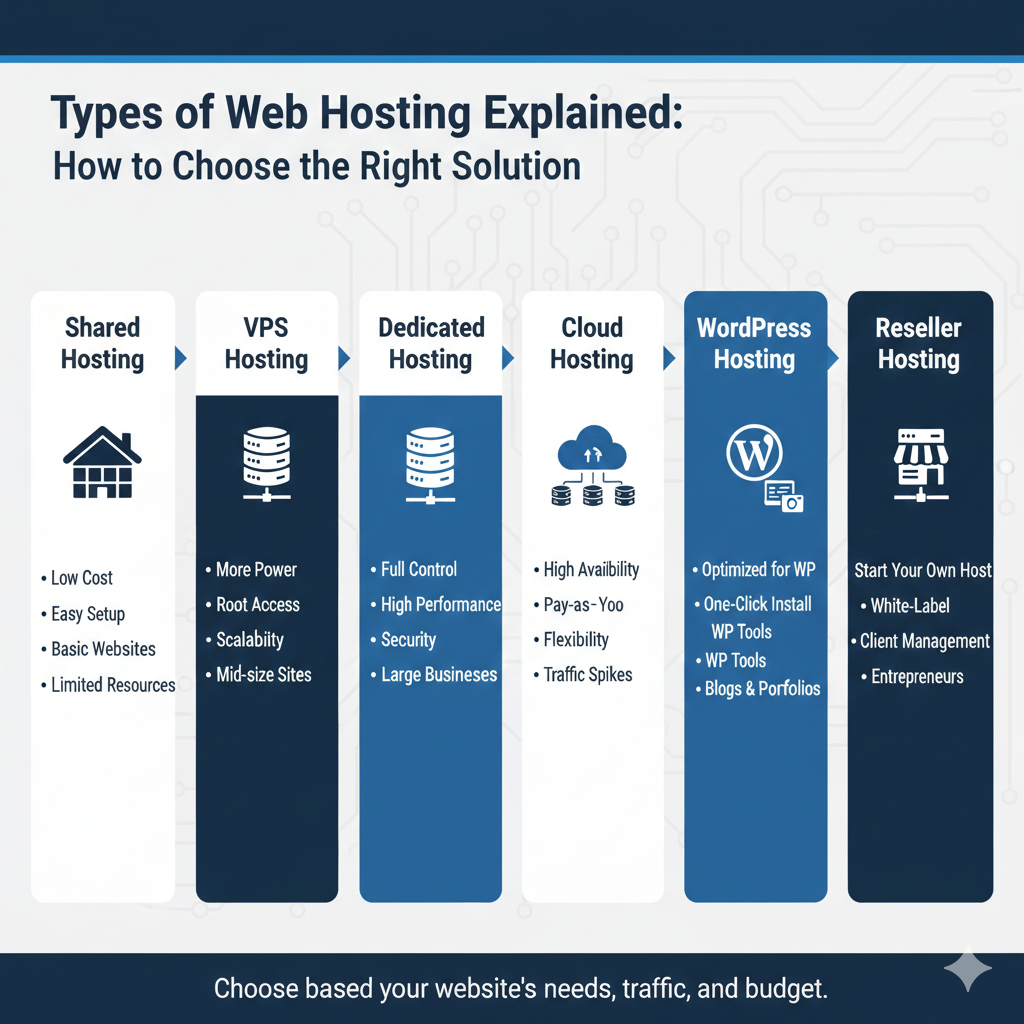
Choosing web hosting can feel overwhelming. Shared, VPS, dedicated, cloud, managed WordPress—each type comes with its own set of features, price points, and performance expectations. If you’re launching a blog, scaling an online store, or running a SaaS platform, understanding the differences between hosting types is essential to making an informed decision.
This guide breaks down each hosting model, explaining how they work, what they cost, and who they’re best suited for. By the end, you’ll have a clear understanding of which hosting type aligns with your needs, budget, and growth trajectory.
Why Choosing the Right Hosting Type Matters
Your hosting choice affects more than just where your website lives. It influences performance, security, scalability, and even your search engine rankings. Here’s why it matters:
Performance impact: Hosting determines how quickly your site loads. Slow load times frustrate visitors and increase bounce rates. A study by Google found that 53% of mobile users abandon sites that take longer than three seconds to load.
Cost implications: Different hosting types come with vastly different price tags. Shared hosting might cost $3 per month, while dedicated servers can run $100 or more. Choosing the wrong type can mean overpaying for resources you don’t need—or underpaying and dealing with performance issues.
Scalability: As your site grows, your hosting needs will change. Some hosting types, like cloud hosting, scale effortlessly. Others, like shared hosting, hit a ceiling quickly.
Security: Hosting impacts your site’s vulnerability to attacks. Dedicated and managed hosting typically offer stronger security measures than budget-friendly shared plans.
SEO impact: Google uses site speed as a ranking factor. Poor hosting can drag down your load times, hurting your visibility in search results.
Understanding how web hosting evolved over the years helps contextualize why so many options exist today. Each hosting type emerged to solve specific challenges faced by different kinds of websites.
Shared Hosting
Shared hosting is the most common entry point for new website owners. It’s affordable, simple to set up, and requires minimal technical knowledge.
How It Works
With shared hosting, multiple websites share the same server resources—CPU, RAM, bandwidth, and storage. Think of it like renting a room in a shared apartment. You have your own space, but you’re sharing utilities and common areas with other tenants.
The hosting provider manages server maintenance, security updates, and technical configurations. You focus on building your site.
Pros & Cons
Pros:
- Affordable: Plans often start at $3–$10 per month
- Easy to use: Most providers include beginner-friendly control panels like cPanel
- Managed infrastructure: The host handles server maintenance and updates
Cons:
- Limited resources: Heavy traffic on a neighboring site can slow down your own
- Performance caps: You’re constrained by the server’s shared resources
- Security risks: If one site on the server gets hacked, others may be vulnerable
Best For
Shared hosting works well for personal blogs, portfolio sites, and small business websites with modest traffic. It’s ideal if you’re just starting out and don’t expect heavy visitor volume.
For a deeper look at shared hosting options, explore our guide on shared hosting providers or compare it against other models in our hosting comparison blog.
VPS Hosting
Virtual Private Server (VPS) hosting offers more control and resources than shared hosting without the cost of a dedicated server.
Virtualization Model
VPS hosting uses virtualization technology to divide a physical server into multiple virtual servers. Each VPS operates independently with its own operating system, allocated resources, and root access.
You still share a physical server with other users, but your resources are guaranteed. It’s like owning a condo in a building—you have your own unit, but you share the structure with others.
Resource Isolation
Unlike shared hosting, VPS hosting isolates your resources. If another site experiences a traffic spike, it won’t affect your performance. You also have more flexibility to install custom software, configure server settings, and scale resources as needed.
Learn more about how RAM and CPU allocation works in VPS environments.
Ideal Use Cases
VPS hosting suits growing websites that have outgrown shared hosting but don’t yet need a dedicated server. It’s a popular choice for:
- Medium-traffic blogs
- Small ecommerce stores
- Developers who need testing environments
- Agencies managing multiple client sites
Explore our VPS hosting guides or see how VPS stacks up in our VPS comparison blog.
Dedicated Server Hosting
Dedicated hosting gives you an entire physical server for your website. No sharing, no neighbors—just you and your server.
Full Server Control
With dedicated hosting, you have complete control over the server environment. You can choose the operating system, install any software, and configure settings to meet your exact specifications. This level of control is essential for businesses with specific compliance or performance requirements.
Enterprise Use Cases
Dedicated servers are typically used by large enterprises, high-traffic websites, and applications that demand maximum performance and security. Examples include:
- Major ecommerce platforms
- SaaS applications
- Media streaming services
- Financial institutions
Cost Considerations
Dedicated hosting is the most expensive option, with monthly costs ranging from $100 to $500 or more. You’re also responsible for server management unless you opt for a managed dedicated plan, which adds to the cost.
For businesses that need this level of power, the investment is worth it. Learn more in our dedicated hosting guide or compare pricing in our hosting comparison blog.
Cloud Hosting
Cloud hosting distributes your website across multiple interconnected servers, offering unmatched flexibility and scalability.
Distributed Infrastructure
Instead of relying on a single physical server, cloud hosting pulls resources from a network of virtual servers. If one server fails, another takes over seamlessly. This redundancy minimizes downtime and improves reliability.
Scalability & Elastic Resources
Cloud hosting excels at handling traffic fluctuations. If your site experiences a sudden surge in visitors, the cloud automatically allocates more resources to accommodate the load. When traffic drops, resources scale back down.
This elasticity makes cloud hosting ideal for businesses with unpredictable traffic patterns or rapid growth trajectories.
Cloud vs Traditional Hosting
Traditional hosting ties your site to a single server with fixed resources. Cloud hosting offers flexibility, letting you pay for only what you use. Many providers offer pay-as-you-go pricing models, which can be more cost-effective than traditional plans.
Check out our cloud hosting blogs or explore the differences in our VPS vs cloud comparison.
Managed WordPress Hosting
Managed WordPress hosting is specifically optimized for WordPress sites, offering enhanced performance, security, and convenience.
Optimization for WordPress
Managed WordPress hosts configure their servers to run WordPress as efficiently as possible. This includes server-level caching, CDN integration, and optimized database performance. The result? Faster load times and smoother user experiences.
Automatic Updates & Security
One of the biggest advantages of managed WordPress hosting is the hands-off maintenance. The host handles:
- WordPress core updates
- Plugin and theme updates
- Daily backups
- Security monitoring and malware removal
This frees you from technical tasks and reduces the risk of vulnerabilities.
When It Makes Sense
Managed WordPress hosting is ideal for:
- Bloggers who want to focus on content, not server management
- Small businesses running WordPress sites
- Agencies managing multiple WordPress client sites
It’s more expensive than standard shared hosting but offers peace of mind and better performance. Learn more in our WordPress hosting guide or find the best options in our best hosting blog.
Comparison Table of Hosting Types
| Hosting Type | Performance | Cost | Scalability | Control | Best For |
|---|---|---|---|---|---|
| Shared Hosting | Low to Moderate | $3–$10/month | Limited | Minimal | Beginners, small blogs |
| VPS Hosting | Moderate to High | $20–$80/month | Moderate | High | Growing sites, developers |
| Dedicated Hosting | Very High | $100–$500+/month | High | Full | Enterprises, high-traffic sites |
| Cloud Hosting | High | Pay-as-you-go | Excellent | Moderate to High | Scalable businesses, SaaS |
| Managed WordPress | High | $15–$50/month | Moderate | Minimal | WordPress users, bloggers |
Hosting Types by Budget
Your budget plays a significant role in determining which hosting type makes sense.
Budget hosting ($3–$15/month): Shared hosting and entry-level managed WordPress plans fall into this range. These are great for personal projects, small blogs, and portfolio sites. For recommendations, check out our cheap hosting blog.
Mid-range ($20–$100/month): VPS hosting and mid-tier cloud hosting fit here. This range suits growing businesses, ecommerce stores, and agencies that need more resources and flexibility.
Enterprise ($100+/month): Dedicated servers and premium cloud hosting plans dominate this category. These are for high-traffic websites, large ecommerce platforms, and mission-critical applications. Explore options in our best hosting blog.
Hosting Types by Use Case
Different websites have different needs. Here’s a breakdown by use case:
Bloggers: Shared hosting or managed WordPress hosting works well for most bloggers. If you’re expecting significant growth, consider starting with VPS hosting.
Ecommerce: VPS or cloud hosting is ideal for online stores. You need reliable performance, strong security, and the ability to scale during peak shopping seasons.
Agencies: VPS or cloud hosting offers the flexibility to manage multiple client sites efficiently. Reseller hosting is another option if you plan to offer hosting as a service.
SaaS: Cloud hosting is the best fit for SaaS platforms. The ability to scale on demand and distribute resources globally ensures a smooth user experience.
Small businesses: Shared hosting works for simple sites, but most small businesses benefit from VPS or managed WordPress hosting as they grow. Learn more in our best hosting for small businesses blog.
How to Choose the Right Hosting Type
Choosing the right hosting type depends on several factors:
- Traffic volume: How many visitors do you expect? Shared hosting handles light traffic, while VPS and cloud hosting support higher volumes.
- Budget: What can you afford? Start with shared hosting if funds are tight, but plan to upgrade as your site grows.
- Technical expertise: Are you comfortable managing servers? If not, opt for managed hosting. If you have technical skills, VPS or dedicated hosting offers more control.
- Growth plans: Do you expect rapid growth? Cloud hosting scales effortlessly, making it ideal for businesses with ambitious expansion plans.
- Security needs: Do you handle sensitive data? Dedicated or managed hosting provides stronger security measures.
To compare hosting providers, explore hosting reviews, or check hosting coupons, visit our review cluster and coupon pages for more information.
FAQs About Hosting Types
Which hosting is best for beginners?
Shared hosting is the best choice for beginners. It’s affordable, easy to use, and requires no technical knowledge. Most providers include one-click WordPress installation and user-friendly control panels.
Is cloud hosting better than VPS?
It depends on your needs. Cloud hosting offers better scalability and reliability, making it ideal for sites with fluctuating traffic. VPS hosting provides more consistent performance at a fixed cost, which may be better for stable traffic patterns.
Do I need dedicated hosting?
Dedicated hosting is only necessary if you have high traffic, require maximum performance, or have specific compliance requirements. Most websites don’t need it until they reach a significant scale.
What’s the cheapest hosting option?
Shared hosting is the cheapest, with plans starting as low as $3 per month. However, cheap hosting often comes with trade-offs in performance and support.
Which hosting is best for SEO?
Any hosting type that offers fast load times, reliable uptime, and strong security can benefit SEO. VPS, cloud, and managed WordPress hosting tend to perform better than basic shared hosting plans.
Can I switch hosting types later?
Yes, most hosting providers allow you to upgrade or migrate to a different hosting type as your needs change. Some even offer free migration services.
Making the Right Hosting Decision
Understanding the types of web hosting available empowers you to choose a solution that aligns with your goals, budget, and technical capabilities. Shared hosting offers an affordable entry point, VPS hosting provides room to grow, dedicated servers deliver maximum control, cloud hosting scales effortlessly, and managed WordPress hosting simplifies maintenance.
Start by assessing your current needs and future plans. If you’re launching a new blog, shared hosting is a logical first step. If you’re running a growing business or ecommerce store, VPS or cloud hosting offers the performance and scalability you need. And if you’re managing an enterprise-level application, dedicated hosting provides the power and control required.
Whichever hosting type you choose, make sure it supports your site’s performance, security, and growth trajectory. The right hosting decision sets the foundation for a successful online presence.