What Is Server Virtualization in Web Hosting?
If you’ve ever shopped for web hosting, you’ve probably come across terms like VPS, cloud hosting, or virtual servers. But what do they actually mean? And what makes them different from traditional shared hosting?
The answer lies in server virtualization—a technology that allows one physical server to act like several independent machines. It’s what powers modern hosting solutions and makes them faster, more secure, and easier to scale.
But how does it work? And why should you care?
This guide breaks down server virtualization in plain language. You’ll learn what it is, how it functions behind the scenes, and why it matters for your website’s performance and security.
What Is Virtualization?
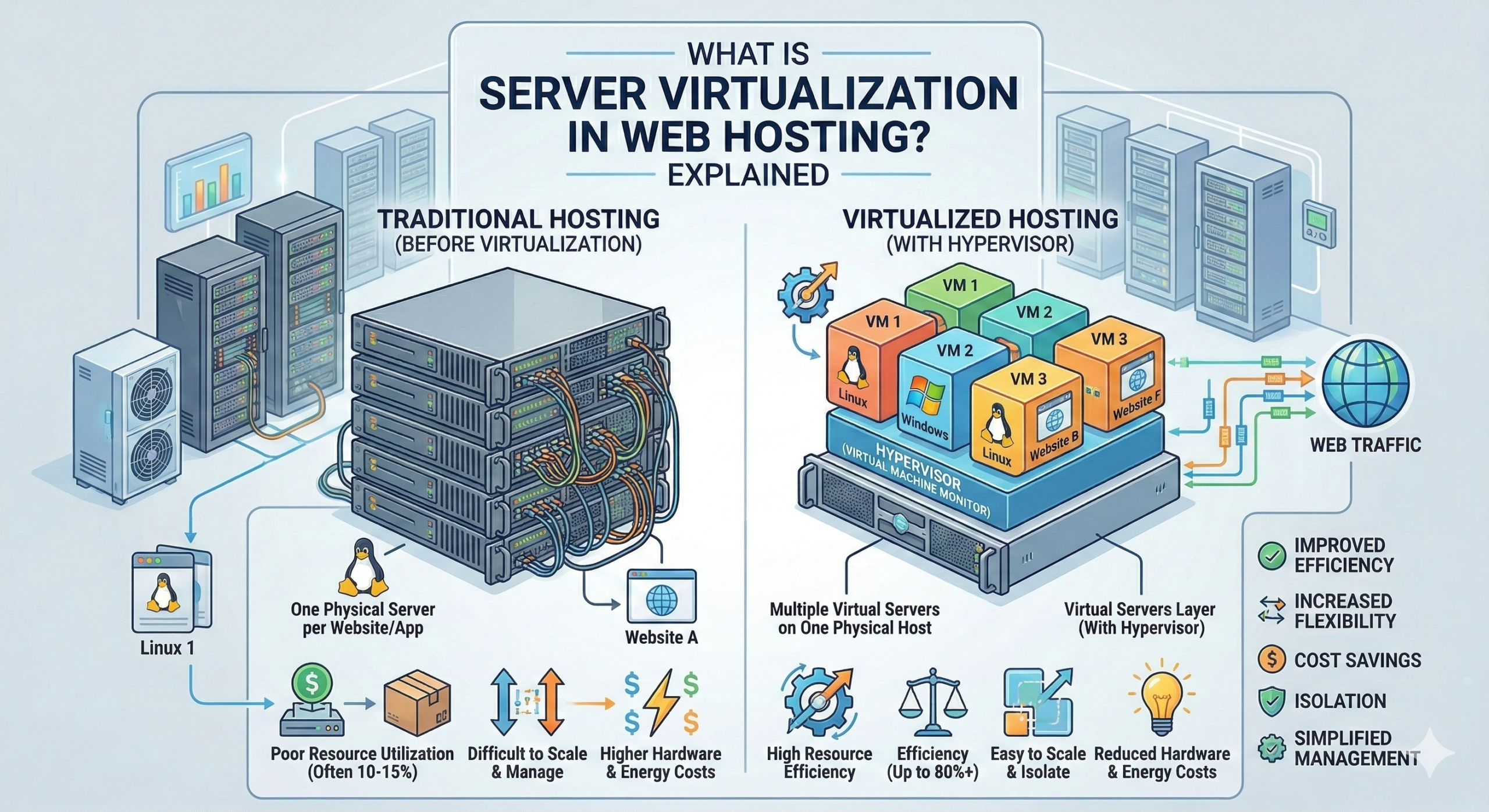
At its core, virtualization is the process of dividing one physical server into multiple virtual servers. Each virtual server operates independently, with its own operating system, allocated resources, and isolated environment.
Think of it like an apartment building. The building itself is one structure, but inside, there are separate units. Each tenant has their own space, utilities, and privacy—even though they’re all under the same roof.
That’s exactly how virtualization works in web hosting infrastructure. Instead of needing a separate physical machine for every website or application, hosting providers can create multiple virtual machines (VMs) on a single server. This makes hosting more efficient, affordable, and flexible.
What Is a Hypervisor?
So how does a physical server get split into multiple virtual ones? That’s where the hypervisor comes in.
A hypervisor is the software layer that sits between the physical server and the virtual machines. It manages and allocates resources like CPU, RAM, and storage to each VM, ensuring they run smoothly without interfering with one another.
There are two main types of hypervisors:
Type 1 (Bare-Metal Hypervisor): Runs directly on the server hardware. It’s faster and more efficient because there’s no underlying operating system slowing things down. Examples include KVM and VMware ESXi.
Type 2 (Hosted Hypervisor): Runs on top of an existing operating system, like Windows or macOS. It’s easier to set up but not as performant. Examples include VMware Workstation and VirtualBox.
Most web hosting providers use Type 1 hypervisors because they offer better speed, stability, and security.
How Virtualization Works in Hosting
Here’s a simplified breakdown of how virtualization works in a hosting environment:
- Physical Server: A powerful machine with CPU cores, RAM, and storage.
- Hypervisor: Installed on the physical server to create and manage virtual machines.
- Virtual Machines (VMs): Each VM is assigned a portion of the server’s resources—like server RAM allocation, CPU cores in hosting, and storage performance.
- Isolation: Each VM operates independently. If one crashes or gets hacked, it doesn’t affect the others.
The result? Multiple isolated environments running on a single piece of hardware. This is what makes modern hosting solutions like VPS and cloud hosting possible.
Virtualization in VPS Hosting
Virtual Private Server (VPS) hosting is one of the most common uses of server virtualization.
With VPS hosting, a physical server is divided into several virtual servers. Each VPS gets dedicated resources—meaning your allocated RAM, CPU, and storage are yours alone. You’re not sharing them with other users like you would in shared hosting.
This creates a middle ground between shared hosting and dedicated servers:
- Better performance than shared hosting
- More control over your environment
- Lower cost than renting an entire physical server
Because each VPS is isolated, your site won’t be affected by traffic spikes or security issues on neighboring accounts. It’s a significant upgrade in reliability and speed.
Learn more about how this works in our guide to the VPS hosting model.
Virtualization in Cloud Hosting
Cloud hosting takes virtualization a step further by distributing virtual machines across multiple physical servers.
Instead of relying on a single machine, your website runs on a network of interconnected servers. If one server fails, another picks up the slack. This is called redundancy, and it’s one of the biggest advantages of cloud hosting.
Here’s what makes cloud hosting unique:
- Elastic scaling: Your site can automatically access more resources during traffic spikes.
- Resource pooling: Multiple servers share the load, improving speed and uptime.
- High availability: Downtime is rare because your site isn’t tied to one physical machine.
Cloud hosting is ideal for websites with fluctuating traffic or businesses that need guaranteed uptime. You can dive deeper into this setup in our article on cloud hosting infrastructure.
Virtualization vs Shared Hosting
So how does virtualization compare to traditional shared hosting?
In shared hosting, multiple websites share the same server resources—without any isolation. If one site experiences a traffic surge or gets compromised, it can slow down or affect every other site on the server.
With virtualization (like in VPS or cloud hosting), each website runs in its own isolated environment. You get dedicated resources and better security. Even if another user on the same physical server has issues, your site remains unaffected.
Here’s a quick comparison:
| Feature | Shared Hosting | Virtualized Hosting (VPS/Cloud) |
|---|---|---|
| Resource allocation | Shared | Dedicated |
| Isolation | No | Yes |
| Performance | Variable | Consistent |
| Security | Lower | Higher |
| Cost | Lowest | Moderate |
If you’re currently on shared hosting and noticing slowdowns or resource limits, upgrading to a virtualized solution could make a big difference.
Check out our breakdown of shared hosting to see if it’s still the right fit for your needs.
Benefits of Server Virtualization
Why do most modern hosting providers rely on virtualization? Because it solves several key challenges:
Scalability
Need more resources? With virtualization, you can quickly upgrade your RAM, CPU, or storage without migrating to a new server. It’s flexible and fast.
Cost Efficiency
Instead of buying and maintaining multiple physical servers, hosting companies can run dozens of virtual machines on one powerful machine. Those savings get passed on to customers.
Better Uptime
Virtualized environments make it easier to implement failover systems and backups. If something goes wrong, your site can be restored or moved to another VM with minimal downtime. Learn more about maintaining strong website uptime.
Security Isolation
Each virtual machine is isolated from the others. Even if one VM is compromised, attackers can’t easily jump to another. This layered security is a major advantage over shared hosting.
Common Virtualization Technologies
Not all hypervisors are created equal. Here are three of the most widely used virtualization technologies in web hosting:
KVM (Kernel-based Virtual Machine)
An open-source hypervisor built into the Linux kernel. It’s fast, secure, and widely supported. Many VPS providers use KVM because it offers near-native performance.
VMware
A enterprise-grade virtualization platform known for reliability and advanced features. It’s commonly used in data centers and cloud environments.
Hyper-V
Microsoft’s hypervisor, often used in Windows-based hosting environments. It integrates well with other Microsoft services and tools.
You don’t need to be an expert in these technologies to benefit from them—but it’s good to know what’s powering your hosting under the hood.
FAQs About Server Virtualization
What is a virtual server?
A virtual server is a software-based server that runs on a physical machine. It behaves like a standalone server with its own operating system and allocated resources, but it shares the underlying hardware with other virtual servers.
Is VPS virtualized?
Yes. VPS hosting relies entirely on virtualization. A hypervisor divides one physical server into multiple virtual private servers, each with dedicated resources and isolation.
Does cloud hosting use virtualization?
Absolutely. Cloud hosting uses virtualization to distribute workloads across multiple physical servers. This enables scalability, redundancy, and high availability.
Is virtualization secure?
Yes, when implemented correctly. Each virtual machine is isolated from others, so a security breach in one VM won’t automatically affect another. However, the hypervisor itself must be properly configured and maintained.
What is a hypervisor?
A hypervisor is the software that creates and manages virtual machines on a physical server. It allocates resources like CPU, RAM, and storage to each VM and ensures they run independently.
Why Virtualization Matters for Your Website
Server virtualization isn’t just a technical buzzword—it’s the foundation of modern web hosting. It makes hosting faster, more affordable, and more reliable.
Whether you’re running a blog, an online store, or a growing SaaS platform, understanding virtualization helps you make smarter hosting decisions. It’s what separates slow, unreliable shared hosting from the performance and control you get with VPS or cloud hosting.
If you’re ready to upgrade your hosting environment, consider a virtualized solution. Your website—and your visitors—will thank you.